
Описание
Simple Calendar это наилегчайший способ добавить события календаря от Google на ваш сайт WordPress. Установить его может даже школьник-второгодник. Легко подстраивается под ваши нужды. Корректно отображается на мобильных устройствах. И вообще он выглядит вполне симпатично!
Особенности плагина Simple Calendar
- Display events from any public Google Calendar.
- Keep managing events in Google Calendar. No need to create events in WordPress.
- Out-of-the-box designs that match your theme’s look and feel.
- Fully responsive and mobile-friendly monthly grid and list views.
- Customize event content display using simple tags. No coding required.
- Combine multiple calendars into single displays explicitly or using categories.
- Интуитивное, простое отображение изменений в конфигурации для удобства настройки календаря под свои нужды.
- Advanced settings to adjust time zones, date/time formats and start of the week.
- Integration with Event Calendar Newsletter for quickly turning your events into a newsletter-friendly format.
- Дополнительная функциональность предлагается с расширением.
- Translations available with more being added on a regular basis. Translations welcome!
- Open source with code hosted on GitHub. Contributions welcome!
Понравился Simple Calendar? Можно получить еще больше возможностей, купив Премиальное расширение
Особенности расширения FullCalendar
- Week and day views added alongside the month view.
- Отображение названия и времени события прямо в вашем календаре.
- Быстрая подгрузка данных при перемещении между соседними месяцами, неделями и днями.
- Настраиваемые кнопки навигации позволяют вашим пользователям легко переключаться между способами отображения событий.
- Интуитивно-понятный дизайн для многодневных событий.
- Настраиваемая высота, чтобы не показывать скролбары.
- Set default start time for week and day views.
- Limit display times for week and day views.
- Пользуйтесь нашим Google Calendar Pro расширением, чтобы показывать события в цвете для любого варианта отображения.
- Priority email support with a 24-hour response time during weekdays backed by a top-notch team.
Особенности расширения Google Calendar Pro
- Показывайте события из приватного и публичного разделов календарей Google.
- Подсвечивайте события с помощью цветов которые соответствуют цветам, назначенным в календаре Google.
- Display attendee names, avatars and RSVP status for any private or public event.
- Display event organizer information.
- Display a list of attachments with links to their original source.
- Secure connection established between your site and Google using the OAuth standard.
- Добавьте красок в свой календарь! Отображайте события в месячном, недельном и дневном представлении при помощи нашего расширения FullCalendar.
- Priority email support with a 24-hour response time during weekdays backed by a top-notch team.
Можете получить все эти прелести с нашими Премиальными Расширениями
Желаете попробовать Simple Calendar? Здесь живой пример
Скриншоты

Базовый сеточный вид 
Базовый списочный вид 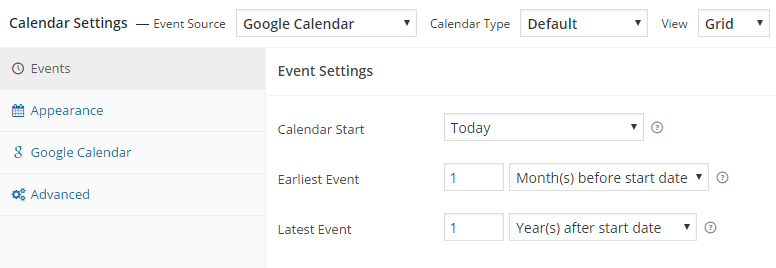
Calendar settings - Events 
Calendar settings - Appearance 
Установки календаря - Google Calendar 
Установки календаря - Расширенные 
Добавить календарный виджет 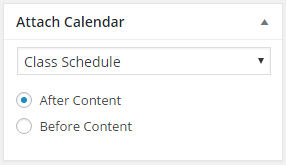
Attach a calendar to a post or page
Установка
Plugin installation instructions
Setup guide and video at WP Beginner (updated March 14, 2016)
Часто задаваемые вопросы
-
Where’s your plugin documentation?
-
Find our docs at docs.simplecalendar.io
-
Уведомлять по-email о новых версиях?
-
Subscribe here to be notified by email of major features or updates.
-
Как мне оказать помощь «Simple Calendar»?
-
Мы будем рады вашей помощи! Здесь перечислены некоторые вещи, которые вы могли бы сделать:
- Rate our plugin and help spread the word!
- Help answer questions in our community support forum.
- Report bugs (with steps to reproduce) or submit pull requests on GitHub.
- Help add or update a plugin translation.
Отзывы


Участники и разработчики
«Simple Calendar — Google Calendar Plugin» — проект с открытым исходным кодом. В развитие плагина внесли свой вклад следующие участники:
Участники


«Simple Calendar — Google Calendar Plugin» переведён на 13 языков. Благодарим переводчиков за их работу.
Перевести «Simple Calendar — Google Calendar Plugin» на ваш язык.
Заинтересованы в разработке?
Посмотрите код, проверьте SVN репозиторий, или подпишитесь на журнал разработки по RSS.
Журнал изменений
3.3.1
- Fix: Persistent update notification appearing for add-ons even after updating the plugin.
3.3.0
- Dev: Compatibility with the OAuth Helper plugin.
3.2.8
- Fix: Cross Site Scripting (XSS) vulnerability.
3.2.7
- Fix: Cross Site Scripting (XSS) vulnerability.
3.2.6
- Fix: CSRF vulnerability for bulk actions.
- Dev: Update dependencies Carbon, Dayjs and TailwindCSS.
3.2.5
- Fix: Possible CSRF vulnerability.
- Dev: Make compatible with Unyson plugin.
3.2.4
- Fix: Compatibility with WP 6.3.1.
3.2.3
- Fix: Add PHP polyfill to fix regression «Call to undefined function str_contains()» error.
3.2.2
- Dev: Update Google API client library to 2.13.1.
- Fix: ‘if-not-today’ shortcode with all day event display issue.
- Dev: Revamp admin setting page banner design.
3.2.1
- Dev: Revamp welcome page.
3.2.0
- Dev: Revamp admin setting page.
- Fix: ‘Simple Calendar Widget’ Calendar selection on block editor.
- Fix: ‘if-not-today’ and ‘add-to-gcal-link’ shortcode with all day event display issue.
3.1.47
- Dev: Added admin notice for plugin update.
- Fixed: Possible CSRF vulnerability.
3.1.43
- Fixed: Cross Site Request Forgery (CSRF) vulnerability.
3.1.42
- Dev: Testing with WordPress version 6.2.
3.1.41
- Fix: Event bubbles not working on mobile devices.
3.1.39
- Fix: ‘Class «Parsedown» not found’ by adding
erusev/parsedownvia PHP Scoper. - Fix: Replaced Moment with Dayjs, it helps with speed and addresses security issues with the Moment library.
- Chore: Data type check for loading scripts and styles.
- Chore: Upgraded NPM packages resolving security issues present with trim-newlines library.
- Fix: Include unmodified assets in the build for a better debugging experience.
- Fix: Multi-day events not showing properly. Shoutout to MartinixH.
3.1.38
- Fix: Add PHP polyfill to fix «Call to undefined function str_contains()» error.
- Fix: Update Google API client to v2.9.2.
3.1.37
- Dev: Tested up to WordPress 6.1.1 and PHP 8.1
- Chore: Updated Github path.
3.1.36
- Fix: Namspace conflicts with other plugins and composer libraries. Huge shoutout to @mickwall001 on github for this.
3.1.35
- Fix: Get rid of empty needle PHP warning
3.1.34
- Dev: Tested up to WordPress 5.6
- Fix: OR searches will now work as OR, not as AND
- Fix: Revert Guzzle to < 7.x version to avoid conflicts (temporary)
3.1.33
- Fix: Trimmed overall size of the plugin to reduce errors from installation failing.
- Dev: Updated minimum PHP requirement to 7.3
- Dev: Updated all vendor packages to latest versions.
- Dev: Tested up to WordPress 5.5.1
3.1.32
- Fix: Undefined index error when saving calendar.
- Fix: Updated Carbon library to latest version.
- Fix: Update date check on list view to remove PHP deprecated warnings.
- Dev: Tested up to WordPress 5.4.2
3.1.28
- Feature: Automatically sort events with the same day and time alphabetically.
- Fix: Issue with jQuery not being added as a script dependency.
- Fix: Updated google/apiclient to ^2.0 to fix Gmail conflicts with other SMTP plugins.
- Security: Updated dependencies.
3.1.27
- Reverted codebase to 3.1.22 version to skip recent update that has an error.
3.1.22
- This bumps the version number but is the same code as 3.1.20 so plugins can auto update to the fixed version.
3.1.20 — December 13, 2018
- Dev: Add the «simcal_post_type_registration_args» filter to allow changes to the calendar post type registration arguments.
3.1.19 — July 25, 2018
- Fix: Issue with moment.js not being available/throwing JS errors.
3.1.18 — July 3, 2018
- Dev: Add filter «simcal_additional_link_attributes» to facilitate additional event link attributes.
3.1.17 — June 6, 2018
- Fix: Issue with calendar settings not saving.
3.1.16 — June 6, 2018
- Fix: Issue with slow loading admin settings page.
3.1.15 — May 22, 2018
- Fix: Issue with jQuery $.ajax call parameter compatibility with older versions of jQuery.
- Fix: Issue with Google API feed sorting not showing correct events in list view.
- Fix: Issue with duplicate default calendar JSON data being output.
3.1.14 — February 15, 2018
- Fix: Issue where navigation to next month would be disabled when multi-day events extended to future months.
3.1.13 — February 5, 2018
- Fix: Issue where calendar event pop-ups would display without content.
3.1.12 — January 4, 2018
- Backwards Compat: Restored previous version (v1) of Google API Client lib to support older versions of PHP.
- Fix: Fixed bug present in PHP 7.2 which was causing fatal errors.
3.1.11.1 — January 3, 2018
- Fix: Bump required PHP version to match 3.1.11 requiring PHP 5.5 so site’s running older versions don’t crash when updating.
3.1.11 — January 2, 2018
- Dev: Update Google API Client libraries to v2. NOTE: Version 5.5+ for PHP now required.
- Fix: Default calendar list view not showing pro calendar coloring when Calendar Settings > Appearance > Limit Visible Events is set.
3.1.10 — August 22, 2017
- Fix: Fixed an issue where Google Calendar API key sometimes wouldn’t save on the settings page.
- Особенности: Администратор может установить ширину разделителя времени и даты в продвинутых настройках календаря.
- Tweak: Add the updated separator to the end date for multi-day events for consistency. i.e. if separator is » @ «, multi-day events date/time would display similar to «August 27 2017 @ 10:00 am-September 04 2017 @ 11:00 am» on tooltip or list view.
3.1.9 — December 9, 2016
- Feature: Add [if-today] and [if-not-today] event template tags. Props @followfung
- Fix: List view incorrectly shifts events between 12 & 1am, or all day events, to previous day.
- Fix: Navigation disabled incorrectly in some cases.
- Dev: System report tweaks for PHP 7 compatibility.
- Dev: Tested up to WordPress 4.7.
3.1.8 — October 18, 2016
- Fix: Multi-day events should not show duplicate events in one day in some time zones.
- Fix: List view heading dates corrected for some time zones.
- Fix: Grid view starting month corrected for some time zones.
- Fix: Remove duplicate «Event source default» option when add-on enabled.
- Tweak: Set «Expand multi-day events» default value to «No, display only on first day of event».
3.1.7 — October 4, 2016
- Fix: Add month/day/time translations back in that stopped working after 3.1.5.
3.1.6 — September 26, 2016
- Fix: Account for events without an end date/time when using the [when] tag.
3.1.5 — September 25, 2016
- Fix: Multi-day events in the future should now display first day of event when selecting «No, display on all days of event up to current day».
- Fix: Correct dates in day headings in list view being off for some time zones.
- Tweak: Clearer warning about using timezone setting «Event source default».
- Dev: Added filters to add your own custom event template tags. Props @Brummolix
- Dev: Remove all calls to date_default_timezone_set() due to the way WordPress core sets it to ‘UTC’ to calculate offsets from there.
3.1.4 — September 19, 2016
- Fix: «Add to Google Calendar» link now uses source calendar’s timezone (except for all-day and UTC timezone events).
3.1.3 — September 12, 2016
- Feature: Added «Add to Google Calendar» link event template tag.
- Fix: Corrected all structured data/schema.org output errors caught by Google’s structured data testing tool.
- Fix: Default colors specified for today and events with days should now work even when colors blanked out.
- Dev: System report tweaks for PHP 7 compatibility.
- Dev: Sass 3.4 compatibility.
- Dev: Move load_plugin_textdomain call to plugins_loaded hook. Not needed with WP 4.6+.
3.1.2 — July 13, 2016
- Fix: Multi-day events do not stop short a day.
- Fix: Events that end at midnight no longer duplicate on the next day.
- Fix: Header shows correct date in list view when there are no events to show.
- Tweak: Tightened up security a bit.
- Dev: Tested up to WordPress 4.6.
3.1.1 — June 16, 2016
- Fix: Correct all-day events displayed in multiple days in some cases.
- Fix: Paging navigation links now hidden when no more events exist past the current page in list view.
- Tweak: «Powered by Simple Calendar» author credit opt in moved to individual per calendar settings.
3.1.0 — May 25, 2016
- Fix: qTips arrow should line up with events more accurately.
- Fix: Cache interval will now update correctly when saved.
- Fix: Mobile-view bullet colors now show custom event colors when used with the Google Calendar Pro add-on.
- Fix: [id] event builder code now just returns the event ID.
- Feature: Added new template tag [ical-shortcode] to return the iCal ID.
- Dev: Switched to set version of qTip library instead of latest release for compatibility issues.
- Dev: Duplicate dropdowns when adding a custom view are now handled properly with JS.
3.0.16 — March 30, 2016
- Fix: Multiple events at the same time on a grouped calendar should now show correctly.
- Fix: PHP notice when adding a new calendar should no longer appear.
- Fix: Issues with Carbon fatal error should not happen.
- Dev: Tested up to WordPress 4.5.
3.0.15 — March 19, 2016
- Fix: Timezone issues with event source option should now work correctly.
- Fix: Tooltips should no longer be empty after a resize.
- Tweak: Removed event source option for grouped calendars.
- Tweak: Allow other plugin or theme shortcodes to be used in the event template.
- Dev: Removed Browser.php from composer so we can use it standalone with customizations.
- Dev: Constructor for Browser.php now compatible with future versions of PHP.
- Dev: Removed PHP 5.2 compatibility code.
3.0.14 — February 10, 2016
- Fix: Updated schema to pass W3C validation. Props @martinburchell
- Fix: Search queries using quotes should now work as expected. Props @justdave
- Fix: Better character encoding for small screen mode characters. Props @witchdoktor
- Fix: Events that start at 12 A.M. will now display correctly. Props @TaylorHawkes
- Fix: Corrected PHP error when removing first recurring event. Props @petersonca
- Fix: Max number of events should no longer refresh to 2500 on change.
- Fix: Default cache interval should now display correctly.
- Fix: Custom date should now show correct month when set to the first of a month.
- Fix: Visual editor is available again when editing event template tags.
- Tweak: Updated default event template tags formatting.
- Tweak: Added an edit calendar link.
- Tweak: Updated how the timezone is handled for calendars. Also fixes an issue with imported calendars.
- Dev: Corrected PHP notice showing in media gallery grid view. Props @Daronspence
- Dev: Added filters to give control over the grid view paging columns. Props @thoronas
- Dev: Updated imagesloaded library to 4.1.0.
3.0.13 — January 25, 2016
- Tweak: Lists that start on a custom date will start at the beginning of the day now.
- Tweak: Make it so grouped calendars are properly sorted by event time.
- Tweak: Updated option for controlling multi-day events.
- Tweak: Allow line breaks from Google calendar description to persist if not using the html attribute.
- Tweak: Updated text output for human date times.
- Fix: Multi-day events that span over to the first day of the month should now show correctly.
- Feature: Added dropdown option on how to handle line breaks and paragraphs for the event template tags.
- Dev: Removed WP Requirements from Composer.
- Dev: Removed always enqueue and disable scripts options so scripts will load automatically on every page.
3.0.12 — January 5, 2016
- Fix: All-day events on the first day of the month will now show up correctly.
- Fix: Calendar start dates using a variable number will now start on the correct date.
- Fix: Disable scripts and disable styles advanced options should now work as intended.
- Tweak: Added «before» and «after» text for human date event builder codes.
- Dev: Added jquery.qtip.min.map file to vendor assets.
3.0.11 — December 31, 2015
- Fix: Custom date and time format settings should no longer override everything else when not selected.
- Fix: Limiting description with HTML tags should now work better.
- Fix: Events from different calendars not showing on a grouped calendar should display properly now.
- Fix: Grouped calendars will now clear the cache of all attached calendars.
- Fix: Cache was requiring a manual clear sometimes and should now work automatically.
- Dev: Updated CSS class for [start-location] and [end-location] tags.
- Tweak: Updated date and time preview to show properly escaped values.
3.0.10 — December 21, 2015
- Fix: Pagination tweak to prevent grouped calendars from getting cut off by last calendar in list.
- Fix: Welcome screen now shows up correctly after a fresh installation.
- Fix: i18n short day names should now display properly.
- Fix: i18n truncated event titles should now display properly.
- Tweak: Allow setting a cache duration of 0.
- Tweak: Pagination will now always show unless the calendar is static.
- Tweak: Allow responsive grid view to use hover option.
3.0.9 — December 16, 2015
- Fix: Fixed all-day events with an end time showing on an extra day.
- Fix: Fixed a bug with site default timezone setting not pulling in correctly.
- Tweak: Make always enqueue option enabled by default for new installs.
- Tweak: Translations moved from .po/.mo files to official wordpress.org translation packs.
- Tweak: Minor text fixes to admin UI.
3.0.8 — December 1, 2015
- Fix: Fixed bug for Google Calendar Pro add-on organizer event builder code.
- Fix: Fixed some inconsistencies with all-day events and multi-day events when combined.
3.0.7 — November 28, 2015
- Fix: Fixed all day multi-day events showing on an extra day.
- Fix: Fixed multi-day events that span less than 24 hours to show up on both days.
- Fix: Fixed multi-day events that span 2 days to show up correctly.
- Fix: Fixed issues with grouped calendars using categories not loading.
- Tweak: Additional empty check for previous array_combine PHP error.
- Tweak: Remove extra qtip triangle image from popup.
3.0.6 — November 24, 2015
- Fix: Fixed bug with days being off by one day.
- Fix: Added check for array to avoid array_combine() PHP error.
- Fix: Allow last list event to show correctly.
- Tweak: Update shortcode to not check for a singular page.
3.0.5 — November 19, 2015
- Fix: Fixed a bug where HTML in event description was not being rendered properly.
- Fix: Fixed a script loading issue when using the CPT view.
- Feature: Check for required PHP extensions upon plugin activation (curl and mbstring so far).
3.0.4 — November 18, 2015
- Fix: Fixed always enqueue option to work correctly.
- Fix: Fixed issue where multiple shortcodes would sometimes not load scripts correctly.
- Fix: Fixed z-index issue for admin tooltips.
- Tweak: Change default «today» color to blue (#1e73be).
3.0.3 — November 13, 2015
- Feature: Added option to display a compact list view.
- Feature: Added option to hide the header in list view.
- Tweak: Improved CSS styling for default list and grid CSS.
3.0.2 — November 12, 2015
- Fix: Fixed bug where calendar days were off by one day.
3.0.1 — November 9, 2015
- Fix: Fixed bug with update script being skipped via attachment to activation hook.
3.0.0 — November 8, 2015
- Announcement: Plugin renamed to Simple Calendar.
- Announcement: Visit our new website at simplecalendar.io!
- Feature: Modular and extensible plugin, add-ons ready.
- Feature: Reworked default calendar views, now fully responsive (and titles in grid).
- Feature: Completely redesigned the admin user interface.
- Feature: Many new settings panel in admin dashboard, with better semantics and organization.
- Feature: A System Report page to help you troubleshoot problems and improve support response.
- Tweak: Use categories to organize your calendars.
- Tweak: Feeds moved from ‘gce_feed’ to ‘calendar’ post type slug, permalink change.
- Fix: Timezones handling are more accurate.
- Fix: Incompatibilities with themes and other plugins.
- Fix: Several other bugfixes.
- Refactor: Plugin rebuilt from ground up: namespaces, closures, Composer support, entirely OOP.
- Dev: PHP 5.3 minimum required.
- Dev: All requests to Google from now on will be handled with the official Google API PHP Client.
- Dev: Tested up to WordPress 4.4.
2.4.0 — September 29, 2015
- Announcement: Simple Calendar is coming, changes ahead.
- Deprecation: The bundled/default Google API key reached it’s quota and was shut off. Using your own API key is now required.
2.3.2 — September 1, 2015
- Fix: Bug in HTML support in events description.
2.3.1 — August 31, 2015
- Fix: Fallback for DateTime::setTimestamp() for installations still using PHP 5.2.
- Fix: Support HTML in events description when using
html="true"attribute in shortcode. - Localization: Added Finnish translations, courtesy of Ville Myllymäki.
2.3.0 — August 24, 2015
- Fix: Improve timezone handling when sending a request to Google.
- Tweak: Reintroduced imagesloaded library to improve compatibility with themes using Isotope and Masonry.
2.2.91 — August 18, 2015
- Fix: Calendar not working correctly with custom date range grid after 2.2.9 changes.
2.2.9 — August 14, 2015
- Fix: Event links pointing to Google Calendar have a timezone argument from feed setting.
- Fix: Improved assets loading, only load scripts on posts and pages that have a calendar.
- Localization: Updated Norwegian translations.
2.2.8 — August 7, 2015
- Fix: Improved security when saving plugin settings.
- Fix: Added URL encoding to fix some issues with API keys containing special characters.
- Tweak: Use calendar feed timezone or website timezone (default calendar).
2.2.7 — July 31, 2015
- Feature: Added an ‘Add Calendar’ button to quickly add a shortcode in posts.
- Fix: Reverted register scripts hook to init.
- Localization: Updated French translations.
- Tweak: Flush permalinks on plugin activation and deactivation.
- Tweak: Added
[if-not-location]event builder conditional shortcode. - Tweak: Added a ‘gce_no_events_message_text’ filter when no events are found.
- Tweak: Added a clear cache bulk action for clearing caches of multiple feeds.
2.2.6 — July 16, 2015
- Plugin performs a requirements check to ensure users are running a recent version of WordPress.
- Added ‘.gce-has—events’ class to count events in each day in grid display.
- Removed unnecessary imagesLoaded JS library (optional dependency of the qTip2 library).
- Fixed a bug with the start month of the custom date range grid view.
- Fixed a bug with backslashes in date ant time custom format inputs.
- Fixed scripts and styles loading issues.
- Fixed bugs when custom date range values were left blank.
- Added Russian translation provided by Vadim Reutskiy.
- Added Swedish translation provided by Familjedaghemmet Chicos.
- Tested up to WordPress 4.3.
2.2.5 — April 22, 2015
- Updated calls to add_query_arg to prevent any possible XSS attacks.
- Fixed bug with fatal error in rare cases by rearragning order of plugin file includes.
- Fixed bug with navigation links sometimes returning -1.
- Corrected typo with paging links title attributes.
2.2.4 — April 6, 2015
- Updated French translation files.
- Fixed Catalan translation files.
- Fixed encoding bug with [maps-link] new window attribute.
2.2.3 — March 26, 2015
- Fixed bug with the «More details…» link encoding.
- Added note about total event limit of 2,500 now enforced by the Google Calendar API.
- Updated earliest feed event date default to 1 (one) month back.
- 0 (zero) value now allowed for earliest and latest feed event dates (sets them to the current date).
- Minor public script improvements.
- Added Brazilian Portuguese translation files.
- Updated jQuery UI datepicker CSS CDN reference for feed settings pages.
- Tested up to WordPress 4.2.
2.2.2.1 — March 17, 2015
- Option to always enqueue scripts & styles now enabled by default.
2.2.2 — March 15, 2015
- Added option to always enqueue scripts and styles on every post and page.
- Added custom date range grid option to display modes.
- Added option to disable the plugin CSS file.
- Fixed bug with list intervals.
- Fixed bug with event list showing past events.
- Minor public JavaScript performance updates.
2.2.1 — February 28, 2015
- Enqueue scripts & styles on all posts & pages temporarily until better detection can be put in place.
- Fixed GCal ID encoding in feed settings.
- Updated Italian translation.
- Updated French translation.
2.2.0 — February 25, 2015
- Added custom date range options.
- Added option to hide tooltips on grid display.
- Added additional save button at the bottom of the feed settings.
- Performance updates to script enqueues.
- Updated Catalan translation files.
- Updated list output logic.
- Fixed bug with multi-day events sometimes not showing up in list view.
- Fixed bug with calendar ID field not getting encoded.
- Fixed bug with tooltips scrolling on mobile.
- Fixed bug with Google Hangout event links.
- Fixed bug with widget settings not being unique.
- Widget UI enhancements.
- Feed settings UI enhancements.
- Error messaging updates.
- Security improvements.
2.1.7 — December 14, 2014
- Restructured next and back paging navigation script.
- Updated Italian translation files.
2.1.6.1 — December 5, 2014
- More tooltip (qTip2) effects & styling.
2.1.6 — December 5, 2014
- Fixed bug with tooltip (qTip2) in some cases by now including it’s imagesLoaded script.
- Tooltip style improvements.
- Tooltip minified JS map file now included.
- Updated French translation.
- Updated Lithuanian translation.
- Fix bug with grouped-list multi-day event title.
- Fix bug when saving a bulk edit.
2.1.5 — December 2, 2014
- Updated jQuery tooltip library to qTip2. Previously using unmaintained original qTip library.
2.1.4 — November 26, 2014
- Reverted CSS enqueue change.
- Added Catalan translation — Provided by Toni Ginard & Monica Grau of agora.xtec.cat.
- Updated AJAX security code.
- Fixed bug with calendar ID field not trimming extra spaces.
- Updated French translation — Pull Request by @Jojaba
- Tested up to WordPress 4.1.
2.1.3 — November 23, 2014
- Only load plugin scripts and stylesheets when the viewable page is rendering output from this plugin.
- Fixed bugs with simple display options.
- Added better error checking and output options to help in debugging GCal feeds.
- Added Dutch translation — Provided by Henri van Werkhoven.
2.1.2 — November 21, 2014
- Fixed bug with quick edit clearing out feed settings.
- Fix bug with pagination creating extra DOM elements.
- Localization string fixes — Pull Request by @Jojaba
- Added HTML to group events of the same day semantically — Pull Request by @martinburchell
- Fixed bug with [cal-id] event builder code.
- Add in post data resets.
2.1.1 — November 20, 2014
- Fixed bug with all day events not displaying.
- Added missing timezone parameter to internal query.
2.1.0 — November 19, 2014
- Updated to use Google Calendar API version 3. Version 2 deprecated on Nov. 17, 2014.
2.0.7.1 -November 17, 2014
- As of Nov. 17, 2014 the GCal API v2 is deprecated, which breaks all calendar feed displays. This update will temporarily hide the display while we work on a solution that uses GCal API v3.
2.0.7 — October 28, 2014
- Events will now display if it hasn’t ended yet for list views.
- Fixed bug with date() call causing a display error in some cases.
- Fixed bug with with widget tooltip text display.
- Added cache clearing on upgrade.
- Added filters for Previous and Next link text.
- Internationalization and language file updates.
- Simplified text domain function.
- Added Lithuanian translation — Provided by Andrius Mazeika of mazeika.info.
2.0.6.2 — October 22, 2014
- Reverted previous bug fix that introduced new bugs.
2.0.6.1 — October 22, 2014
- Added Polish translation — Provided by Michał Pasternak of iplweb.pl.
- Updated Italian translation.
- Updated French translation.
- Fixed bug with date() call causing a display error in some cases.
- Minor bug fixes.
2.0.6 — October 16, 2014
- Added minimum and maximum feed date options to fix event display issues and boost performance.
- Fixed a caching issue to increase performance.
- Fixed bug where backslashes kept getting added to event titles that already contained single quotes when navigating through pages in widget.
2.0.5.1 — October 15, 2014
- Fix timezone issue.
2.0.5 — October 10, 2014
- Fixed display bug with event date and grouped lists.
- Fixed broken paging links when feed IDs contain spaces between them.
- Fixed bug with start offset and grouped lists not working properly.
- Fixed bug where clear cache link was showing on any type of CPT.
- Added German translation — Provided by Stefanie Drucker of kreativhuhn.at.
- Added Norwegian translation — Provided by Tore Hjartland of aliom.no.
2.0.4 — October 7, 2014
- Added option to show/hide paging.
- Added option to limit display to any number of days or events per page.
- Added option to set the start date offset any number of days back or ahead (list view).
- Removed retrieve events from/until options now that display limit options will be used.
- Removed max number of events to retrieve option.
- Added shortcode attribute ‘paging’.
- Added shortcode attribute ‘interval’.
- Added shortcode attribute ‘interval_count’.
- Added shortcode attribute ‘offset_interval_count’.
- Added shortcode attribute ‘offset_direction’.
- Updated shortcode ‘display’ attribute to allow a value of ‘grouped-list’.
- Date no longer shows up for the title (list view).
- HTML restructured to use div tags instead of an unordered list (list view).
- Nav bar HTML (Back/Next links and month title) restructured to use div tags instead of span and percentages.
- Moved clear cache button and changed style.
- Added Italian translation — Provided by Francesco Paccagnella of pacca.it.
- Added French translation — Provided by Vincent Bray.
- Fixed PHP error during upgrade.
- Fixed cross-site scripting (XSS) vulnerability.
- JavaScript restructured to fit more in line with best practices.
- Remove unused admin script file.
= 2.0.3.1 — October 7, 2014=
- Fixed bug where retrieve from/until dates were accidentally removed.
2.0.3 — September 20, 2014
- Fixed bug where calendar feed caches weren’t getting cleared properly.
- Fixed feed settings metabox content wrapping issue.
2.0.2 — September 17, 2014
- Added Spanish translation — Provided by Eduardo Larequi of educacion.navarra.es/web/pnte/.
- Fixed timezone issues by forcing calendar feeds to use the timezone selected in the site’s General Settings. Feed-specific timezone setting removed.
- Fixed a bug with recurring events display.
- Fixed an upgrade bug with multiple day events.
2.0.1 — September 11, 2014
- Fixed display errors with certain event builder shortcodes.
- Added language folder.
2.0.0 — September 9, 2014
- Plugin rewritten from scratch.
- Now using custom post types for storing and customizing Google calendar feeds.
- Introduced the shortcode
[gcal](old shortcode still supported).