Режим праздников для WooCommerce

Описание

Режим «Праздники» в WooCommerce® позволяет временно приостановить работу вашего интернет-магазина на время праздников, отпусков, технического обслуживания или других запланированных перерывов.

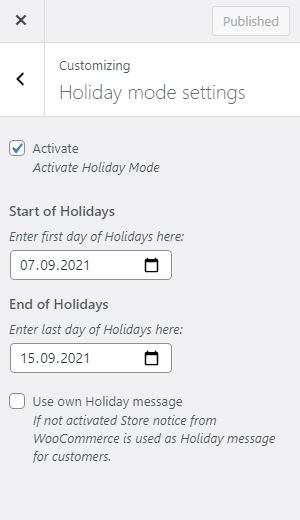
Укажите даты начала и окончания периода закрытия, чтобы автоматически включать или отключать режим «Праздники». В течение этого времени вы можете отображать хорошо заметное настраиваемое сообщение об отсутствии, чтобы информировать клиентов о временном закрытии, дате возобновления работы или другой важной информации.

Функции:

  • Отключить прием новых заказов путем удаления кнопки «Добавить в корзину» и отображения пользовательского сообщения
  • Отключить корзину (при включении праздничного режима товары из корзины будут удалены)
  • Отключить оформление заказа на период праздников
  • Отобразите заметное пользовательское сообщение об отсутствии, чтобы проинформировать клиентов о временном закрытии
  • Optionally show the absence message on every page, not just the shop, product, cart and checkout pages
  • Schedule holiday mode with a specific start and end date
  • Optional advance-notice period — show a heads-up message a configurable number of days before the shop closes, so customers can still place orders before purchasing is disabled
  • Automatically deactivate holiday mode when the vacation period ends
  • Works with headless/decoupled storefronts and the Cart & Checkout blocks, via the WooCommerce Store API
  • Admin notice reminding you that Holiday Mode is currently active, shown throughout wp-admin
  • Plays nicely with caching plugins – automatically flushes your page cache when you save your settings, and marks pages as non-cacheable while Holiday Mode is active, so visitors never see a stale, out-of-date version of your shop

WooCommerce® является зарегистрированным товарным знаком компании Automattic Inc.

Политика конфиденциальности

Данный плагин не собирает, не обрабатывает и не хранит никаких персональных данных.

Скриншоты

Установка

Для установки и настройки плагина выполните следующие действия:

Загрузите папку с плагином в каталог /wp-content/plugins/ Активируйте плагин через меню «Плагины» в WordPress Перейдите в раздел «WooCommerce» «Настройки» «Праздничный режим», чтобы настроить параметры

Часто задаваемые вопросы

Will items already in a customer’s cart be removed when Holiday Mode starts?

Yes, if the «Disable purchasing» setting is enabled. As soon as Holiday Mode becomes active, existing cart contents are removed automatically so nobody can check out with items added before your break started.

Does Holiday Mode reactivate my shop automatically once the end date passes?

Yes. Once today’s date is past your configured end date, Holiday Mode stops being active on the next page load — you don’t need to log back in and switch it off manually. You can also turn it off early at any time from the settings page.

Can I warn customers before the shop actually closes?

Yes. Set «Advance notice» (under WooCommerce -> Settings -> Holiday Mode) to the number of days before your start date you’d like to give customers a heads-up. During that window, a separate, distinctly styled notice is shown — purchasing stays fully enabled until Holiday Mode itself becomes active on the configured start date.

Will Holiday Mode hide my shop from Google or affect my SEO?

No. Holiday Mode only disables purchasing and displays your absence message — it doesn’t hide pages, add noindex tags, or otherwise change how your site is treated by search engines.

Does this work with caching plugins like WP Rocket, W3 Total Cache, or LiteSpeed Cache?

Yes. Saving your Holiday Mode settings automatically flushes the page cache of all major caching plugins (W3 Total Cache, WP Super Cache, WP Rocket, LiteSpeed Cache, WP Fastest Cache, Cache Enabler, Breeze, WP-Optimize, Hummingbird, SiteGround Optimizer, Swift Performance), and pages are marked as non-cacheable for as long as Holiday Mode is active, so visitors always see its current status.

Does this work with a headless/decoupled storefront (e.g. a custom app built on the WooCommerce Store API)?

Yes. New orders are blocked the same way for headless storefronts as for a regular WordPress theme: products become non-purchasable and adding to cart or checking out is rejected while Holiday Mode is active. Your frontend can also ask the WooCommerce Store API directly whether Holiday Mode is active and what your absence message is, so it can be displayed even though it never renders any WordPress page. No setup is required for this — it is available as soon as the plugin is active, using your existing Holiday Mode settings.

(For developers) What does the Store API extension data look like?

Holiday Mode is included automatically in the Cart and Checkout endpoint responses (/wc/store/v1/cart and /wc/store/v1/checkout), under extensions.holiday-mode-woocommerce:

{
  "active": true,
  "purchasing_disabled": true,
  "message": "We are on vacation, back on 1 September.",
  "notice_type": "error"
}

Отзывы

18.07.2026
I’ve been using this plugin for quite some time, and it’s great to see that it’s still actively maintained. Thanks to the developer for continuing to improve it and keep it up to date. It does exactly what I need: I can pause orders while I’m away without having to take my whole store offline. The setup is quick, the settings are easy to understand, and the option to display a custom message for customers is a nice touch. After all this time, it’s still the solution I keep coming back to whenever I need a reliable holiday mode for WooCommerce.
14.03.2023
I've tested with version 6.1.1. The banner does not appear, it only removes the add to basket and google and/or apple pay button. It would be useful if the settings were more fruitful and it would allow you to just show the message rather than stop orders all together.
09.03.2023
Great! Simple and useful plugin. Everything works flawlessly. This plugin enables everything that I could not achieve with code snippets. Amazingly good.
17.08.2022
Easy to configure, it does what it should and if after the vacation everything works again (the cache) I am very happy. The alternative message is not displayed although configured. But for the functionality and because the plugin is free 4 stars anyway.
16.12.2021
I was tasked with shutting down a client's WooCommerce store for the Xmas holidays so being lazy and in a hurry I looked to see if there was a well worn plugin for that simple task. Some were far too elaborate, others expensive for what little I needed, but this one with zero reviews yet turned out to be just right. Closed for the Holidays, that's it. I'm going to make myself a rum and eggnog now. I'd like to buy Heinrich Franz a drink. Maybe I'd prefer the controls somewhere under Woocomerce than under Appearance — Customize — but hey, whatever.
Посмотреть все 5 отзывов

Участники и разработчики

«Режим праздников для WooCommerce» — проект с открытым исходным кодом. В развитие плагина внесли свой вклад следующие участники:

Участники

«Режим праздников для WooCommerce» переведён на 7 языков. Благодарим переводчиков за их работу.

Перевести «Режим праздников для WooCommerce» на ваш язык.

Заинтересованы в разработке?

Посмотрите код, проверьте SVN репозиторий, или подпишитесь на журнал разработки по RSS.

Журнал изменений

3.1.0

  • Fixed: The review-request notice’s «active for two weeks» timer was never started for existing installations updating from an older version, so it would never appear for them. It now also starts on the first admin page load after updating, not just on a fresh activation.

3.0.0

  • New: «Advance notice» setting shows a heads-up message a configurable number of days before the shop closes, so customers can still place orders before purchasing is disabled.
  • New: The vacation message and advance notice message both support {start_date}/{end_date} placeholders, replaced with your configured dates.
  • New: A dismissible admin notice asks for a review once the plugin has been active for two weeks.

2.9.0

  • New: Added a «Support» and a star-rating link to the plugin’s row on the Plugins list page.

2.8.0

  • New: «Show on all pages» setting displays the holiday notice on every page of your site, not just the shop, product, cart and checkout pages.
  • Fixed: Corrected the plugin’s text domain to match its wordpress.org slug, so translations load correctly.

2.7.0

  • New: Admin notice reminding you that Holiday Mode is currently active, shown throughout wp-admin so it’s harder to forget your shop is closed.
  • Tested up to WordPress 7.2.

2.6.0

  • New: Holiday Mode status and your absence message are now exposed through the WooCommerce Store API, so headless/decoupled storefronts and the Cart & Checkout blocks can display them.

2.5.0

  • Снизить минимальную требуемую версию PHP до 8.0, чтобы обеспечить поддержку веб-сайтов, на которых по-прежнему используется PHP версий 8.0–8.3.
  • Новое: добавлена возможность выбора цвета и значка для уведомления об отсутствии.

2.4.0

  • New: Settings are now validated on save — Holiday Mode can no longer be activated with a missing/invalid date range or an empty vacation message.
  • Новое: настройка «Отключить покупки» позволяет выбрать, будет ли «Праздничный режим» блокировать покупки (удалять кнопку «Добавить в корзину») или просто отображать праздничное уведомление. По умолчанию эта функция включена.

2.3.0

  • Снизить минимальную требуемую версию PHP до 8.3, чтобы обеспечить возможность установки на WordPress 6.7 и выше.

2.2.0

  • Исправлено: в темах с блоками (например, Twenty Twenty-Five), использующих стандартный шаблон магазина WooCommerce на основе блоков, уведомление о празднике могло отображаться под названием архива/количеством результатов, а не в самом верху страницы.

2.1.0

  • Исправлено: в режиме «Праздники» теперь также скрываются кнопки «Добавить в корзину» / «Купить товар» для внешних/партнерских товаров и товаров в наборах.

2.0.0

  • Улучшение: в режиме «Праздники» теперь явно скрывается кнопка «Добавить в корзину» для товаров с вариантами.

1.9.3

  • Исправлено: плагин некорректно отключался после обновления с предыдущей активной версии.

1.9.2

  • Безопасность: добавлена улучшенная экранировка сообщений с уведомлениями о праздничных днях для усиления защиты от уязвимостей XSS.
  • Обслуживание: Проведена рефакторизация внутреннего кода и наведение порядка в различных разделах плагина.

1.9.1

  • Исправлено: в некоторых классических темах на страницах отдельных товаров не отображалось уведомление о празднике.
  • Исправлено: в некоторых настройках блочных тем на страницах магазина, архива, корзины и оформления заказа отсутствовало уведомление о празднике. Теперь в таких случаях уведомление отображается правильно.

1.9.0

  • Улучшена совместимость с плагинами кэширования.
  • Текстовые поля для ввода даты начала и окончания были заменены на календари выбора даты для повышения удобства использования.

1.8.3

Незначительное обновление переводов

1.8.2

Обновить метаданные плагинов

1.8.1

Обновление файла README.txt

1.8.0

  • Настройки перенесены из «Настройщика» на отдельную страницу в разделе «WooCommerce» «Настройки» «Праздничный режим»
  • Существующие настройки Customizer переносятся автоматически при первой загрузке страницы администратора
  • Объявлена совместимость WooCommerce HPOS (настраиваемые таблицы заказов) и блоков «Корзина»/«Оформление заказа»
  • Повышение безопасности и надёжности (эскапирование, очистка данных, обработка часовых поясов)

1.7.1

  • Совместимость с WordPress 5.9

1.7

  • Добавить дополнительное сообщение на странице товара для повышения совместимости с темой (если активная тема не использует hook woocommerce_before_main_content)
  • Настройки отображаются только в том случае, если в WordPress активирован плагин WooCommerce
  • Теперь в сообщениях для клиентов можно использовать HTML
  • Only provide vacation feature if WooCommerce is available
  • Минимальная версия PHP теперь составляет 7.3, поскольку срок поддержки более ранних версий истек

1.6

  • Исправлено предупреждение: часовой пояс теперь используется правильно

1.5

  • Добавить дополнительный перевод

1.4

  • Установлен язык перевода по умолчанию

1.3

  • Добавить немецкий язык

1.2

  • Исправлена версия, чтобы обеспечить возможность обновлений

1.1

  • Исправлено: имена теперь более уникальны

1.0

  • Первая версия