

Описание
Internet Archive Wayback Machine Link Fixer — это плагин WordPress, предназначенный для борьбы с «гниением ссылок» — постепенным устареванием веб-ссылок по мере перемещения, изменения или удаления страниц. Он автоматически сканирует содержимое ваших записей — при сохранении и по всем существующим записям — для обнаружения исходящих ссылок. Для каждой ссылки он проверяет наличие архивной версии в Wayback Machine Архива Интернета и создает снимок, если таковой отсутствует.
Когда связанная страница исчезает, плагин помогает сохранить пользовательский опыт, перенаправляя посетителей на надежную архивную версию. Он также работает проактивно, архивируя ваши собственные записи каждый раз при их обновлении, создавая последовательную резервную копию истории вашего контента.
Защитите свои ссылки, сохраните свой контент и автоматизируйте процесс архивации — всё с минимальными усилиями.
Ключевые особенности
- Автоматически сканирует исходящие ссылки в содержимом записей
- Проверяет наличие существующих архивов в Wayback Machine
- Создает новые снимки, если архив не существует
- Перенаправляет битые или отсутствующие ссылки на архивные версии
- Архивирует ваши собственные записи при обновлениях
- Работает как с новым, так и с существующим контентом
- Помогает поддерживать долгосрочную надежность контента и SEO
Внешние сервисы
Этот плагин подключается к внешним сервисам, предоставляемым Архивом Интернета, для обеспечения своей основной функциональности. Следующая информация подробно описывает, какие данные отправляются, когда и зачем:
API Wayback Machine Архива Интернета (web.archive.org)
Что это за сервис и для чего он используется:
Wayback Machine Архива Интернета — это цифровой архив Всемирной паутины. Этот плагин использует их API для проверки существующих архивных версий веб-страниц, создания новых снимков страниц и проверки статуса заданий архивации.
Какие данные отправляются и когда:
- Проверка статуса системы: Персональные данные не отправляются. Используется для проверки, находится ли сервис Wayback Machine в сети.
- Валидация учетной записи пользователя: При настройке ключа API ваш ключ доступа и секретный ключ отправляются в заголовке Authorization для проверки вашей учетной записи и получения статистики использования (доступные снимки, дневные лимиты и т.д.).
- Архивация URL: URL-адреса из содержимого вашего сайта отправляются для создания новых снимков в Wayback Machine. Это включает как внешние ссылки, найденные в вашем контенте, так и URL-адреса ваших собственных записей, когда включена автоархивация.
- Проверки статуса снимков: Идентификаторы заданий отправляются для проверки статуса запросов на архивацию.
- Поиск существующих снимков: URL-адреса отправляются для поиска существующих архивных версий веб-страниц.
Условия обслуживания и Политика конфиденциальности:
- Условия обслуживания: https://archive.org/about/terms.php
- Политика конфиденциальности: https://archive.org/about/privacy.php
API бота Архива Интернета (iabot-api.archive.org)
Что это за сервис и для чего он используется:
Этот сервис проверяет, доступны ли веб-страницы, и получает конечные URL-адреса после перенаправлений. Он используется для определения того, являются ли ссылки битыми и нуждаются ли в замене на архивные версии.
Какие данные отправляются и когда:
- Проверки доступности ссылок: URL-адреса из содержимого вашего сайта отправляются для проверки их доступности и получения конечного URL-адреса после любых перенаправлений.
- Параметр impersonate: Технический параметр (
impersonate=1) отправляется для обеспечения корректного поведения при проверке ссылок.
Условия обслуживания и Политика конфиденциальности:
- Условия обслуживания: https://archive.org/about/terms.php
- Политика конфиденциальности: https://archive.org/about/privacy.php
Internet Archive Wayback Availability API (archive.org)
What the service is and what it is used for:
This API reports whether a URL already has a snapshot in the Wayback Machine. The plugin uses it to find the most recent snapshot for a link, and to find the snapshot closest to a given date.
Какие данные отправляются и когда:
- Existing Snapshot Lookups: URLs from your website content are sent to check whether an archived version already exists, along with a date when looking for the closest snapshot to that date.
- Account Credentials: If you have configured an API key, your access key and secret key are sent in the Authorization header.
Условия обслуживания и Политика конфиденциальности:
- Условия обслуживания: https://archive.org/about/terms.php
- Политика конфиденциальности: https://archive.org/about/privacy.php
Internet Archive Save Page Now Status API (web-wp.archive.org)
What the service is and what it is used for:
This service reports the progress of a snapshot that has already been requested. The plugin uses it to find out whether a snapshot has completed, failed, or is still pending.
Какие данные отправляются и когда:
- Snapshot Status Checks: The job ID returned when the snapshot was requested is sent to retrieve that job’s current status. No personal data is sent.
- Account Credentials: If you have configured an API key, your access key and secret key are sent in the Authorization header.
Условия обслуживания и Политика конфиденциальности:
- Условия обслуживания: https://archive.org/about/terms.php
- Политика конфиденциальности: https://archive.org/about/privacy.php
Data Retention and Privacy:
The Internet Archive is a non-profit organization dedicated to preserving digital content for public access. URLs sent to these services become part of the public archive and may be accessible through the Wayback Machine interface. Apart from the Archive.org API credentials you choose to configure, no personal information beyond the URLs themselves is transmitted to these services.
Документация для разработчиков
Документация для разработчиков и исходный код доступны в репозитории GitHub: https://github.com/a8cteam51/internet-archive-wayback-machine-link-fixer
Скриншоты

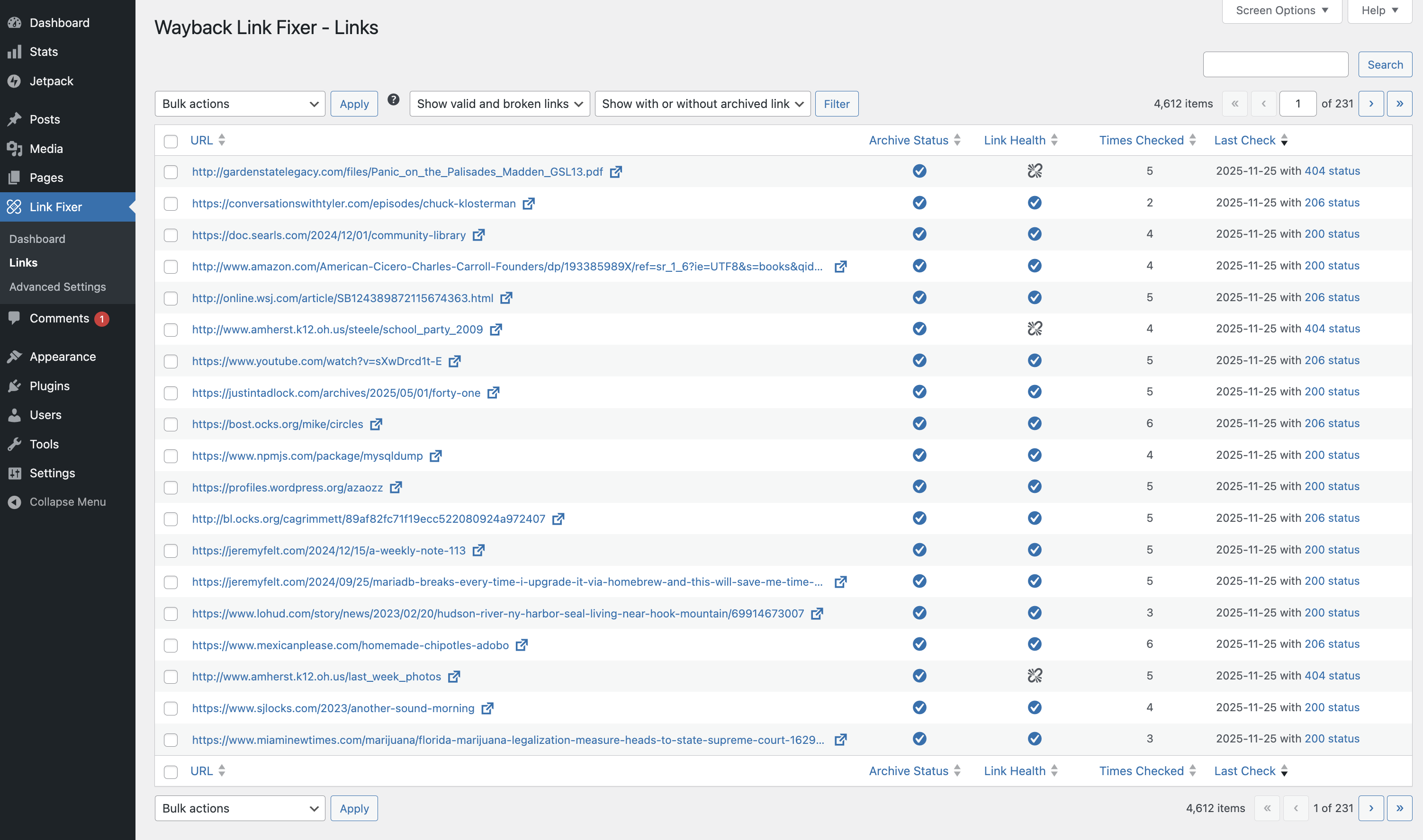
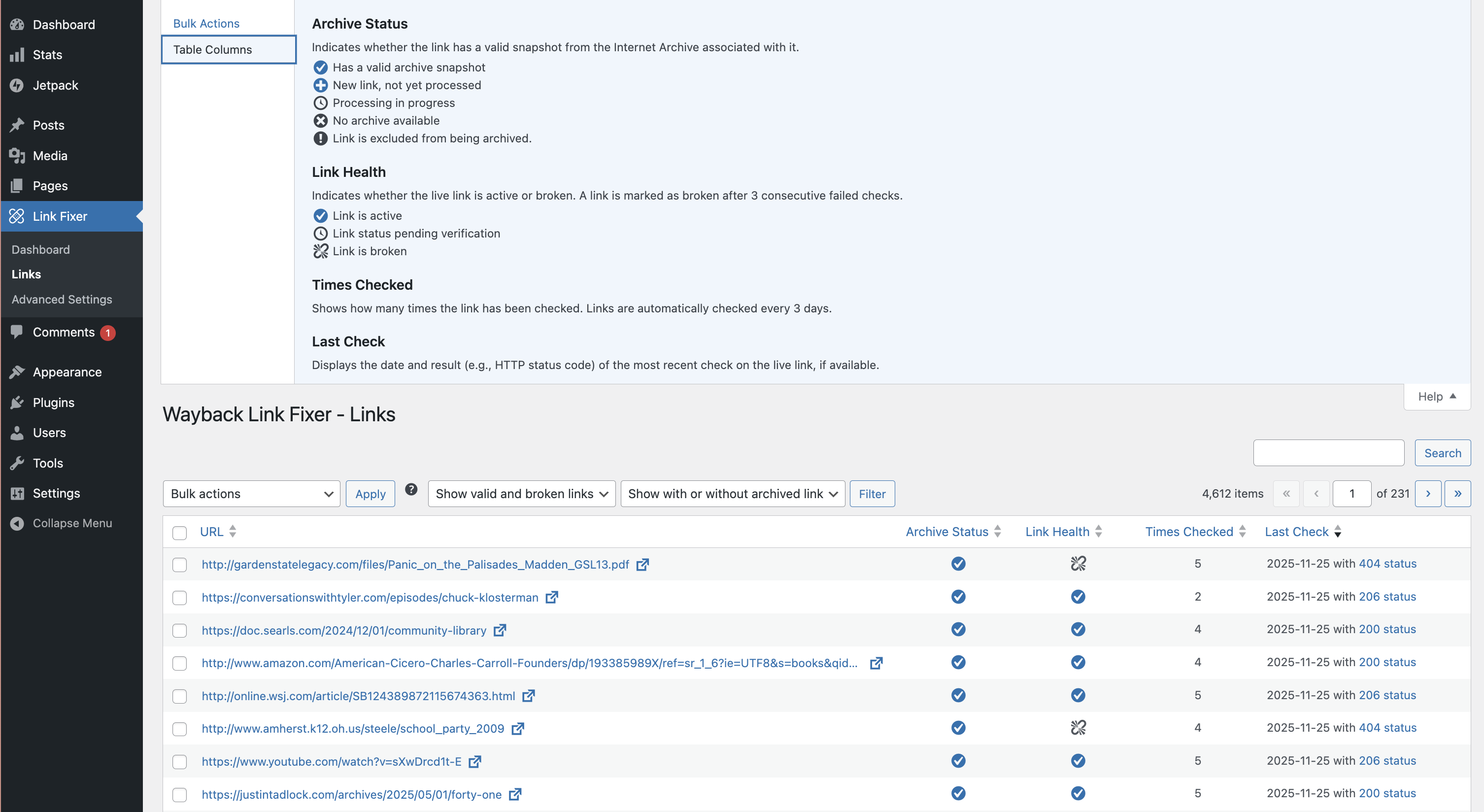
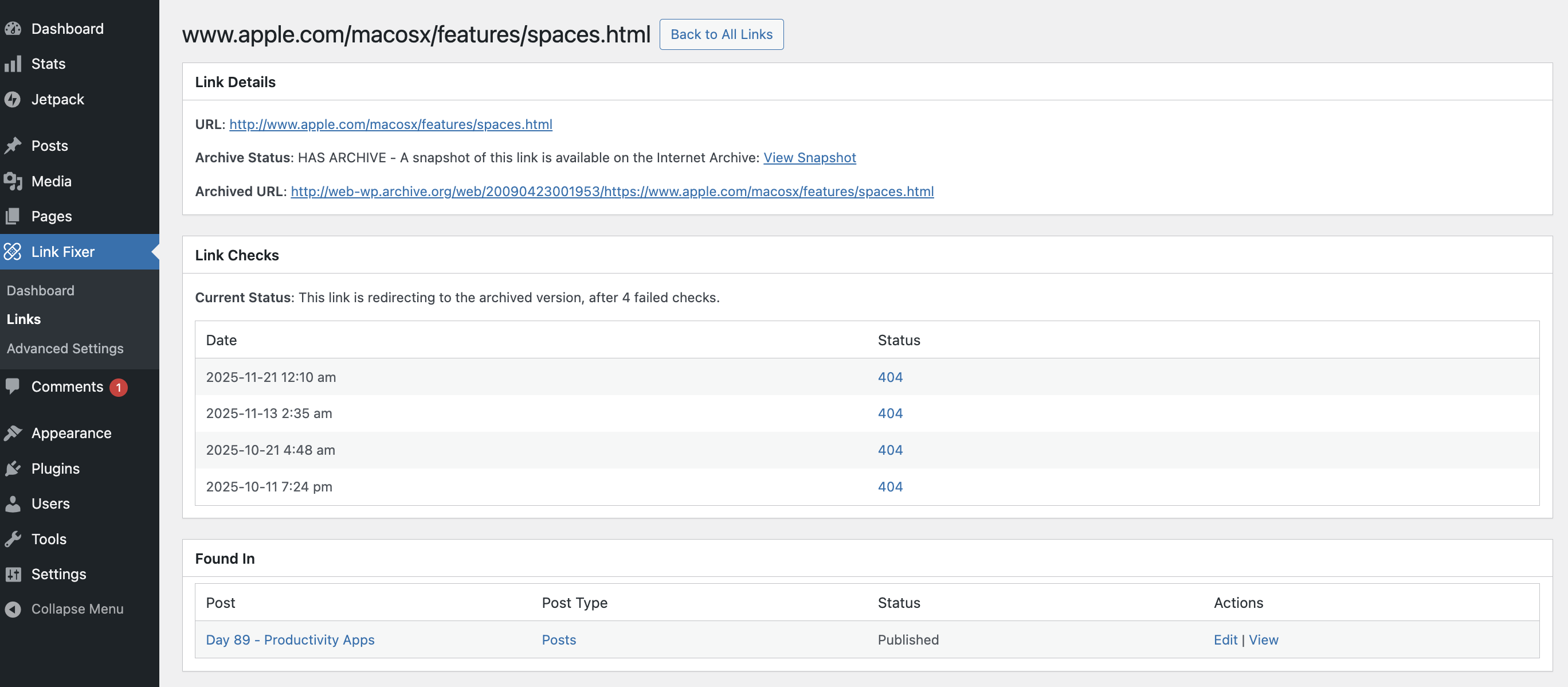
Установка
The plugin stores its link data in a JSON column, so it requires MySQL 5.7 or later, or MariaDB 10.2 or later. Activation is blocked with an explanatory notice on anything older.
- Upload the plugin folder to
/wp-content/plugins/, or install it through the Plugins screen in WordPress. - Activate the plugin through the Plugins screen in WordPress.
- A setup wizard opens on activation and walks you through choosing which post types to scan, whether to archive your own content, and how links should be handled.
The wizard can be run again at any time from the plugin’s settings page.
An Archive.org account is not required, but adding your API keys on the settings page raises the number of snapshots you can create per day.
Часто задаваемые вопросы
-
Как работает проверка ссылок?
-
Ваш контент проверяется на наличие ссылок. Когда находится ссылка, плагин проверяет, обрабатывалась ли она ранее. Если нет, то он найдет или создаст снимок веб-страницы в Архиве Интернета. Затем, если позже целевой сайт этой ссылки отключится, мы сможем изменить ссылку на архивную версию.
-
Как мы определяем, что ссылка битая?
-
Мы используем политику, подобную Википедии. Мы проверяем ссылки раз в неделю, и если получаем 3 последовательные ошибки, мы считаем ссылку битой, если только целевой сайт не вернется в сеть.
-
Можно ли обработать все ссылки?
-
К сожалению, нет. Некоторые сайты не разрешают Архиву Интернета архивировать их контент.
-
Архивируется ли мой собственный контент?
-
Да, вы можете включить Авто-архиватор, и тогда новые снимки будут создаваться каждый раз при внесении изменений.
-
Что происходит с битыми ссылками?
-
Когда мы находим битую ссылку, мы обновляем src на лету; это означает, что исходный контент не редактируется и остается таким, каким был создан.
-
Why is a working link being reported as broken?
-
Some websites block automated bots, so the checker can receive a «403 Forbidden» and flag the link as broken even though it works fine in a browser. If this happens you can exclude that single link from its report page, or add a URL rule (with a * wildcard) to the Link Exclusions setting to cover a whole domain.
-
Сколько времени это занимает?
-
Всё зависит от количества ссылок в вашем контенте. Всё обрабатывается в фоновом режиме, но может занять много недель, если на сайте тысячи ссылок. Лучше всего использовать его как инструмент, который вы настраиваете и оставляете работать в фоне.
-
Добавляет ли это большую нагрузку на мой сайт?
-
Поскольку вся обработка происходит в фоновом режиме, в пользовательских таблицах, это не должно добавлять заметной нагрузки на ваш сайт.
-
Нужен ли мне ключ API archive.org?
-
Хотя это и не обязательно, наличие ключа API значительно увеличит количество снимков, которые вы можете создавать в день.
-
Что происходит, если Архив Интернета отключается?
-
Если сервисы Архива Интернета отключатся, исправление ссылок задержит все процессы на 24 часа и повторит попытку позже.
-
Как часто обновляются мои собственные записи при активной автоархивации?
-
Существующий контент отправляется в Wayback Machine пакетно при активации плагина, а затем повторно каждые 30 дней (по умолчанию, но может быть изменено). Новый контент отправляется на архивацию вскоре после публикации. Обновления существующего контента также вызывают отправку обновлений в Wayback Machine.
-
Совместимость с мультисайтами?
-
К сожалению, в настоящее время плагин не полностью совместим с мультисайтами. Единственный способ его использования — включение на уровне отдельного сайта, а не всей сети. Мы планируем решить эту проблему в одном из будущих релизов.
-
Поддержка плагинов-конструкторов страниц и произвольных полей?
-
Сейчас плагин лучше всего работает с основным редактором блоков, и нам предстоит дополнительная работа для поддержки плагинов-конструкторов страниц и произвольных полей.
Отзывы


Участники и разработчики
«Internet Archive Wayback Machine Link Fixer» — проект с открытым исходным кодом. В развитие плагина внесли свой вклад следующие участники:
Участники


«Internet Archive Wayback Machine Link Fixer» переведён на 4 языка. Благодарим переводчиков за их работу.
Перевести «Internet Archive Wayback Machine Link Fixer» на ваш язык.
Заинтересованы в разработке?
Посмотрите код, проверьте SVN репозиторий, или подпишитесь на журнал разработки по RSS.
Журнал изменений
1.5.0
- Security fixes around the archive.org credentials, the link check endpoint and admin access. See the upgrade notice.
- Adds a «Last Archived» column to the posts list, enabled from Screen Options.
- Now finds links inside shortcodes, dynamic blocks and international URLs, which were previously skipped.
- Fix: a stray line break at the end of Classic Editor posts.
- Fix: the auto archiver could push back its own queue and never run.
- Fix: Advanced Settings links shown to editors who cannot open it.
- Fix: Advanced Settings Link Icon row, post exclusion search and «%20» in link exclusion rules.
- Fix: Dashboard broken link count and onboarding with drafts or excluded posts.
- Fix: more broken link formats are now replaced, including on pages that list posts.
- The front end now checks at most 2 links at a time.
- Fix: links on sites that block the link checker (401, 403, 429 or 503) are no longer marked broken or replaced, and are flagged in the Links table instead.
- Redirects (300 to 308) no longer count as a failed check.
- medium.com, nytimes.com, udemy.com, kickstarter.com, player.fm, washingtonpost.com, reuters.com and perplexity.ai are added to the built-in exclusion list.
- Various fixes to the links report, link checking and the settings screen.
- Performance and accessibility improvements throughout the admin.
- Now requires MySQL 5.7 or MariaDB 10.2, checked on install.
1.4.3
- Adds a global set of excluded urls that will never be archived or checked due to the sites blocking the internet archive.
- Reintroduces a Scan but do nothing outcome for broken links.
- Fix: a non-200 response from the link checker is now treated as the service being offline and rescheduled, rather than marking a good link as broken.
1.4.2
- Fix: Manually excluded links sometimes revert to unexcluded and can still be run through the link checker process. Now fully respects manual exclusions.
1.4.1
- Fix: link data span now survives themes that wrap post content in
wp_kses_post(previously the JSON could leak as visible text on category and archive templates).
1.4.0
- Changes to how we store link information in posts, now uses an escaped
<script>tag. - Move the frontend link checker from Ajax-driven to REST.
- Improvements to link table queries for better memory usage.
- Various small UI fixes.
- Added optional link icon displayed next to fixed links on the frontend, with before/after positioning and third-party extensibility via the
iawmlf_link_iconsfilter.
1.3.6
- Allows posts to be selected to be excluded from link fixing and/or auto archiving.
- Improves cleanup of passed attempts to create and verify snapshots
- Adds an Archive.org donation notice.
- Improves translatable strings for betting internationalisation.
1.3.5
- Небольшая корректировка процесса логирования ошибок при создании снимков.
- Улучшение способа генерации статистики по ссылкам.
- Приводит все архивированные URL к https://, можно отключить в настройках.
- Улучшения в обработке отмененных действий по сканированию собственных записей, чтобы предотвратить переполнение базы данных отмененными задачами.
1.3.4
- Незначительные улучшения и изменения пользовательского интерфейса
- Уменьшены интервалы проверки по умолчанию и общее количество битых страниц, необходимое для срабатывания перенаправления.
- Упрощен процесс онбординга.
1.3.3
- Исправлена ошибка, при которой ссылки и скрипты загружались, даже если было установлено «ничего не делать»
- Переход на пользовательские URL с префиксом WP
- Исправлены различные проблемы с иконками и счетчиками на панели управления
- Улучшена обработка проблем аутентификации и уведомлений
- Обнаружение тестовых сайтов и предотвращение запуска автоархивации.
- Исправлена ошибка, при которой отсутствие опции автоархивации в базе данных могло приводить к индексации записей.
1.3.2
- Исправление ошибки
1.3.1
- Внесены различные изменения в пользовательский интерфейс и опыт взаимодействия, касающиеся значков, подсказок и меток.
- Также исправлены несколько незначительных ошибок, связанных с настройками и работой мастера.
1.3.0
- Первая публичная версия.
Примечание: все версии до 1.3.0 не были публично выпущены.