Title: PMT PostGrid for block editor with elementor support
Author: postmagthemes
Published: 08.10.2026
Last modified: 08.10.2026
---
Поиск плагинов
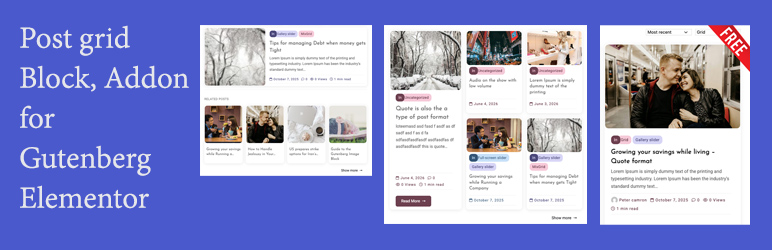
# PMT PostGrid for block editor with elementor support
Автор: [postmagthemes](https://profiles.wordpress.org/postmagthemes/)
[Скачать](https://downloads.wordpress.org/plugin/pmt-postgrid-block-editor-elementor-support.zip)
* [Детали](https://ru.wordpress.org/plugins/pmt-postgrid-block-editor-elementor-support/#description)
* [Отзывы](https://ru.wordpress.org/plugins/pmt-postgrid-block-editor-elementor-support/#reviews)
* [Установка](https://ru.wordpress.org/plugins/pmt-postgrid-block-editor-elementor-support/#installation)
* [Разработка](https://ru.wordpress.org/plugins/pmt-postgrid-block-editor-elementor-support/#developers)
[Поддержка](https://wordpress.org/support/plugin/pmt-postgrid-block-editor-elementor-support/)
## Описание
PMT PostGrid for block editor with elementor support adds a live, configurable post
grid to your site — as a block-editor block, an Elementor widget, or both. Both
builders share the same underlying render function, so a grid built in one looks
identical to a grid built in the other, and every setting behaves the same way regardless
of which editor you use.
👉 [Plugin Demo](https://contextblog.postmagthemes.com/postgrid/) | [Documentation](https://www.postmagthemes.com/docs/documentation-for-post-grid-plugins/)
| [Plugin detail ](https://www.postmagthemes.com/downloads/post-grid-blocks-addons-gutenberg-and-elementor/)
| [Get Pro](https://www.postmagthemes.com/downloads/pmt-pro-postgrid-block-editor-with-elementor-support/)
👈
**Three layouts**
* **Design 1** — a standard responsive grid (2-6 columns, any number of posts).
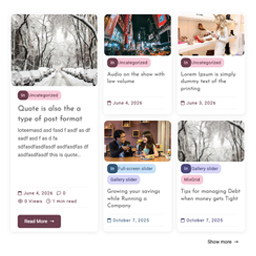
* **Design 2** — a golden-ratio featured layout: one large featured post alongside
a 2×2 grid of four smaller posts.
* **Design 3** — a stacked list, each post split into an image and content column
at the golden ratio, with an optional alternating image side.
**Query controls**
* Filter by category, author, or hand-pick specific posts by title.
* Exclude specific posts from the results.
* Order by date or comment count.
* Set columns and post count (Design 1).
* A live, front-end category dropdown lets visitors instantly switch which category
is shown, with no page reload.
**Content controls**
* Toggle featured image, excerpt (with adjustable word length), tags, and category
badge independently.
* Auto-colored category badges — each category is assigned a distinct color automatically,
no configuration required.
* Optional «Read more» button and an optional main section title, both independently
configurable.
* Reorder each card’s elements (image, category, title, excerpt, meta, tags) via
a simple drag-to-reorder list.
**Style controls**
* Column and row spacing, image corner radius, card corner radius.
* Full box-shadow control (offset, blur, spread, color, inset).
* Optional card border (width, style, color).
* Title font size, with an automatic scale for the smaller cards in Design 2.
* Left/center/right text alignment.
**«Show more» button**
Automatically appears when there are more matching posts than the grid currently
displays, linking to the relevant category archive (or your site’s main blog page)
in a new tab.
**Built to stay in sync**
Every setting is wired through shared PHP functions rather than duplicated per builder
or per layout, so a fix or feature added in one place applies everywhere — Design
1, Design 2, Gutenberg, and Elementor can’t drift out of sync with each other.
### Developer hooks
This plugin fires several `apply_filters()` hooks, so themes and other plugins can
extend or override its behavior without editing its files directly (changes to plugin
files are lost on update; filters aren’t).
**`pmtpofob_post_grid_args`**
Filters the fully-merged settings array before anything is rendered — runs before
the design is even dispatched, so it can change `$args['design']` itself or override
any individual setting. Fires once per grid instance, covering every design and
both builders.
```
apply_filters( 'pmtpofob_post_grid_args', array $args )
add_filter( 'pmtpofob_post_grid_args', function( $args ) {
$args['showExcerpt'] = true; // Force excerpts on, site-wide.
return $args;
} );
```
**`pmtpofob_post_grid_query_args`**
Filters the `WP_Query` arguments right before the query runs — add a `meta_query`,
a `tax_query`, restrict/expand post types, etc.
```
apply_filters( 'pmtpofob_post_grid_query_args', array $query_args, array $args, string $design )
add_filter( 'pmtpofob_post_grid_query_args', function( $query_args, $args, $design ) {
$query_args['meta_key'] = 'featured';
$query_args['meta_value'] = '1';
return $query_args;
} );
```
**`pmtpofob_post_grid_card_html`**
Filters a single rendered card’s HTML before it’s returned. Fires for every card,
in every design.
```
apply_filters( 'pmtpofob_post_grid_card_html', string $html, int $post_id, string $variant, array $args )
$variant is `'full'` (Design 1 / Design 2's Column A), `'simple'` (Design 2's Column B), or `'row'` (Design 3).
```
**`pmtpofob_post_grid_category_color`**
Filters the color pair (`array( 'bg' => '#hex', 'fg' => '#hex' )`) used for a category’s
badge, meta text, tags, and Read more button. Override the auto-rotated palette
with your own brand colors.
```
apply_filters( 'pmtpofob_post_grid_category_color', array $color, int $term_id )
add_filter( 'pmtpofob_post_grid_category_color', function( $color, $term_id ) {
if ( 5 === $term_id ) { // Your "News" category's term_id.
return array( 'bg' => '#FFE0E0', 'fg' => '#8A1F1F' );
}
return $color;
}, 10, 2 );
```
**`pmtpofob_post_grid_output`**
Filters the complete rendered output of a grid instance right before it’s returned—
the entire thing: wrapper, header, dropdown, every card, Show more button.
```
apply_filters( 'pmtpofob_post_grid_output', string $html, array $args, string $design )
```
**`pmtpofob_post_grid_structured_data`**
Filters the schema.org `ItemList` array before it’s serialized to JSON-LD — add/
remove fields, or return an empty array to suppress it entirely for a specific instance.
```
apply_filters( 'pmtpofob_post_grid_structured_data', array $schema, array $items )
```
## Скриншоты
[⌊Design 1 -- standard responsive grid.⌉⌊Design 1 -- standard responsive grid.⌉[
Design 1 — standard responsive grid.
[⌊Design 2 -- golden-ratio featured layout.⌉⌊Design 2 -- golden-ratio featured layout
.⌉[
Design 2 — golden-ratio featured layout.
[⌊Block editor settings panel (Gutenberg).⌉⌊Block editor settings panel (Gutenberg)
.⌉[
Block editor settings panel (Gutenberg).
## Блоки
Этот плагин предоставляет 1 блок.
* Post Grid (Postmagthemes)
## Установка
1. Upload the plugin folder to `/wp-content/plugins/`, or install directly through
the Plugins screen in your WordPress admin.
2. Activate the plugin.
3. **Gutenberg**: in the block editor, add the «Post Grid» block and configure it
in the sidebar.
4. **Elementor**: with Elementor active, drag the «Post Grid» widget into your layout
and configure it in the left panel. The widget only registers itself if Elementor
is installed and active — no errors or dependency warnings if it isn’t.
## Часто задаваемые вопросы
### Does this work with both Gutenberg and Elementor?
Yes — as two separate integrations (a block and a widget) built on the same shared
rendering code, so results are visually identical either way. You can use either
one, or both on different pages of the same site.
### Is the grid static or does it update automatically?
It’s fully dynamic. The grid queries your posts live on every page load — publish
a new post, or edit an existing one, and the grid reflects that automatically. Nothing
needs to be re-saved.
### Does it work without Elementor installed?
Yes. The Gutenberg block works entirely independently. The Elementor widget only
registers itself if Elementor is active; with Elementor inactive or not installed,
that part of the plugin is simply inert.
### How are category badge colors chosen?
Automatically. Each category is deterministically assigned one of several preset
colors based on its ID, so the same category always gets the same color across your
site with no setup required.
### Can I show a specific set of posts instead of a category feed?
Yes — use the «Specific posts» picker to choose exact posts by title. When any are
selected, they completely override the category/order settings and display in the
order you picked them.
### Can I customize this plugin’s behavior from my theme or another plugin, without editing its files?
Yes — see «Developer hooks» below.
### What happens to my data if I delete this plugin?
Deleting the plugin (not just deactivating it) removes everything it stores: its
own settings, its view-count tracking, and the short-lived cache used by the live
front-end filter. It does not touch any block or widget you’ve placed in your pages/
posts — that content is yours and stays exactly as it is, so if you reinstall the
plugin later, your grids come back too.
## Отзывы
Нет отзывов об этом плагине.
## Участники и разработчики
«PMT PostGrid for block editor with elementor support» — проект с открытым исходным
кодом. В развитие плагина внесли свой вклад следующие участники:
Участники
* [ postmagthemes ](https://profiles.wordpress.org/postmagthemes/)
«PMT PostGrid for block editor with elementor support» переведён на 8 языков. Благодарим
[переводчиков](https://translate.wordpress.org/projects/wp-plugins/pmt-postgrid-block-editor-elementor-support/contributors)
за их работу.
[Перевести «PMT PostGrid for block editor with elementor support» на ваш язык.](https://translate.wordpress.org/projects/wp-plugins/pmt-postgrid-block-editor-elementor-support)
### Заинтересованы в разработке?
[Посмотрите код](https://plugins.trac.wordpress.org/browser/pmt-postgrid-block-editor-elementor-support/),
проверьте [SVN репозиторий](https://plugins.svn.wordpress.org/pmt-postgrid-block-editor-elementor-support/),
или подпишитесь на [журнал разработки](https://plugins.trac.wordpress.org/log/pmt-postgrid-block-editor-elementor-support/)
по [RSS](https://plugins.trac.wordpress.org/log/pmt-postgrid-block-editor-elementor-support/?limit=100&mode=stop_on_copy&format=rss).
## Журнал изменений
#### 2.42.4
* readme updated. css updated. hide 0 post category in output.
#### 2.42.3
(renamed slug/text domain to pmt-postgrid-block-editor-elementor-support, prefix
changed from pmt_/pmt- to pmtpofob_/pmtpofob-, added Requires Plugins: elementor;
verified Elementor-specific code already loads only when Elementor is active and
fails gracefully otherwise — no functional change needed; fixed a stale old-plugin-
name reference in uninstall.php’s header comment and in CHANGELOG.md’s own intro
line; prefixed uninstall.php’s own $site_ids/$site_id variables to pmtpofob_site_ids/
pmtpofob_site_id — these sit at the file’s top-level script flow rather than inside
a function, closer to global scope than an ordinary function-local variable; checked
the rest of the codebase for anything similar and found nothing else in that category)
*
proper escaping done in many places. * Added two new panels/sections in both builders,
positioned right after Reset: «Document» (links to the plugin’s documentation) and«
Buy Premium» (links to the Pro version’s download page).
#### 2.42.2
* Fixed a real gap in the JSON-LD structured data’s `` breakout guard,
in `pmt_post_grid_render_structured_data()` — the only place this plugin generates
structured data, which every design (1/2/3) and both builders funnel through.
The guard used `str_replace()`, which only matches the exact lowercase string`
`; browsers close `` would have slipped through and closed the tag early,
letting whatever followed execute as live JavaScript. Switched to `str_ireplace()`(
case-insensitive). Fixed at the single source function rather than patched at
each of the four call sites that echo its output, since escaping there isn’t
really the issue — the string those call sites return is a deliberate mix of
trusted markup and already-safe dynamic content, and the actual defect was in
how the JSON-LD segment gets sanitized before that string is even assembled.
Renamed the plugin again: «PMT PostGrid for block editor with elementor support»(
was «Post Grid Block and Addon for the Block Editor and Elementor»). WordPress.
org’s plugin review flagged the previous name as too generic and overlapping
existing «Post Grid» plugins, with «Elementor» not clearly framed as a third-
party integration. New name puts a distinctive brand prefix («PMT») first, per
WordPress.org’s own stated pattern for trademark framing (brand name first, generic
description in the middle, third-party trademark at the end as «with X support»).
Requested slug/Text Domain (`pmt-post-grid`) is unchanged — it already matched
the plugin’s existing internal folder name and every internal identifier, so
this was a display-name-only update, not a full text-domain migration.
#### 2.42.1
* Renamed the plugin: «Post Grid Block and Addon for the Block Editor and Elementor»(
was «…for Gutenberg and Elementor»). WordPress.org’s plugin upload validator
rejected the previous name — «gutenberg» is a restricted term and cannot appear
in a plugin’s name/permalink at all, regardless of context. Updated consistently
everywhere the name appears: the PHP `Plugin Name:` header, the readme title,
the admin menu title, and the admin page heading.
#### 2.42.0
* Removed the «Leave a review» admin notice entirely (added in 2.38.1) — the activation
hook, its self-healing admin_init fallback, the review-action handler, the allowed_redirect_hosts
filter it needed, the notice itself, and its two options (`pmt_post_grid_activated_time`,`
pmt_post_grid_review_dismissed`) are all gone, including their cleanup entry
in `uninstall.php` — this plugin was never distributed with the feature active,
so there’s no legacy data anywhere to account for.
#### 2.41.3
* Switched the «Leave a review» notice’s external redirect (the «Ok, you deserve
it» action) from `wp_redirect()` to `wp_safe_redirect()`, and added `wordpress.
org` to `allowed_redirect_hosts` so the off-site redirect to the actual WordPress.
org review page still works correctly — `wp_safe_redirect()` silently blocks
redirects to any host not on that list by default.
* Documented (via `phpcs:ignore`) why `uninstall.php`‘s two bulk-delete queries
intentionally don’t use `wp_cache_get()`/`wp_cache_set()`/`wp_cache_delete()`—
both are one-time, pattern-based bulk deletes with no «next read» for a cache
to ever serve, since they run exactly once, right before the data they touch
ceases to exist entirely.
#### 2.41.2
* Removed all remote image references from the «Post Grid» admin products page —
fixes a PluginCheck.CodeAnalysis.Offloading.OffloadedContent finding. Plugin
icons (previously loaded from ps.w.org) and theme screenshots (previously loaded
from WordPress.org’s own asset CDN) are gone entirely; the page is now text-only(
name, description, install count, link) for both «Our Plugins» and «Our Themes.»
Offloading any image/script/style to a remote host is disallowed regardless of
whose server it is, including WordPress.org’s own — not something that could
be fixed by simply hosting the same images locally either, since this plugin
has no way to fetch and bundle real third-party image assets as part of its own
build process.
#### 2.41.1
* Switched date/time output to late escaping (escaping applied inline, right at
the point of output, rather than pre-assigned to a variable earlier and echoed
later) — fixes a WordPress.Security.EscapeOutput.OutputNotEscaped PHPCS finding
at pmt-post-grid.php:1015, and two further occurrences of the same underlying
pattern (the meta-info date entries in the ‘row’ and ‘full’ card variants) that
a targeted search turned up. Not a security fix — the data was already safe either
way — but the correct, current best-practice pattern per WordPress’s own coding
standards, and easier to audit.
#### 2.41.0
* Removed the last remaining static inline styles — the «Post Grid» admin products
page (Our Plugins / Our Themes) was built quickly with `style="..."` attributes
throughout, which is exactly the pattern flagged and fixed elsewhere in this
plugin earlier (the same distinction applies: static values that never vary should
be a CSS class, not an inline style). Moved everything into a new dedicated stylesheet,`
admin/products-page.css`, enqueued only on that one admin page — never loaded
anywhere else, including the front end. Every remaining inline style in the plugin
is now confirmed genuinely dynamic (per-category colors, per-instance CSS custom
properties) and can’t be a static class.
#### 2.40.2
* Found the actual root cause of the block staying under «Widgets»: Gutenberg blocks
have two separate registrations — server-side PHP (`register_block_type()`, which
2.40.0/2.40.1 correctly updated) and client-side JS (`wp.blocks.registerBlockType()`
in `block/index.js`, which controls what the block inserter UI actually displays).
The JS registration had its own hardcoded `category: 'widgets'`, completely overriding
the PHP side regardless of how correctly that was configured. Fixed to `category:'
postmagthemes'`, matching the PHP registration. Both the category being registered(
PHP, fixed in 2.40.1) and the block being assigned to it (JS, fixed here) were
necessary together — neither alone was sufficient, which is why 2.40.1 alone
didn’t resolve it.
#### 2.40.1
* Fixed the «Post Grid by Postmagthemes» Gutenberg category not actually taking
effect (the block still showed under «Widgets» despite 2.40.0’s fix). Root cause,
confirmed against a real-world plugin doing the same thing correctly: the filter
was registered at the default priority, which risks another plugin’s own block-
categories filter running afterward and rebuilding the array without preserving
this addition. Now registered at a very high priority (999999999, so it runs
last) and on both the current filter name (`block_categories_all`) and the older,
still-supported one (`block_categories`).
#### 2.40.0
* Added a «Post Grid by Postmagthemes» category to the Gutenberg block inserter—
the block previously had no explicit category, so it fell back to the generic«
Widgets» bucket. Renamed Elementor’s matching category from «Postmagthemes» to
the same «Post Grid by Postmagthemes» title for consistency (its slug is unchanged,
so nothing else needed updating there). Both builders now share the same category
slug (`postmagthemes`), so any future block/widget from this plugin can be added
to the same category in both places just by referencing that slug.
#### 2.39.0
* Added `uninstall.php` — WordPress’s standard, documented mechanism for plugin
cleanup, only ever run when a user clicks «Delete» on an already-deactivated
plugin (never on simple deactivation). Removes every piece of persistent data
this plugin writes: the review-notice options (`pmt_post_grid_activated_time`,`
pmt_post_grid_review_dismissed`), the `_pmt_views` view-count meta on every post,
and the short-lived per-instance transients used by the live front-end filter.
Handles multisite properly (loops every site on the network via `switch_to_blog()`,
rather than only cleaning the current site). Deliberately leaves actual block/
widget content in posts/pages untouched — that’s the user’s own content, not
this plugin’s internal data.
#### 2.38.4
* Moved the category post count to the correct place: the editor’s own Category
control (both builders, e.g. «Business (12)» when choosing which category to
query), not the live front-end filter dropdown visitors see — reverted that one
back to plain names, since that was never the intended location.
#### 2.38.3
* The live front-end category filter dropdown now shows each category’s post count
alongside its name, e.g. «Business (12)» — uses the `count` property WordPress’s`
get_categories()` already returns, no extra query needed.
#### 2.38.2
* «Our Themes» on the Post Grid admin page now shows only the 8 most recently updated
themes, reordered by actual recency (per postmagthemes’ real Theme Trac update
history) rather than install count. Added a «More themes» button linking to the
real WordPress.org author page (`wordpress.org/themes/author/postmagthemes/`)
for the full 14.
#### 2.38.1
* Added a «Leave a review» admin notice, shown on every wp-admin page (hooked on`
admin_notices`, which fires globally regardless of which menu item is open —
not scoped to this plugin’s own settings page), once an administrator has had
the plugin active for more than 7 days. Three actions, all plain nonce-verified
GET links, no JS/AJAX: «Ok, you deserve it» (dismisses permanently, sends to
the WordPress.org review page), «Nope, maybe later» (pushes the 7-day threshold
forward another 30 days), «I already did» (dismisses permanently, no external
visit). Includes a self-healing fallback so existing installs (not just fresh
activations) get the countdown started too.
#### 2.38.0
* Added a new top-level «Post Grid» admin menu page showing postmagthemes’ other
WordPress.org products — «Our Plugins» (PostmagThemes Demo Import, WP Theme Statistic)
and «Our Themes» (all 14 published theme, with screenshots). Every name, link,
and install count is real, sourced directly from postmagthemes’ actual WordPress.
org profile, not placeholder content.
#### 2.37.2
* Fixed «Show author» being missing from «Reset all settings» in both builders —
the toggle was fully wired up when added in 2.37.0, but the two hand-maintained
reset-defaults maps (Gutenberg’s `PMT_DEFAULT_ATTRIBUTES`, Elementor’s `getElementorDefaults()`)
were never updated to include it. Audited both maps against every actual control/
attribute to confirm this was the only gap.
#### 2.37.1
* Fixed the author avatar sitting visibly lower than the date/comments/views icons
in meta info. The 2.37.0 fix only handled alignment _inside_ the author item (
avatar vs. its own text) — it missed that `.pmt-extra-info` (the outer row all
meta items share) had no `align-items` set at all, defaulting to `stretch`. Every
item stretched to match the tallest sibling (now the 20px avatar), but each item’s
own content stayed wherever it naturally sat within that stretched box rather
than centering against its siblings. Added `align-items: center` to `.pmt-extra-
info` itself, both files.
#### 2.37.0
* Added author (avatar + name, linked to the author’s archive) as a new meta info
item, in both builders — always the first item in meta info, ahead of date/comments/
views/reading time. New «Show author» toggle, positioned first in the Meta info
panel/section, default on. Uses WordPress’s own `get_avatar()`, so it respects
whatever Gravatar/avatar setup is already configured site-wide.
#### 2.36.1
* Changed view-tracking to match the Pro version’s implementation exactly: cookie-
based de-duplication (once per visitor per post per day) instead of the transient
+IP/UA-fingerprint approach from 2.36.0; read-then-write increment instead of
an atomic SQL `UPDATE`; own tracking (`_pmt_views`) now checked _first_ in `pmt_post_grid_get_views()`,
with third-party plugin keys as the fallback (previously the reverse); and adopted
Pro’s fuller bot-signature list (19 patterns, including Slack/Discord/headless-
browser bots, vs. 8 previously).
#### 2.36.0
* Added a genuine view-counting mechanism — previously «Show views» only _read_
from common view-count meta keys, with nothing in the plugin actually incrementing
any of them (no theme edits needed here, since this hooks into WordPress’s own`
template_redirect` action rather than a template file). Writes to its own dedicated`
_pmt_views` meta key, which is deliberately the lowest-priority key `pmt_post_grid_get_views()`
checks — so if a dedicated view-counter plugin is already active and tracking
one of the other recognized keys, that count is what displays; this just runs
harmlessly in the background as a fallback for sites with no other view tracking
at all. Includes real safeguards: only counts genuine single-post visits (never
pages/previews/admin), skips logged-in staff (`edit_posts` capability) so the
site’s own authors don’t inflate their own counts, filters a handful of common
bot/crawler user agents, de-duplicates by visitor for one hour via a transient
so refreshes don’t each count as a new view, and increments via a single atomic
SQL `UPDATE` rather than read-then-write, avoiding a race condition where near-
simultaneous visitors could lose an increment.
#### 2.35.2
* Fixed a real race condition in the Elementor «Reset all settings» button: the
listener was only ever bound inside a `$(window).on('elementor:init', ...)` handler,
which permanently misses the event if `elementor:init` had already fired before
this script loaded (script load order isn’t guaranteed relative to when Elementor
finishes its own init — this can shift with any WordPress/Elementor update).
The button would render and be clickable, but silently do nothing, since the
listener that should have caught its event was never actually registered. Now
checks synchronously whether Elementor has already initialized and binds immediately
in that case, falling back to the event listener only if it genuinely hasn’t
initialized yet.
#### 2.35.1
* Removed Beaver Builder support (added in 2.35.0) — back to Gutenberg and Elementor
only.
#### 2.35.0
* Moved the Elementor «Reset all settings» button out of the bottom of the Typography
section into its own dedicated «Reset» section, right after Typography — it was
easy to miss buried at the end of an unrelated section. Gutenberg’s placement(
end of the Typography panel) is unchanged, since its own panel structure already
makes it reasonably discoverable there.
#### 2.34.4
* Fixed the real root cause of the Elementor reset button: it was updating the
underlying settings correctly (panel controls showed the new values), but doing
so by mutating the raw Backbone settings model directly — which silently skips
Elementor’s live-preview refresh, undo/redo history, and the «document modified»
flag that enables the Publish/Update button. Switched to Elementor’s documented
Commands API (`$e.run('document/elements/settings', {...})`), the same command
real user edits go through, so the reset now correctly updates the live preview
and enables Publish/Update, and the reset actually persists on save. Removed
the manual repeater-collection reset workaround from 2.34.2/2.34.3 — no longer
needed, since the Commands API handles all setting types (including repeaters)
the same way the real UI does.
#### 2.34.3
* Added diagnostic console logging throughout the Elementor «Reset all settings»
script (`block/elementor-editor.js`) — every step now logs what it found or why
it’s aborting, and the actual reset is wrapped in try/catch so a real error is
now clearly attributable to this script rather than indistinguishable from unrelated
console noise (e.g. Elementor’s own AI/Cloud-Kit background requests). Console-
only, no visible behavior change if it was already working.
#### 2.34.2
* Added a «Reset all settings to default» button to the bottom of the Typography
panel/section, in **both** builders:
- **Gutenberg**: a plain button + confirmation prompt that calls `setAttributes()`
with every attribute’s registered default in one go — straightforward, since
Gutenberg attributes are just React state.
- **Elementor**: a BUTTON control firing a Backbone event, handled by new editor-
only JS (`block/elementor-editor.js`, never loaded on the front end) using
Elementor’s Container API. Repeater controls (`layoutOrder`, `layoutOrderDesign3`)
are reset via their own nested Backbone Collection specifically, not just
the parent settings model — Elementor repeaters maintain their rows separately
from the main settings, so a blanket reset on the parent alone doesn’t reliably
refresh the repeater’s own view.
- Every default value in both reset maps was cross-checked line-by-line against
the actual PHP-registered defaults (shared PHP defaults, Gutenberg’s attribute
schema, Elementor’s control defaults) — all match exactly.
#### 2.34.1
* Trimmed the bundled Font Awesome stylesheet down to only the 4 icons this plugin
actually uses (calendar, comment, eye, clock) — cuts `fontawesome.css` from ~
83KB to under 1KB.
* Removed unused solid/brands/v4-compatibility webfont files from the package;
only the regular-weight font actually used by the plugin ships now.
* Fixed the `