

Описание
SnapWidget shows your latest Instagram posts on your WordPress site, in a page, a post, a sidebar or a footer. The feed updates by itself when you post. Used by more than 200,000 websites.
You make the widget on SnapWidget: connect your account, then pick a layout and its settings. This plugin then puts the widget on your site with a shortcode or a sidebar widget.
Free plan
- Instagram and Facebook widgets
- Grid, board, slideshow and scrolling layouts
- Unlimited views
- No logo on the widget
- New posts every 15 minutes
- Works on HTTPS websites
Paid plans
- TikTok, YouTube and X widgets
- Feed layout
- Photos open in a lightbox or link to the original post
- Shoppable Images: link each photo to a product in your store
- Instagram hashtag widgets (Pro and Developer plans)
- Review widgets for Google, G2 and your own testimonials
- Widget analytics: views and clicks
- Your own custom CSS
- New posts every 5 minutes
- 14-day free trial
See the plans on the pricing page.
Скриншоты


Установка
- In WordPress, go to Plugins > Add New, search for «SnapWidget» and click Install Now, then Activate.
- On SnapWidget, create your widget and click Save.
- Click Install Widget and look at the code. The widget ID is the part after
/embed/. - Add the shortcode
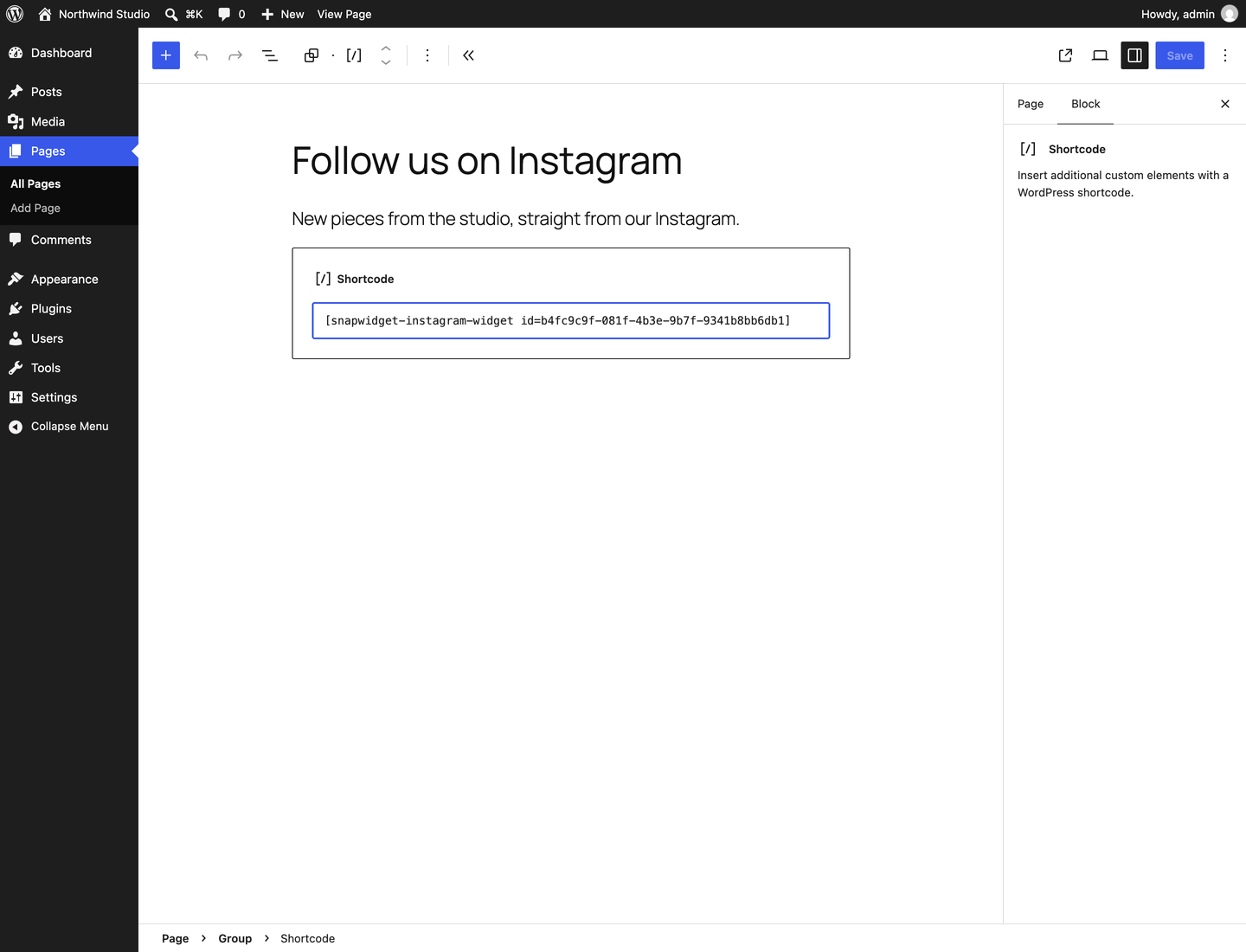
[snapwidget-instagram-widget id=WIDGET_ID]to a page or post. ReplaceWIDGET_IDwith your own widget ID.
To show the widget in a sidebar or footer of a classic theme, go to Appearance > Widgets and add the Instagram widget. Enter your widget ID.
Shortcode options
- id: the ID of your widget on SnapWidget. Example:
[snapwidget-instagram-widget id=WIDGET_ID] - width: the width of the widget, a number with px or %. Example:
[snapwidget-instagram-widget id=WIDGET_ID width=600px] - height: the height of the widget, a number with px or %. Example:
[snapwidget-instagram-widget id=WIDGET_ID height=600px] - lightbox: open the photos in a lightbox. Paid widgets only. Example:
[snapwidget-instagram-widget id=WIDGET_ID lightbox=true]
Leave out width and height to let the widget size itself to the page.
Часто задаваемые вопросы
-
How do I add an Instagram feed to my WordPress site?
-
Create an Instagram widget on SnapWidget, copy its widget ID from the Install Widget code, and add the shortcode
[snapwidget-instagram-widget id=WIDGET_ID]to a page or post. The feed then updates by itself when you post on Instagram. -
Is SnapWidget free?
-
Yes. The free plan has Instagram and Facebook widgets with unlimited views. Paid plans add TikTok, YouTube and X widgets, a lightbox, shoppable photos and more.
-
Which Instagram accounts can I connect?
-
The account must be a creator or business account. Personal accounts no longer work. You can switch to a creator account for free in the Instagram app.
-
Does the widget show a SnapWidget logo?
-
No. The widget shows your posts only, on every plan.
-
How often does the feed update?
-
Free widgets get new posts every 15 minutes. Paid widgets get new posts every 5 minutes.
-
Can I show TikTok, YouTube, Facebook or X posts?
-
Yes. Facebook widgets are free. TikTok, YouTube and X widgets need a paid plan. The shortcode works for all of them.
-
Can I add the widget without this plugin?
-
Yes. Paste the widget code into a Custom HTML block. See How do I add an Instagram widget to my WordPress website?
Отзывы


Участники и разработчики
«SnapWidget Social Photo Feed Widget» — проект с открытым исходным кодом. В развитие плагина внесли свой вклад следующие участники:
Участники
Перевести «SnapWidget Social Photo Feed Widget» на ваш язык.
Заинтересованы в разработке?
Посмотрите код, проверьте SVN репозиторий, или подпишитесь на журнал разработки по RSS.
Журнал изменений
1.3.1
- Fix: the widget now lines up with the page content, in block themes and in classic themes such as Twenty Twenty-One.
1.3.0
- Security: the shortcode now accepts only a widget ID and sizes in px or %, and escapes them in the page.
- Tested with WordPress 7.1.
- New description, install steps and FAQ for the current SnapWidget.
1.2.0
- Test and confirm working with new version of WordPress 5.6.2
1.1.0
- Update to support the new Instagram Basic Display API and Instagram Graph API.
1.0.4
- Update readme and plugin name as per requirement from Facebook.
1.0.3
- Fix issue with responsive widgets not resizing correctly.
1.0
- Initial release