Описание
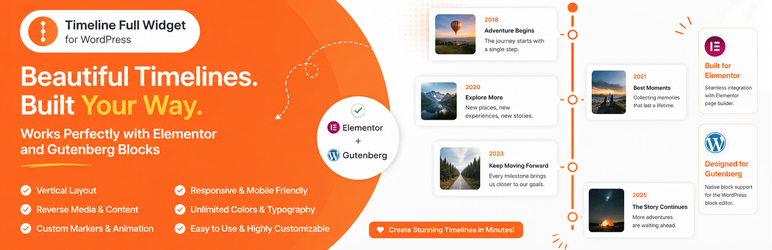
Timeline Full Widget — это лёгкий и гибкий плагин временной шкалы для WordPress, который позволяет создавать временные шкалы с помощью Elementor и Gutenberg.
Плагин обеспечивает единообразный интерфейс редактирования во всех конструкторах сайтов и предоставляет полный контроль над макетом, стилем и контентом без излишней сложности.
Ключевые преимущества:
- Работает с Elementor и Gutenberg
- Понятное и простое редактирование
- Настраиваемые стили (цвета, типографика, отступы)
- Support for images and video, with optional per-item media width in px or %
- Адаптивный макет
- Повторное использование стилей между элементами временной шкалы
- Separate per-item background color and card background color/image, preserved across compatible Elementor and Gutenberg imports
- Independent horizontal layout and media order switches for every Elementor and Gutenberg Timeline Item
- Области бокового и основного содержимого на основе блоков для элементов временной шкалы в Gutenberg
- Portable Timeline import/export for both Gutenberg and Elementor: move and replace timelines across sites, preserving native editor properties, advanced layout, custom CSS classes, responsive design, typography, and per-item styles
- Privacy-minded media placeholders for imported images, custom markers, and video posters, with image size and video-type settings retained
- Two-way Elementor Gutenberg conversion: import compatible Timeline settings, item text, links, layout, media placeholders and marker styles between editors (editor-specific controls remain editor-specific)
- Selective imports: choose whether to transfer headings/text/inner content, margins, padding, gaps, IDs, CSS classes, custom styles, links, animation, responsive settings, typography and backgrounds
Вы можете использовать его для:
- Сроки реализации проекта
- Дорожные карты
- История компании
- Временной шкалы событий
- Ключевые этапы
Внести свой вклад
Хотите помочь перевести Timeline Full Widget на свой язык?
Вы можете предложить переводы здесь:
https://translate.wordpress.org/projects/wp-plugins/timeline-full-widget/
Latest editor improvements
- Elementor: an optional numeric Width of media setting with separate px/% units. Full-width images use responsive full-resolution sources, regardless of thumbnail preset.
- Gutenberg: Timeline background color and image settings, including image size and position.
- Cross-editor import/export carries background settings and optional media width, without copying original image URLs from donor sites.
- Custom marker pictures are confined to the selected Timeline marker size.
Скриншоты


Блоки
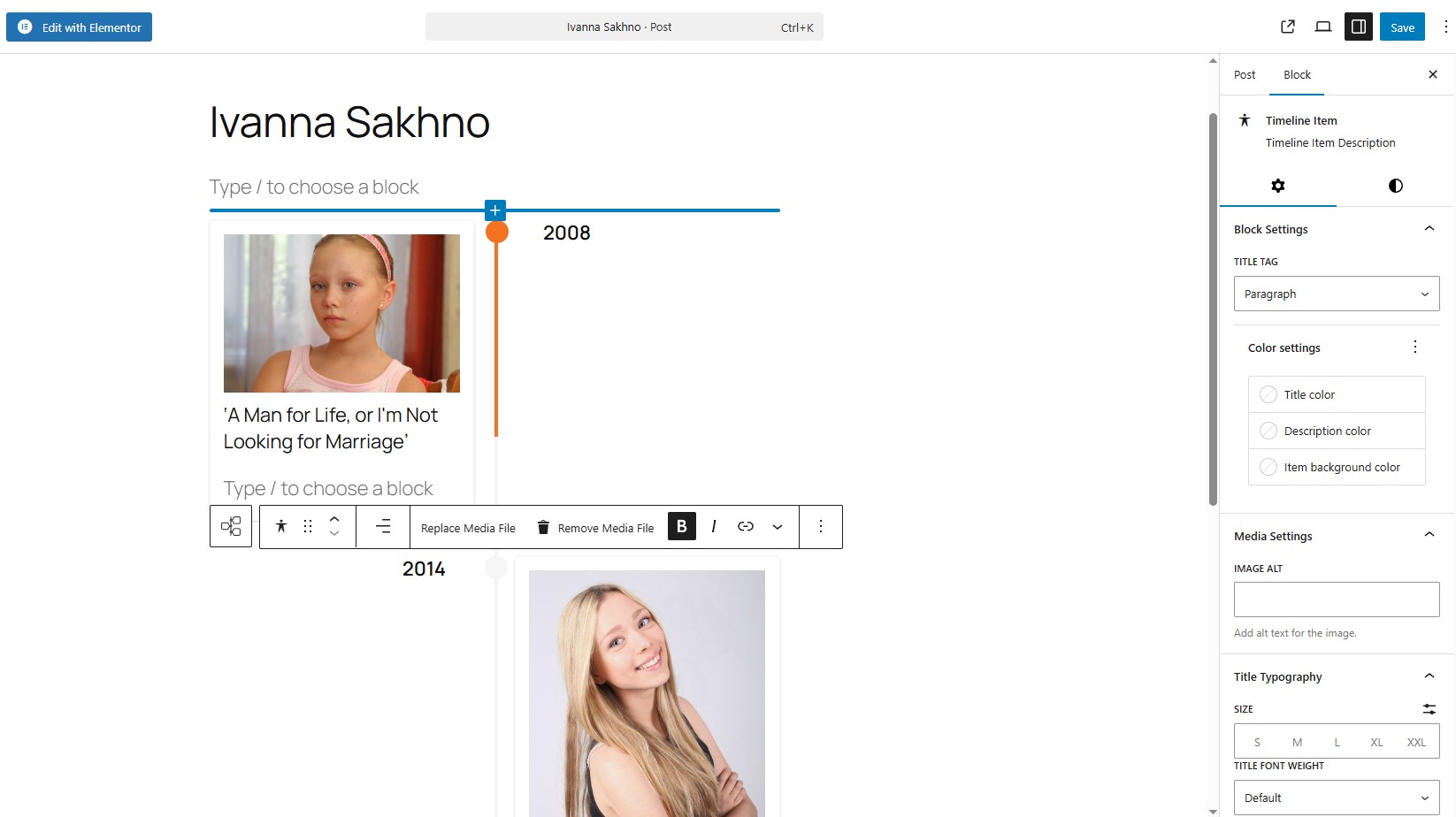
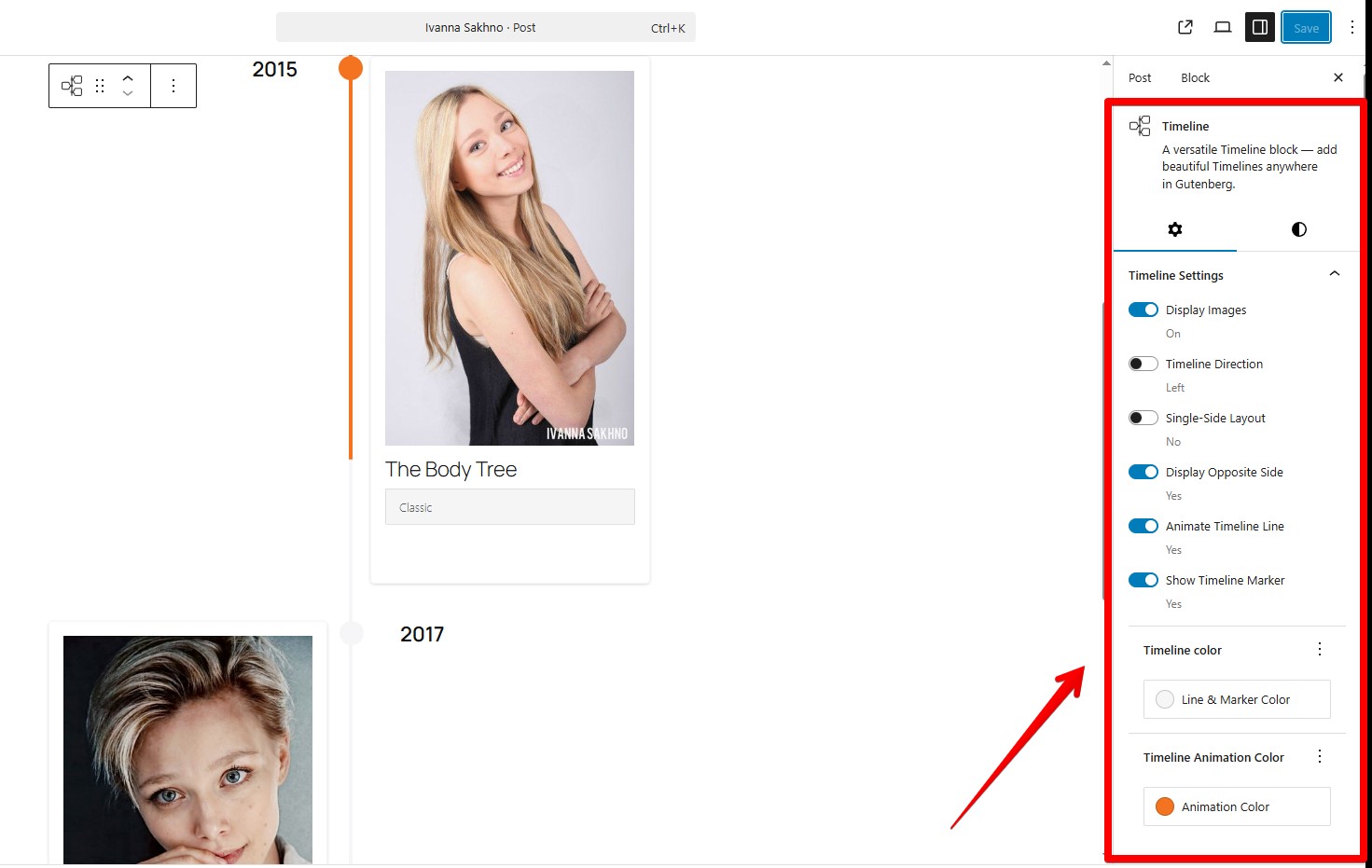
Этот плагин предоставляет 1 блок.
- Timeline Full Widget Универсальный блок «Временная шкала» для добавления адаптивных временных шкал в Gutenberg.
Установка
- Загрузите файлы плагина в каталог
/wp-content/plugins/timeline-full-widgetили установите его напрямую через экран плагинов WordPress. - Активируйте плагин на экране «Плагины» в WordPress.
- Используйте редактор Elementor или редактор Gutenberg.
Часто задаваемые вопросы
-
Работает ли плагин с последней версией Elementor?
-
Yes, tested with Elementor 4.0.0 and WordPress 7.1.
-
Поддерживает ли он Gutenberg (блочный редактор)?
-
Да, плагин включает в себя встроенный блок Gutenberg. Введите «/timeline»
-
Могу ли я изменить маркеры на элементах временной шкалы?
-
Да, можно. Используйте кнопку «Редактировать маркер». В разделе «Настройки маркера» выберите опцию «Уникальный маркер», после чего вы сможете установить персональный маркер, например, в виде изображения.
-
Можно ли добавлять блоки внутри элемента временной шкалы?
-
Да. В Gutenberg каждый элемент временной шкалы теперь имеет отдельные области на основе блоков для бокового и основного содержимого. В каждую область можно добавлять заголовки, абзацы, списки, галереи и другие совместимые блоки.
-
Можно ли настроить стиль элементов временной шкалы?
-
Yes. Set separate colors for the full Timeline Item and for its card, plus a card background image. Both editors support these item-specific controls; media is replaced with a local placeholder when imported to another website.
-
In Elementor, timeline items use shared typography styles by default. Turn off «Use shared item styles» inside a repeater item only when that item needs unique text styling. Item and card backgrounds are always editable inside each repeater item, independent of that switch. Each Elementor Timeline Item has separate «Use horizontal content layout» and «Reverse media and content order» switches under Item layout, both off by default, regardless of shared styles. In Gutenberg, newly inserted Timeline Items copy style/layout settings from the item directly above them, and the existing toolbar button can still apply the current item styles to other items.
-
Can I transfer a Timeline to another website?
-
Yes. In Elementor open the widget’s Import / Export Timeline section under Content. In Gutenberg select the Timeline block and open Import / Export Timeline in the block sidebar. Export a
.tfw.jsonfile, then add a new Timeline widget or block on the destination site and import it. For both editors, importing a validated file opens a popup to choose which properties to transfer (IDs, margins, padding, classes, custom CSS, responsive styles, text and more) before replacing the selected Timeline. The Gutenberg sidebar contains only import/export actions and notifications, not the confirmation checkboxes. Media is replaced by local placeholders rather than copied from the donor site. -
How are Gutenberg palette colors transferred to Elementor?
-
Standard WordPress palette slugs are resolved to their actual CSS colors, including per-item backgrounds and supported heading/paragraph colors. New Gutenberg exports also capture used theme palette values so custom colors can travel between websites. Other site-specific theme styles and unsupported nested block styling may still need adjustment.
-
Can I import a Gutenberg Timeline into Elementor or vice versa?
-
Both directions, Gutenberg Elementor and Elementor Gutenberg, can import supported core Timeline layout, item headings/text, hyperlinks, common colors, marker settings and media placeholders. Conversions are best-effort: Elementor Advanced CSS, custom font families, complex Gutenberg nested blocks, and theme-dependent tokens have no guaranteed direct equivalent. For highest fidelity, import into the originating editor. Elementor repeater layout and media-order switches work independently for every item, even while shared item styles remain enabled.
-
Why are some texts missing from an older Gutenberg export?
-
Some files created in version 4.0.1 serialized RichText values as empty JSON objects. The content is absent from those files and cannot be reconstructed. Version 4.0.6 preserves rich text in new exports and warns when an older file has missing text; turn off content import to preserve the destination’s existing text.
-
Will the imported Timeline look exactly the same?
-
Native same-editor settings (including Advanced and repeater-item styles) are preserved. Replace placeholder images/videos with local media. Exact appearance also depends on destination theme CSS, locally installed fonts, responsive breakpoints and Elementor global design tokens. Missing donor-only global styles, theme styles, or plugins may require adjustment.
-
How do Wide width and Full width work in Gutenberg?
-
The Timeline block follows WordPress alignments. Wide width uses the active theme’s wide block layout, while Full width can extend to the page layout edges when the theme permits. Astra’s Container Width is the maximum site container width, not necessarily the width of every aligned block. The page template, layout, parent Group/Stack, and theme styles can also affect the result.
-
Он адаптивен?
-
Да, расположение элементов на временной шкале адаптируется к различным размерам экрана.
-
Будет ли это работать с моей темой?
-
Да, это работает с большинством тем WordPress, включая блочные и классические темы.
Отзывы
Нет отзывов об этом плагине.
Участники и разработчики
«Timeline Full Widget» — проект с открытым исходным кодом. В развитие плагина внесли свой вклад следующие участники:
Участники
«Timeline Full Widget» переведён на 11 языков. Благодарим переводчиков за их работу.
Перевести «Timeline Full Widget» на ваш язык.
Заинтересованы в разработке?
Посмотрите код, проверьте SVN репозиторий, или подпишитесь на журнал разработки по RSS.
Журнал изменений
4.0.0
- Added native, selective cross-site import/export for both Elementor widgets and Gutenberg Timeline blocks.
- Added image, marker, background and video-poster placeholders without transferring original media attachments.
- Added a shared portable file contract, editor-only adapters and security checks for untrusted files.
3.3.6
- Corrected the Gutenberg block translation domain to timeline-full-widget.
- Registered shared Elementor styles on init and loaded them only where needed on the frontend.
- Removed redundant Elementor editor script registration and limited Classic Editor assets to applicable editor screens.
- Fixed Elementor title output when the selected HTML tag is a link but no URL was provided.
- Added developer-only PHP/JavaScript regression and PSR-4-style checks.
3.3.5
- Fixed Elementor Timeline item styling controls by replacing the obsolete Side content alignment override with Title alignment for unique items.
- Moved shared Title alignment next to shared Title color and limited shared title styles to non-unique items.
- Removed unused Elementor side-content alignment override code.
3.3.4
- Fix Elementor Timeline Item side content alignment so shared and per-item alignment changes update reliably in the editor and frontend.
3.3.3
- Fixed Elementor live preview for timeline line width, marker size, line colors, and marker colors. Changes now apply immediately in the editor without switching to another component.
- Removed duplicate inline CSS custom properties from the Elementor timeline wrapper so Elementor selector-generated CSS controls the live preview and frontend consistently.
3.3.2
- Fixed Elementor Timeline side content alignment for both shared item styles and unique per-item overrides.
- Added shared text alignment utility styles to the Elementor/Core stylesheet so preview and frontend output match.
3.2.0
- Статические шаблоны InnerBlocks в Gutenberg обновлены до API шаблонов типов блоков, представленного в WordPress 7.2 / Gutenberg 23.8.
- Структура боковой части и контента элемента временной шкалы переведена на атомарный уровень для улучшения работы в режиме совместного редактирования.
3.1.0
- Исправлена проблема с blueprint.json.
3.0.0
- Структура элемента временной шкалы Gutenberg переработана для поддержки областей бокового и основного содержимого на основе блоков.
- Добавлена поддержка добавления любых совместимых блоков WordPress как в область бокового содержимого, так и в основную область описания каждого элемента временной шкалы.
- Вложенные области бокового и основного содержимого остаются редактируемыми по умолчанию, включая обычную вставку блоков WordPress.
- Пользовательское поле заголовка элемента временной шкалы заменено стандартным редактируемым блоком «Заголовок» в области основного содержимого.
- Сохранено копирование стилей между элементами временной шкалы, включая совместимые стили вложенных блоков.
- Добавлена поддержка миграции существующего содержимого элементов временной шкалы, включая перенос устаревших заголовков в блоки «Заголовок» и сохранение пользовательских устаревших стилей заголовков только тогда, когда они отличаются от значений по умолчанию.
- Добавлен слой совместимости 3.x для устаревших заголовков с примечанием в коде о его удалении в версии 4.0.0 или выше после миграции сохранённого содержимого пользователями.
- Для новых элементов временной шкалы после стандартного блока «Заголовок» добавлен пустой блок «Абзац» по умолчанию.
- Из текущей схемы блока удалены устаревшие атрибуты типографики заголовка Gutenberg.
- Улучшены отступы кнопки добавления блоков в редакторе для вложенных областей содержимого временной шкалы.
2.3.0
- PHP-структура плагина переработана в классы в стиле PSR-4 внутри
includes/, при этом исходные файлы Gutenberg сохранены вsrc/. - Сохранены обратно совместимые константы для существующих пользовательских интеграций.
- Улучшено разделение загрузки Gutenberg, Elementor, классического редактора, ресурсов и административных метаданных.
- Добавлена возможность изменять размер маркера
2.2.1
- Исправлена проблема с оптимизацией модульных скриптов.
- Улучшена загрузка фронтенд-скрипта блока Gutenberg, чтобы анимации корректно инициализировались.
2.2.0
- Добавлено отображение номеров шагов для элементов.
2.1.1
- Исправления ошибок.
2.1.0
- Добавлена поддержка WordPress Playground.
- Добавлена поддержка горизонтального и вертикального макетов содержимого.
- Добавлена возможность менять порядок медиа и содержимого на обратный.
2.0.0
- Исправления ошибок.
- Улучшены элементы управления типографикой заголовка.
- Добавлена поддержка обёртки-ссылки для медиаэлементов.
- Добавлены элементы управления стилями ширины временной шкалы.
1.3.0
- Добавлена кнопка для копирования стилей из текущего элемента.
- Добавлены адаптивные медиазапросы для временной шкалы в блоке Gutenberg.
- Добавлены адаптивные медиазапросы для временной шкалы в виджете Elementor.
- Добавлены элементы управления шириной медиа внутри элементов временной шкалы.
- Исправлены проблемы со стилями типографики содержимого в Elementor.
- Стили цветов линии и маркера разделены.
1.2.0
- Исправлены стили временной шкалы в блоке Gutenberg.
- Исправления ошибок.
1.1.0
- Исправления ошибок.
- Добавлен выбор семейства шрифтов для элементов заголовка в блоке Gutenberg.
1.0.1
- Добавлены настройки закреплённого текста для противоположной стороны временной шкалы.
- Исправлено поведение анимации маркеров.
1.0.0
- Дата выпуска — 25 сентября 2025 г.
- Первая версия.