Описание
The WooCommerce Product Filter plugin enhances your online store by allowing customers to easily refine their product search based on various criteria such as price, categories, tags, taxonomy, and attributes.
It’s designed to be fully customizable, providing you with complete control over each filtering option to best suit your store’s needs. 100% compatibility with Elementor.
WooCommerce Product Filter Key Features
Comprehensive Filtering
customers have the flexibility to filter products by a wide range of criteria including: Price, Price range, Categories, Tags, Author, Featured, On Sale, In Stock, Rating, Search by text**, Attribute filters.
Flexible Display Options
present the filters in various formats to suit your storefront’s design and user preferences. Options include: radio button list (single select) dropdown (single select), checkbox list (multi-select)** and icons** for attribute filters (colour, size, rating).
AJAX live search
Enhance the user experience with AJAX live search, which provides instant filtering results without the need to reload the page. This feature can be configured to activate immediately after a user selects their desired filter options and clicks the filter button, making product searches faster and more intuitive.
Elementor Integration
WooCommerce Product Filter compatible with Ellementor, allowing you to effortlessly create and customize product filters directly within the Elementor interface. All features of the WooCommerce Product Filter by WBW are accessible within the Elementor tab, providing a streamlined workflow for page building.
To help you get started, there’s a comprehensive video tutorial available that guides you through the process of setting up the WooCommerce Product Filter by WBW, ensuring you can make the most of its features to improve your online store’s functionality and user experience.
Фильтры продуктов — это ключевой элемент, который позволяет вашим клиентам просматривать товары желаемым образом и легко находить нужные продукты.
Statistics
Product Filter by WBW comes with a detailed filter statistics section to make it easier to collect, analyze data and subsequently support global business growth. Gather information about filtering and searching for products by your buyer and convert them into business solutions.
Живое Превью
С Живым Превью результаты появятся на панели прямо в тот момент, когда вы внесете изменения в настройки.
Разнообразие вариантов сортировки товаров
Плагин поиска товаров для WooCommerce позволяет сортировать товары по популярности, рейтингу, цене, новизне, алфавитному возрастанию или убыванию.
Создай новые фильтры товаров в несколько кликов
Легко установить и настроить. Просто добавьте фильтр на каждую страницу, используя виджет или шорткоды.
Дизайн Фильтра цены
Придайте вашему фильтру уникальный дизайн, контролируя каждый элемент. Настройки дизайна настолько широки, что способны удовлетворить самые разные вкусовые предпочтения, от классических до самых современных.
Автоматические настройки ценового диапазона с фиксированными значениями шага
Настройте диапазон вручную и укажите точное значение каждого шага, или используйте автоматическое определение.
Показать Количество и Пересчитать продукты по выбранному фильтру
Пересчитайте продукты по выбранным фильтрам и отобразите точное количество товаров, соответствующих результатам фильтра.
Полностью адаптивный
Фильтр корректно выглядит и работает отлично на разных устройствах, на мобильных телефонах и планшетах, а также на настольных компьютерах и ноутбуках.
Поддержка и предложения для WooCommerce Product Filter Plugin
Задавайте вопросы на форуме поддержки или свяжитесь с нами напрямую
Скриншоты
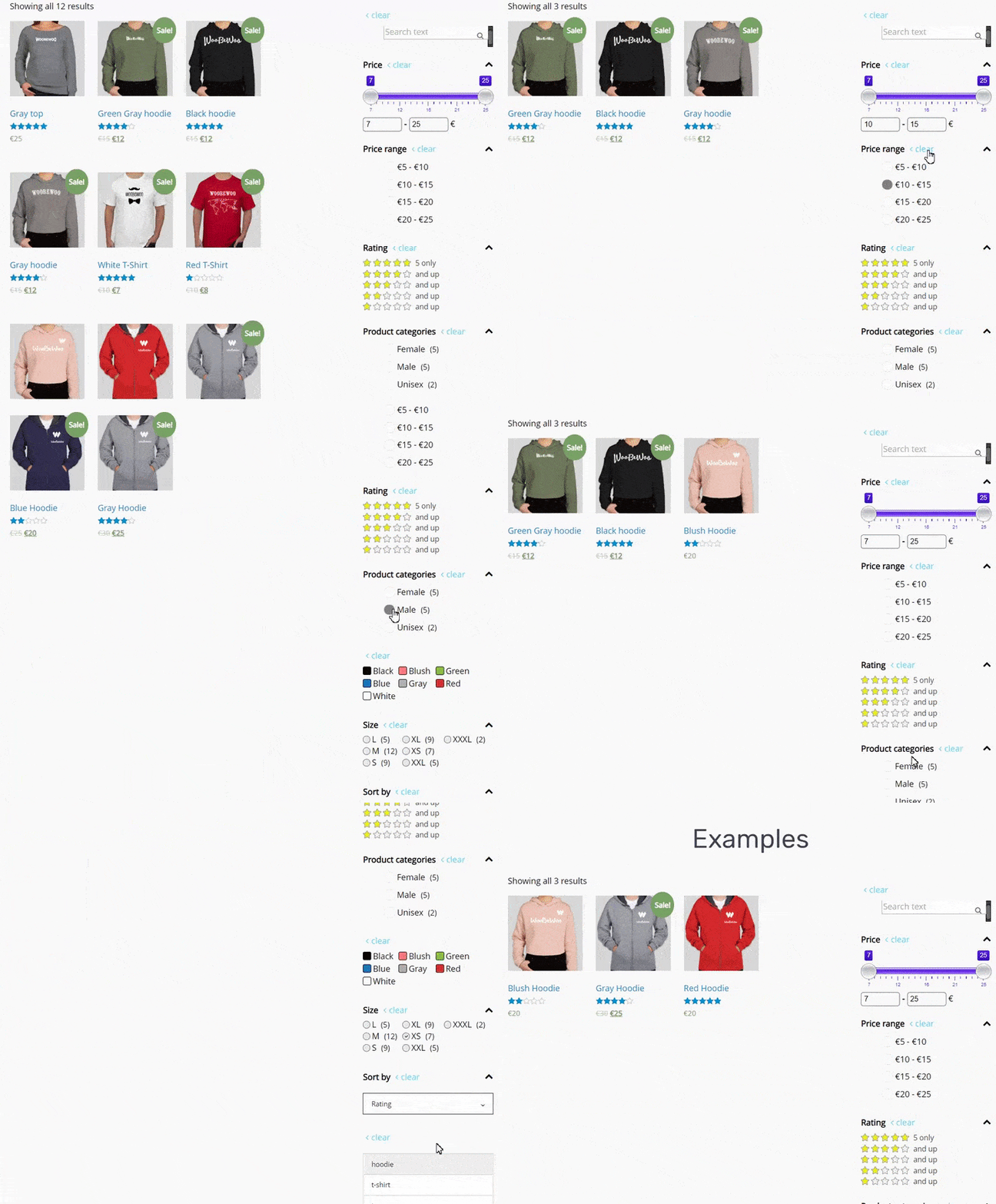
WooCommerce Products Filter Frontend 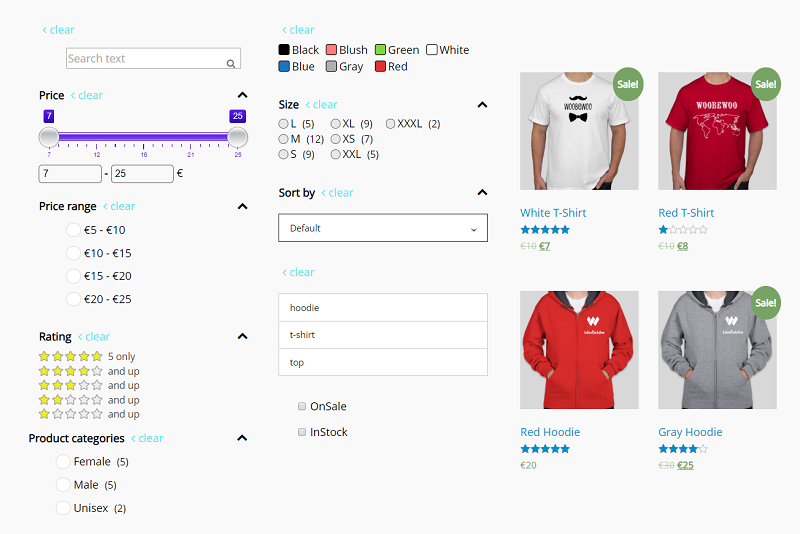
Product filter демо 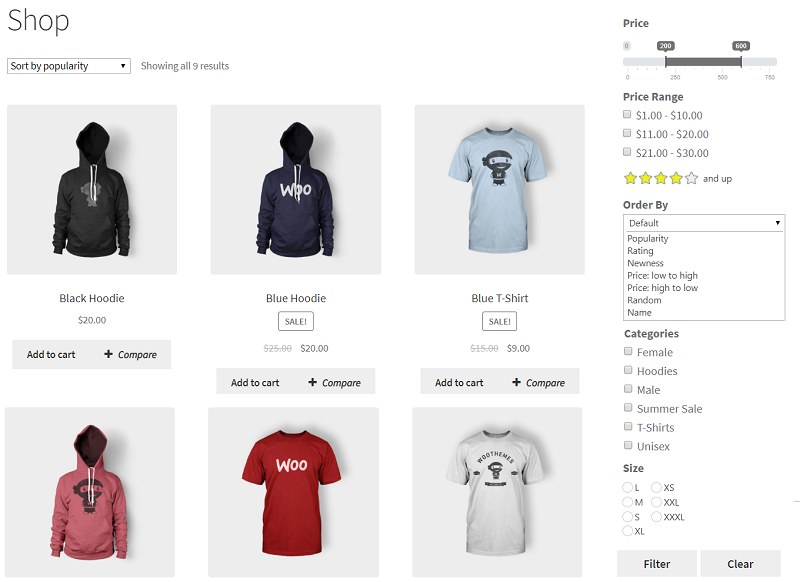
Пример Product filter 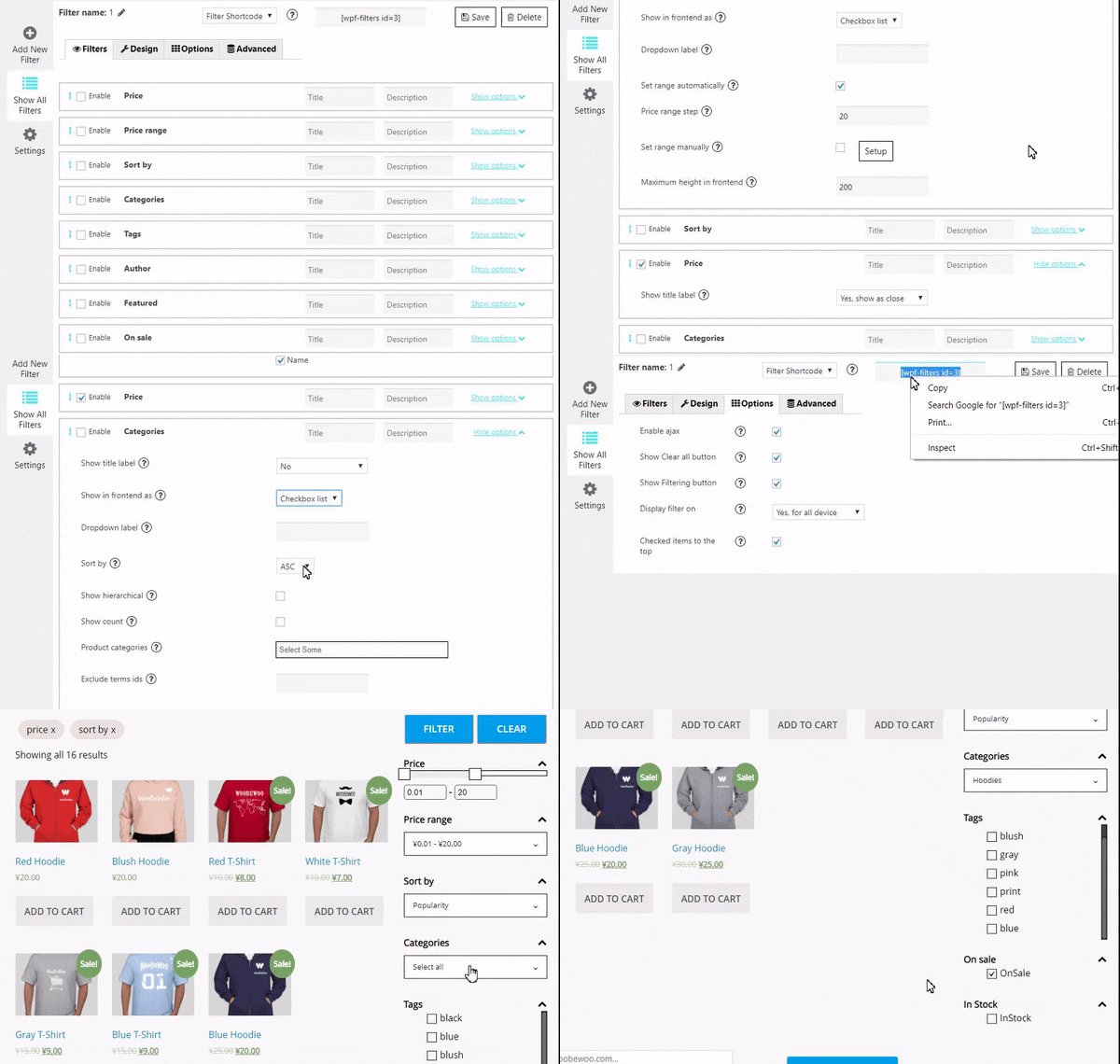
Product filter на странице магазина 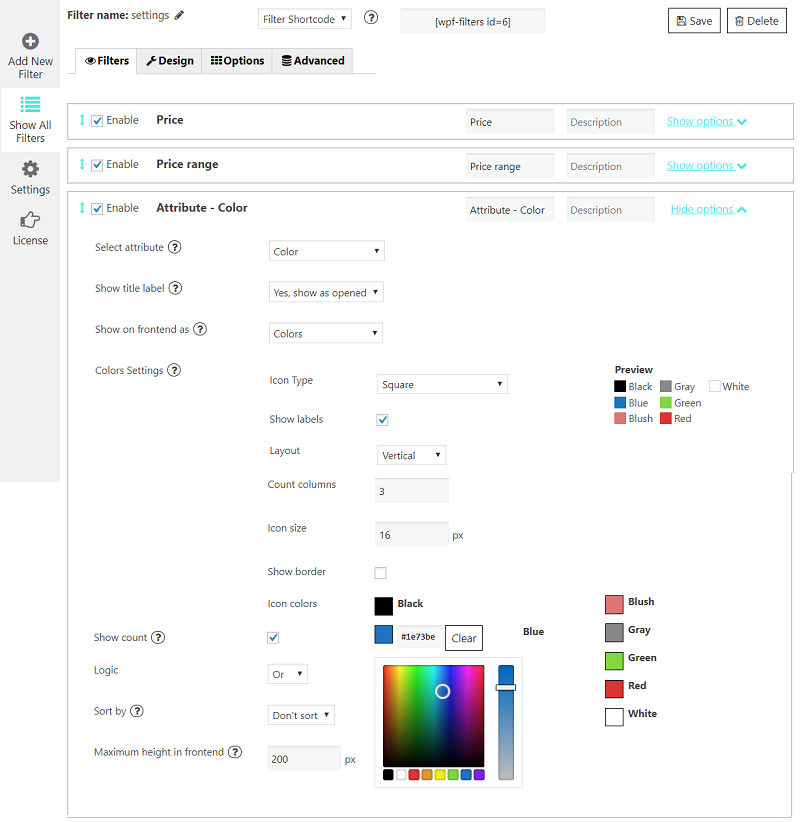
Конструктор фильтров товаров. Цена 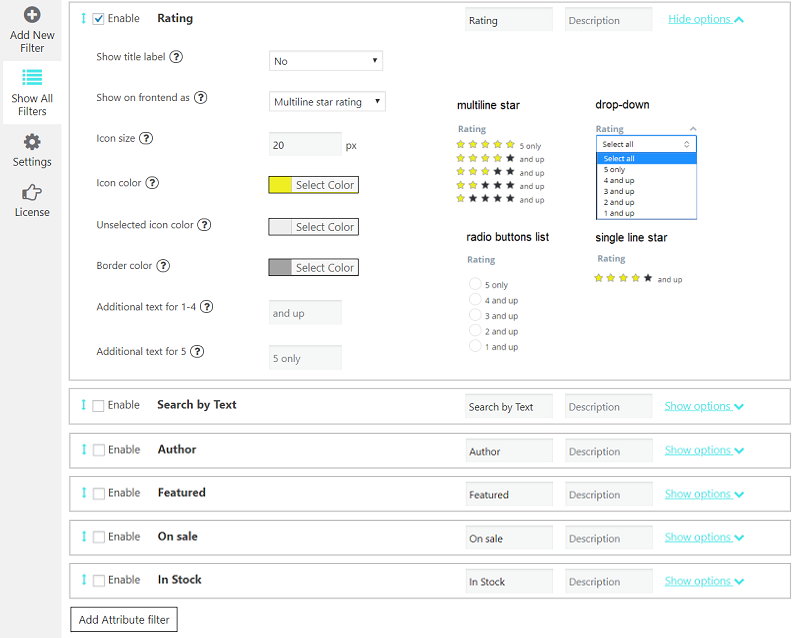
Конструктор фильтров товаров. Атрибут 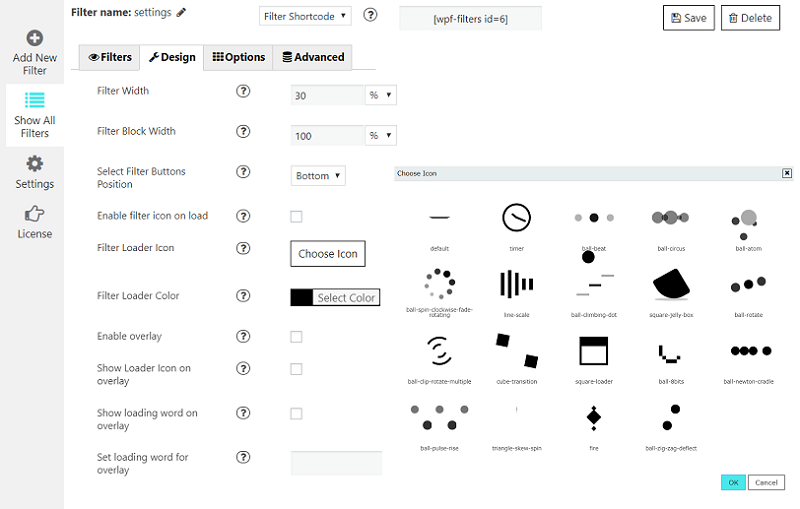
Конструктор фильтров товаров. Рейтинг
Установка
a) VIA FTP
A download zip archive with WooCommerce Product Filter by WBW plugin
Extract files
Copy the folder with the plugin
Open via FTP folder \wp-content\plugins\
Paste plugin folder into here
Go to admin panel => Plugins => WooCommerce Product Filter by WBW press activate
B) ПРЯМАЯ ЗАГРУЗКА ЧЕРЕЗ ОБЛАСТЬ АДМИНИСТРИРОВАНИЯ
Скачать zip-архив с плагином
Перейти в панель администратора => Плагины => Добавить новое
Выберите архив с плагином и загрузите его
Подождите, пока вы не получите уведомление, что установка прошла успешно
Нажмите кнопку Активировать
C) VIA WORDPRESS REPOSITORY
Navigate to admin panel => Plugins => Add new
Type \» WooCommerce Filter Plugin by WBW»\ in the search field
Choose our plugin from the list and click \»Install\»
Wait until you get the notification installation went successfully
Press Activate button
Часто задаваемые вопросы
-
Как создать фильтр продуктов для моего сайта?
-
У нас есть все необходимые опции в одном плагине. Вы можете начать использовать их прямо сейчас, следуя этим инструкциям. Сделать необходимые настройки и добавить плагин фильтра в свой интернет-магазин очень просто.
Чтобы установить и настроить плагин, ознакомьтесь с руководством. Главные настройки -
По каким критериям я могу сортировать
-
Теперь есть возможность сортировать результаты по популярности, рейтингу, новизне, цене от низкой к высокой и наоборот, случайным образом, по названию или по порядку по умолчанию.
-
Какие настройки доступны для каждого фильтра?
-
В зависимости от типа и специфики фильтра можно настроить:
- Фильтр по названию и описанию.
- Способ отображения заголовка фильтра на странице: без заголовка, показывать как закрытый/открытый.
- Тип: список чекбоксов/раскрывающийся список, множественный раскрывающийся список или иконки.
- Выпадающее меню лейбл. Установите плейсхолдер выпадающего меню.
- Показать поиск и многое другое.
-
Как мне добавить фильтр продуктов в магазин?
-
After creating the filter you can add a filer it in 2 ways: with shortcode and PHP code ( you can find them under the settings tab) or add WBW Product Filter widget.
-
Шорткод
Скопируйте шорткод и вставьте его в контент вашего сайта. Плагин Product Filter отобразит созданный вами фильтр на соответствующем посте/странице с использованием настроек, которые вы настроили в этом фильтре. -
Шорткод PHP
Код PHP можно вставить в любое место страницы, чтобы код отображался именно в этом месте, например в шапке или футере страницы. -
Виджеты
Если вы используете фильтр продуктов на боковой панели интернет-магазина, вы также можете воспользоваться виджетом фильтра продуктов.
Чтобы отобразить фильтр продуктов на боковой панели, перейдите в раздел WP Admin > Внешний вид > Виджеты. Разверните раскрывающийся список на боковой панели, затем перетащите виджет «Фильтр». Выберите фильтр, который необходимо отобразить, и сохраните.
-
-
Является ли плагин «Product Filter» responsive?
-
Фильтр продуктов WooCommerce полностью совместим и отзывчив! Плагин работает и отлично отображается на планшетах и телефонах, что позволяет покупателям легко и удобно наслаждаться покупками и совершать покупки на всех устройствах.
-
Зачем мне нужен фильтр продуктов?
-
На стандартном сайте покупателям приходится прокручивать множество страниц и ссылок, чтобы найти товар. Это утомительный и трудоемкий процесс, и именно здесь в игру вступает фильтрация продуктов. Эта функция позволяет пользователям находить свой путь к продукту, настраивая различные характеристики.
Вы можете прочитать о Как заставить фильтрацию работать наилучшим образом
и найти советы Где разместить фильтры, как отобразить фильтры, как представить наиболее подходящие фильтры и не перегружать клиентов. -
Мой WooCommerce Product Filter плагин не работает?
-
Если у вас возникли проблемы с работой плагина или что-то не работает как следует выполните следующие действия:
* Протестируйте плагин с темой WordPress по умолчанию, чтобы убедиться, что ошибка не вызвана используемой вами темой.
* Деактивируйте все используемые вами плагины и проверьте, сохраняется ли проблема.
* Убедитесь, что версия плагина, версия темы и WordPress обновлены, и проблема еще не решена в более позднем обновлении плагина.
Если ни один из этих советов вам не помог, свяжитесь с нами через форму поддержки на нашем сайте и опишите свою проблему. -
WooCommerce Product Filter не доступен на моем языке. Что делать?
-
You may help us translate the plugin into your language and get the PRO version of the plugin for free as soon as it is released. If this method seems to be too complicated, please send us a request and we will let you know as soon as the WBW Filter plugin will be available in your localization.
Отзывы


Участники и разработчики
«Product Filter by WBW» — проект с открытым исходным кодом. В развитие плагина внесли свой вклад следующие участники:
Участники
«Product Filter by WBW» переведён на 8 языков. Благодарим переводчиков за их работу.
Перевести «Product Filter by WBW» на ваш язык.
Заинтересованы в разработке?
Посмотрите код, проверьте SVN репозиторий, или подпишитесь на журнал разработки по RSS.
Журнал изменений
2.5.8
- Added compatibility with pagination from Essential Addons Product Grid
- Fixed shortcode elementor-template
- Minor issues fix
2.5.7
- Added compatibility with Woo-products from PowerPack Pro for Elementor
- Added dropdown to choose the number of products per page
- Added custom orderby
- Minor issues fix
2.5.6
- Readme fix
- Minor issues fix
2.5.5
- Added option Сollapse all when deleting by search for Category filter
- Fixed option Instock always show first
- Fixed compatibility with Fusion Builder
2.5.4
- Added compatibility with Divi Filter Loadmore
- Fixed statistics for Menu mode
- Fixed reseting of button filters
- Minor issues fix
2.5.3
- Fixed overlay for floating filter
- Fixed filter overlay for several filters on page
- Fixed option Check page category
- Fixed indexing for attributes with Emojis in slugs
- Fixed Alphabetical index
2.5.2
- Fixed Alphabetical index for Meta fields
- Fixed default stock status
- Fixed export/import
- Fixed option Checked Items To The Top by Back button
- Fixed option Count products per page
- Added opportunity for force filter refresh
- Added multiple default option for StockStatus Filter
- Add default sorting for custom meta attribute
- Added multiple attributes for Search by Number filter
- Added option Unfolding collapsed by search for Category filter
- Fixed double ajax-filtering
- Minor issues fix
2.5.1
- Added compatibility with Woocommerce blocks for preselected parameters
- Fixed conflict with WooCommerce Google Product Feed plugin
- Added equals logic for SearchNumber filter
- Added flag for Woocommerce Load More Products
- Fixed option Filter synchronization for color-filters
- Added option Сheck category hierarchy for One by One mode
- Added compatibitity with WooCommerce Measurement Price Calculator
- Added compatibitity with Variation Swatches for WooCommerce — Pro
- Fixed preselects for multilanguage sites
- Added search by the list of attributes for the text filter
- Minor issues fix
2.5.0
- Fixed count products recalc for list filters
- Added compatibility with Phone Orders for WooCommerce Plugin
- Fixed Not In logic for attributes
- Added compatibility with Divi Archive Loop
- Added hierarchical options for attributes filter
- Minor issues fix
2.4.9
- Added fix for the ability to filter WBW-tables
- Added formatting for Date Picker type ACF-fields
- Added compatibility with Product Grid by Woo Essential plugin
- Fixed option Show search for attributes
- Fixed attributes labels
2.4.8
- Added translation for Show More/Show Fewer
- Fixed defaults and preselects
- Added compatibility with YayCurrency Plugin
- Fixed FontAwesome for group colors option
- Minor issues fix
2.4.7
- Updated custom order for attributes
- Added filter Search by Number
- Fixed Menu mode
- Added decimal step for Price filter
- Added compatibility with theme Total for option Display variation
- Minor issues fix
2.4.6
- Added updating attribute slider by selected filters
- Minor issues fix
2.4.5
- Fixed CSV Export Problem
- Fixed Divi load more
2.4.4
- Fixed bulk activate by TGM Plugin Activation
- Added compatibility with Avada Builder Woo Product Grid
- Fixed Floating filter button
- Fixed default sorting
- Fixed Reset button & default StockStatus option
2.4.3
- Fixed compatibility with Elementor widget Posts
- Fixed rtl-styles
- Fixed compatibility with Essential Addons Elementor
- Minor issues fix
2.4.2
- Fixed default filters by not empty url parameters
- Fixed compatibility with plugin CoDesigner
- Fixed count products for Always Filtering By All Products
- Fixed char + in uri with search filter
- Fixed Crear button by redirect
- Added option By default сreate filters for all products
- Fixed pagination for Elementor widget woocommerce-products
- Fixed custom order for attributes
- Fixed Force Theme templates for grid/list display mode
- Fixed bulk plugins activate
- Fixed option Form attribute filters by variations
- Minor issues fix
2.4.1
- Increased range for Price Slider
- Fixed products count for compatibility with Essential Addons Elementor
- Added selection of filter blocks by creating a new product filter
- Fixed Clear All button
- Minor issues fix
2.4.0
- Fixed loader style
- Fixed count products for Always Filtering By All Products
- Added compatibility with plugin CoDesigner (Formerly Woolementor)
- Minor issues fix
2.3.9
- Fixed processing many parallel ajax-requests
- Fixed order by price
- Fixed option Display Variations Instead Of Variable Product for shortcodes
- Added compatibility for Divi Plus pagination
- Added hook for default settings
- Fix for multisite
2.3.8
- Fixed autocomplete for several TextSearch fields on page
- Added compatibility with widget Premium Woo Products from Premium Addons for Elementor
- Fixed compatibility with Advanced Woo Search
- Added hook for Dokan
- Fixed default params for Visual Builders products block
- Added the ability to select child attributes in the list of displayed
- Minor issues fix
2.3.7
- Fixed admin area for iphone
- Fixed checkboxes in Firefox
- Fixed filtration for search page
- Added option Hide filter with single item
- Fixed option Close popup after action
2.3.6
- Fixed deprecated functions
2.3.5
- Delete PhpMailer
- Added Perfect brands to autocomplete for Search Filter
- Fixed decimals for Numeric Attributes Slider
- Added translatable strings
- Fix for Elementor
- Added option to prevent redirect when product is missing
- Minor issues fix
2.3.4
- Added compatibility with Royal Addons widget Woo Grid
- Added compatibility for widget Advance Products by Phlox Shop plugin
- Fixed option Don’t Use Shortcode Settings
- Fixed products widget from UX Builder by Flatsome Theme
- Fixed attributes filter for variations
- Added compatibility for Besa Theme
- Minor issues fix
2.3.3
- Added a link to start indexing
- Fixed option Move sidebar to top for mobile for Allston theme
- Fixed Autocomplete search filter
- Added compatibility with Divi Plus
- Added option for disabled reindexing by product stock changes
- Fixed page reseting by filtering
- Fixed styles loading
- Added compatibility with plugin Woocommerce Products Per Page and added option Display on Perfect Brands Page
- Minor issues fix
2.3.2
- Fixed call button in floating mode
- Added compatibility with Qi Addons For Elementor
- Added option for disable loading Fontawesome library
- Fixed bug when temporary tables not allowed in DB
- Hid last license error
- Rebranding
2.3.1
- Small code fix for Safari
- Fixed compatibility with EA Elementor Product Gallery
- Added option for Hide price slider if there are no products with price
- Fixed compatibility with Elementor
- Added compatibility with Flatsome UXBuilder
- Added compatibility with Relevanssi Plugin
- Added compatibility with Perfect Brands in the Search Text Filter
- Declaring compatibility with HPOS
- Minor issues fix
2.3.0
- Minor issues fix
2.2.9
- Fixed Hide Filter Button on mobile
- Added option for form filter attribute blocks by variations
- Fixed filtering on search page
2.2.8
- Added for Hide Filters Button option Show as open if filtered
- Added custom order for ACF-attributes
- Fix for Safari scrollbars
- Minor issues fix
2.2.7
- Fixed option Recount Products By Selected Filter by page reload
- Minor issues fix
2.2.6
- Added compatibility with CURCY plugin
- Minor issues fix
2.2.5
- Added the filtering variations by stock status
- Minor issues fix
2.2.4
- Fix for Woocommerce Loockup table regeneration
- Checking the existence of an ACF-attribute value
- Minor issues fix
2.2.3
- Added Select All for muiliselect in adminarea
- Fixed ACF attributtes
- Fixed brands filter
- Fixed Fusion builder post query
- Fixed expired license msg
- Added Ajax hooks for open/close filter popup
2.2.2
- Fixed categories hierarchy
- FR lang update
- Fixed ACF attributes indexing
- Added optimization for db with many attribute values
- Added all values for ACF-attrites with choices
- Fixed move sidebar to top for mobile
- Added compatibility with Advanced Woo Search
- Replace banner for Reward Points Plugin
- Added sorting by price for WooCommerce Price Based on Country Plugin
- Fixed counters by Display variations
- Fixed order by for page>1
- Added option Always Filtering By All Products for shortcodes
- Minor issues fix
2.2.1
- Fixed color group
- Added option for disable clearing cache
- Fixed floating mode
- Fixed display variations
- Added fusion-builder Woo Products Grid support
- Added compatibility with FiboSearch
- Added Index tables optimization
- Fix for MySQL variable sql_require_primary_key
- Fixed sorting for product shortcode
- Fixed scroll for Floating mode
- Minor issues fix
2.2.0
- Added Overview
- Added Single select for Colors
- Fixed hide empty block
- Minor issues fix
2.1.9
- Added compatibility with WooCommerce Price Based on Country Plugin
- Added dynamic loading of color groups
- Fix color group && encode get meta value
- Minor issues fix
2.1.8
- Added hook usage for «woodmart» theme
- Added clear & reset onebyone
- Added key ‘type’ in args
- Added Floating mode customization
- Fixed custom css loading && ‘change’ event initialization
- Fixed get meta value
- Plugin ‘woolementor’ integration added
- Fixed elementor widget
- Added scroll top for option ‘Checked Items To The Top’
- Added alternative update server
- Minor issues fix
2.1.7
- Fixed indexing and displaying 0 value
- Fixed indexing acf fields
- Fixed buttons filter && autoscroll
- Fixed OR logic
- Added Statistics
- Added loader icon on filter during automatic filter update
- Fixed register elementor widget && init session
- Removed deprecated jquery functions
- Added check isset data for sortby filter
- Minor issues fix
2.1.6
- Fixed get post per page
- Fixed init session && escape name table
- Added session_write_close for ajax request
- Fixed color group
- Fixed hiding loader until filter is fully loaded
- Fixed filtration for Post Archive widget
- Fixed Sorting Oldest first
- Added check for non-empty clauses
- Minor issues fix
2.1.5
- Fixed ion range slider cannot display value greater than 2000000
- Fixed taxonomy detection
- Added option ‘not display the result type’
- Added option ‘hide parents of all levels’
- Added correct counting of attributes with OR logic
- Added option ‘Disable Instead Of Hiding Following’
- Fixed return of category id during ajax request
- Fixed add custom tax query
- Fixed option ‘Don’t Use Shortcode Settings’
- Fixed error when creating a new filter
- Fixed display widget
- Added synchronization of multiple filters
- Added OR logic when calculating counters
- Fixed phpcs requirements
- Fixed custom attributes sql
- Floating filter mode added
- Fixed display of hierarchy icons
- Fixed added OR logic when calculating counters
- Fixed slider output with OR logic
- Added sorting by SKU
- Added option «Display Only Children Of Current Category»
- German Show more title fix
- Added Order Oldest first
- Fixed multi logic
- Added reset counters
- Minor issues fix
2.1.4
- Fixed making changes to the request plugin «YITH WooCommerce Ajax Product Filter Premium»
- Added option Sort In stock first
- Fixed activation license using the second site
- Fixed bug in sql query
- Added option Exclude variations on backorder
- Added property ‘acf_prefix’ existence check
2.1.3
- Fixed forceProductFilter
- Fixed detection if filter is selected
- Added option «Hide current page category»
- Fixed price order for compatibility with Discount Rules and Dynamic Pricing plugin
- Set enabled by default for Filtering By Variations Attributes for new installs
- Fixed forced query for elementor
2.1.2
- Added support for product_id when defining photo for displaying variation
- Fixed filter change event handler
- Added check woocommerce option «woocommerce_hide_out_of_stock_items»
- Fixed work group color
2.1.1
- Fixed WCAG + text filter type
- Added hide expired license notification
- Fixed undefined variable: metaKeyId
- Fixed css & notice
- Added integration with «divi cart pro» theme
- Added remove woocommerce default hooks
- Fixed forceProductFilter
- Added option «display variation image»
- Fixed SearchText Filter
- Added compatibility with DynamicPostsBase
- Fixed reload
- Fixed filtering before button click
- Changed prefix from filter_ to wpf_filter
- Added wpf_ prefix for max_price and min_price
- Fixed scrolling on page load
- Added forced query replacement if elementor-pro plugin is active
- Minor issues fix
2.1.0
- Fixed preselects
- Fixed attributes slider
- Add class
needsclickto multiselect - Fixed get count terms && resolve acf label
- Fixed filtering when using ‘Dynamic.ooo — Dynamic Content for Elementor’ plugin
- Minor issues fix
2.0.9
- Fixed Elementor styles
- Added option ‘show all slider attributes’
- Added optiona to show widget on all site pages
- Fixed adding js variable
- Fixed meta attributes slider after Clear
- Added option «Do not remove products on loading»
- Minor issues fix
2.0.8
- Fixed default Price filter for rtl
- Added variation links and fixed variation image
- Minor issues fix
2.0.7
- Added use shortcode attributes Divi theme
- Added settings to attribute color
- Fixed event search filter
- Add thousend separator to price not-default slider
- Added filter import/export
- Fixed post_status when requesting via ajax
- Add support plugin WooCommerce Products Per Page
- Fixed posts_per_page value when using shortcodes
- Optimized JS and CSS loading
- Moved «wcag» option to the free version
- Added compatibility with UAEL Woo–Products widget and EAEL Groduct grid widget
- Added compatibility with Elementor Pack Pro WC Products widget
- Add option «open filters one by one» for step by step filer
- Fixed default sorting date
- Fixed Show more with Checked to the top
- Add option «display products with the status private»
- Fixed variations instead of parent
- Added «Menu mode» for category filter
- Improved WPML compatibility
- Minor issues fix
2.0.6
- Fixed option Unfolding children
- Added style options for the selected item
- Fixed bug when using «apply parameters from the address bar» option
- Added «default id» options for views mul_dropdown, buttons, text
- Fixed price maxvalue && restore query
- Fixed selection filter parameters
- Added bold for selected items
- Added custom line-height style for blocks
- Added custom styling for Hide Button
- Added tooltip to «Floating button on mobile» checkbox
- Minor code fixes
2.0.5
- Fixed search in multy-dropdowm
- Optimized option Include children for category
- Fixed option «apply parameters from the address bar …»
- Minor code fixes
2.0.4
- Fixed table optimization after dropping indexes
- Fixed two category filters on one page
- Added integration infinite_scroll with
flatsometheme - Fixed search filter
- Added option Run in background for recalc indexing
- Fixed tax for Price filter
- Fixed vertical columns
- Added option ‘unfolding all nesting levels’ && collapse other radioboxes
- Fixed group colors for variations
- Removed post_status on ajax request
- Fixed replacement of filter parameters with «elementor pro» plugin
- Minor code fixes
2.0.3
- Meta-indexing optimization for DB with many variable products and many attributes
- Added advertising of the pro version to the free version
- Fixed adding an event handler to the filter button
- Fixed bug with multiple blocks in force template
- Fixed query if active plugins essential-addons-for-elementor-lite
2.0.2
- Fixed brand select
- Fixed db update
- Add show currency in slider
- Added option ‘display only selected filter items’
- Fixed rounding after currency conversion
- Replaced themify builder action
- Added support for woocommerce block ‘products by category’
- Added option in search filter ‘disable auto filtering when focus out’
- Added option ‘start indexing on a schedule’
- Fixed selection default value in the stock filter
- Added internal FontAwesome
- Plugin rename
- Minor code fixes
2.0.1
- Added fusion-builder plugin support
- Fixed display of child filter items
- Fixed checked items of attribute filter not in latin
- Added new display mode «Brand Page»
- Fixed recalc meta tables after import and added option for disable auto recalculation
- Fixed ajax pagination
- Added ignoring of anchors in the link
- Fixed update after deactivation
- Added hook handling ‘woocommerce_product_get_image’
- Fixed return meta_query
- Added Default for Sort Filter
- Fixed color group
- Added last check license errors
- Fixed output with empty parent categories
- Fixed installer
- Added fix for plugin: WooCommerce Load More Products
- Fixed load product grid
- Fixed Acf-select (single)
- Fixed condition for adding clausses
- Added sorting after filter cleaning
- Fixed indents controller.php
- Minor code fixes
2.0.0
- Performance optimizations
- Added index products button in plugin settings
- Fixed use of «hide_without_price» option
- Fixed vendor detection
- Added option «Checkbox list (multiple select)» and «Layout» in Product Brands
- Fixed meta data filter
- Optimized DB speed
- Fixed output of 1 product in force_theme_templates mode
- Fixed filtering by variations
- Fixed admin message
- Fixed acf attributes
- Fixed if multidimensional array in address bar
- Fixed slug cleaning
- Added for search by variation option Not IN
- Fixed url formation when using acf
- Fixed color group with variations, etc
- Added option to recalculate filters when force theme template is enabled
- Fixed meta sliders
- Fixed loop when using search filter
- Fixed plugin list notification
- Added option «Generate HTML based on WCAG standards»
- Fixed untranslatable links «Show more» and «Show fewer» for German language
- Fixed use filter when «divi-bodyshop-woocommerce» plugin is enabled
- Added multiselect brand selection
1.5.8
- Fixed local attribute
- Fixed search by SKU in admin panel
- Fix for «search everything» plugin error
- Fixed checking shortcode class
- Added additional processing shortcodes if using the Divi theme
- Fixed behavior when the «auto_update_filter» option is selected & assigning post_per_page
- Added «Use custom tags» option in Product Brands
1.5.7
- Add clean cache wp-rocket on save filter
- Fixed elementor widget
- Fixed wpfslug
- Added border color for checked checkbox
- Added support plugin dokan vendors
- Fixed Check page category
- Fixed price slider with multiple currencies
- Fixed behavior of redirect_only_click and auto_update_filter options
- Fixed price range with multiple currencies
- Fixed price and tax with multiple currencies
- Fixed select local attribute sql
1.5.6
- Added support for the «sale_products» shortcode and the «on_sale» attribute
- Fix attributes filtering by variations
- Fixed action when changing filter for redirect
- Added trimming of the last # sign in the address bar for popups
- Fixed view dropdown
- Added a redirect condition to the browser history was not written
- Minor code fixes
1.5.5
- CSS Fix for Categories and Brand filters
1.5.4
- Added stylized dropdown in pro
- Added option «Display on pages apply for shortcode»
- Fixed js error for wpf-products shortcode when there is no filter on the page
1.5.3
- Add automatically collapses the parent if all child categories collapse
- Added custom css loading condition
- Added do_not_use_shortcode option
- French lang update
- Added option not_found_products_message
- Fixed filter attributes
- Added search for the number of found products outside the selected block
- Added option auto_update_filter
- Added «show more» for color mode for attributes
- Fixed display shortcode filter
- Fixed clear button on top
- Find the filter shortcode in the text widget
- Fixed display of the widget in blocks
- Added litespeed cache is clear on filter save
- Add localization js
- Minor code fixes
1.5.2
- Added filter sync with product shortcode
- Fix search
- Fixed Back button
- Fix stock_status
- Add hook isFiltered
- Fixed priceTax
- Added check for class in shortcode
- Fixed sql 5.7
1.5.1
- Fixed Clear block
- Fixed search results by variations of a product
- Fixed external pagination if enabled «Force theme templates»
- Add group color attribute
- Fixed search sku
- Fixed added indexes to attributes
- Fixed behavior defaults when sorting WooCommerce
- Fixed display subcategories
- Fixed view of titles for different devices
- Fixed display filter on search page
- Display Author name by Username (store name)
- Added setting hide_without_price
- Moved the option Filter by variations to the free version
- Added compatibility of product shortcode and filter shortcode
- Added check for product type
- Minor code fixes
1.5.0
- Fixed ajax
- Minor code fixes
1.4.9
- Fix selection of variations after ajax filtering
- Switcher + Filter integration fix
- Fix product variation filter attributes
- Check enable mbstring
- Fix filter attributes & custom meta field
- Fix search by text
- Fix title block
- Fix format code
- Added indexes to attributes
- Fixed images not loading after filter action
- Added specific pagination formation for theme Themify Ultra
- Fix search
- Fixed condition for adding post_type
- Fixed filter selection by default together with WooCommerce sorting
- Minor code fixes
1.4.8
- Fix reload the page on click back button of the browser
- Added Collapse children on parent deselect in category filter
- Added hook addFilterExistsItemsArgs and params for js-hook wpfAjaxStart
- Fix slider price issue
- Fix checkbox color
- Fix error WP_Scripts::localize
- Fix dropdown display
- Fix force numeric values bug
- Fix for php 8
- Keep open checked filters
- Add slider disable number formatting
- Minor code fixes
1.4.7
- Fixed defaults for Stock Status Filter
- SQL optimization for large databases
- Fix for Elementor tabs
1.4.6
- Reload the page on click back button of the browser fix
- SQL optimization for large databases
- Added the ability to replace category ids with slugs in the Url
- Calculate with the price with tax
- Fix slider attributes
- Remove notice undefined property
- Fixed pagination
- Fix prixe range
- Minor code fixes
1.4.5
- Add Search for variable products by meta fields
- Add frontend type slider
- Fixed Show more
- Add check get parameter for filter items
- Fix for hidden product blocks
- Fix compatibility with Divi theme
- Fix filters creating empty space in widget area
- Fix rating and product variation accounting in address bar parameters
- Fix meta fields
- Ajax fields loading + search button
- Fix tooltip for option ‘Move Sidebar To Top For Mobile’
- Added search shortcode inside the container
- Add use meta-fields search by text
- Fixed Attributes Color Filter
- Fixed preselects
- Fixed autocomplete for search field
- Fixed slider styles
- Fixed dropdown filters for Safari
- Added label Clear All for selected parameters
- Add Connection between WooFilter and a brands page
- Add option single select for multiselect dropdown
- Added Integration with AJAX Search for WooCommerce
- Category filter that the children will be less distant from the parent
- Added finding the closest value in the slider
1.4.4
- Fix for 833 line notice
- Minor code fixes
1.4.3
- Added an option to use the selected filter value for other filters
- Old Pro error fix
- Minor code fixes
1.4.2
- Fix shortcode overlapping arguments filters orderby
- Added compatibility with Currency Switcher for WooCommerce
- Fix price range does not take selected product category
- Fixed Attribute slider
- Fix for filtering by variations
- Add sort options ‘title A to Z’ and ‘title Z to A’
- Fix new type filter custom meta field
- Added option Check page category
- Fix for theme ajax-loading
- If the oxygen plugin is activated then check if the javascript is already registered
- Fixed counter for custom taxonomy and custom meta
- Autoclosing on mobile fix
- Replaced .size () with .length
- Fixed count calculation for custom/meta attributes and categories without children
- Fixed orderby for shortcodes and Force theme templates
- Fix dosenot conculed children categories
- Add custom title for selected, featured
- Added compatibility with Infinite scroll
- Added DE translation
1.4.1
- Fixed SortBy Filter
- Fix for OceanWP theme
- Fix mobile move sidebar for Jevelin Theme
- Fix for filtering and display variations
- Added compatible with Qty Increment Buttons for WooCommerce
- Fix for FontAwesome5 SVG
- Fixed ajax filtering for search page
- Fixed Elementor Widget Assets Loading
- Fix Mobile Move to top for Betheme
- Add new type filter custom meta field
- Fix Mobile Move to top for Rife
- Add change Color of the selected filter item
- Added option Force Theme templates
- Font Awesome SVG API
- Added auto Unfolding children
- Added hide empty terms for active filters
- Fixed Table List
1.4.0
- Added custom icon categories
- Fix range price truncate text issue
- Added sort as numbers
- Added space after the product category before count
- Added select default id for dropdown
- Fix ajax filtering issue with dynamically changeable classes in product loop wrapper
- Fixed Firefox bug
- Fix attribute slider type filter encoding issue and filter items order issue
- Added homepage / product pages redirect
- Added product block class selector
- Added Collapse level chooser
- Clone fix
- Fixed ajax sorting
- Fixed WCFM conflict
- Fix for on page resize filter adaptation
- Fixed autoscroll to products
- Sort by radio buttons mode added
- Fix compatible with Theme Astra
1.3.9
- Add input fields to attribute slider
- Fix slider filter attribute type issue with multiple slides
- Fix attribute filter logic issue
- Added option Filtering of categories list
- Fixes for admin view
- Fix filter attribute slider type number of filtering options issue
- Added option Force show only current filter on page
- Fixes for price filter with outofstock WooCommerce option
- Fixes for two products block in elementor
- Fixes for Text max_height
- Add autocomplete for Searching by Text filter to category, tags and attribute options
- Fixes for filter by variations option
- Added Reset all filters option
- Small fixes for ajax filtration
- Fixes for filters by attributes
- Fixed the text of tooltips
- Moved links in tooltips outside of translatable strings
- Fix fatal error with php SimpleXML extension disabled
- Fix show/hide individual filter items issue with user filter type
- Add multi dropdown type optionality to auto filter
- Fix pagination issue with «Search by Text» filter type
1.3.8
- Minor code fixes
- Fix for star rating
1.3.7
- Fixes for custom taxonomies filter
- Fix shortcode filtering with attribute results issue
- Fix white-space FHD screen price slider issue
- Add icon position optionality for a filters title
- Fixes for admin view
- Add increase clickable area optionality for a filter title
- Fixes for undefined const in pro
- Fixes for const
- Fixes for elementor filters view
- Small fixes for price inputs
- Fixes for divi shop module
- Added Display on Specific category option value
- Small changes for license activation
- Minor code fixes
1.3.6
- Fix default attribute slider hidden inputs
- Fixes for storefront zoom
- Fixes for colors filter
- Fixes for filter search with Divi shortcode in pro
- Add bicolor optionality to attribute color filter type
- Fix settings saving checkbox type
- Fixes for ie11
- Small fixes for the pro updater
- Code formatting fixes
- Code fixes for filtering exists terms
- Fix pagination issue with query-based permalink type
- Fix wordpress.com base site console errors
- Minor code fixes
1.3.5
- Fixes for WC vendors page filtering
- Added search for multiple dropdown type
- Fix filter display issue on an attribute and custom taxonomies WooCommerce pages
- Fixes for attr slider
- Added price min/max options in PRO
- Added floating btn options
- Add radio button filter type to attribute filter
- Add search by product SKU filter functionality
- Fixes for category ajax filtering
- Fixes for Mozilla price inputs
- Fixes js notice for WP 5.5
- Fix zero price filtering issue with ‘Sort By’ filter
- Fixed price decimal points
- Added animation for custom loading icons
- Added close/open icon selection option
- Add filter only child/parent functionality for a hierarchical filter types
- Fix tooltip error
- Added hook for Hiding filters button
- Fixes for Elementor
- Fixes for attr product count
- Added external selected parameters shortcode
- Added options filter by variation attributes
- Added display variation instead of product
- Assets — add gif deleted scro1l
- Added multi dropdown view for category filter in pro
- Fix numeric slider attribute reset to 1 collision issue
- Fixes for autocompleting search
- Fixes for wpf_order
- Add radio button behavior to button type filter optionality
- Added use exact values option for rating
- Add clear and float style CSS optionality to filter buttons
- Added exact option for a star rating
- Fixes for categories …