
Описание
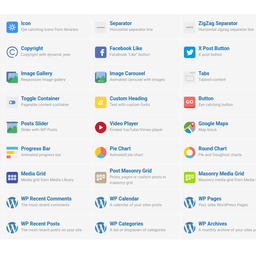
This WordPress plugin adds a module to WPBakery Page Builder plugin, bringing back the old school style of editor elements icons that WPBakery used in versions prior to 8.0.
If, like me, you fall in love with interfaces you’ve used for decades, then this plugin can be useful for you if you don’t feel comfortable with the new ‘Add Element’ popup icons in WPBakery Page Builder introduced after version 8.0.
After installing the plugin, you can enjoy the old icon style again in both the backend and frontend WPBakery Page Builder editors. You can always switch it on or off in the Module interface on the WPBakery Page Builder settings page.
Source file code you can find on our GitHub plugin page
Скриншоты


Установка
- Upload the plugin folder to the ‘/wp-content/plugins/’ directory.
- Activate the plugin through the ‘Plugins’ menu in WordPress admin dashboard.
Отзывы

Участники и разработчики
«Add Old School Elements Icons Module for WPBakery Page Builder» — проект с открытым исходным кодом. В развитие плагина внесли свой вклад следующие участники:
Участники
Перевести «Add Old School Elements Icons Module for WPBakery Page Builder» на ваш язык.
Заинтересованы в разработке?
Посмотрите код, проверьте SVN репозиторий, или подпишитесь на журнал разработки по RSS.
Журнал изменений
1.0
- Initial release.