Описание
Referral traffic from AI assistants is hard to measure: apps and many browsers send no referrer, so it lands in «direct». Hand-checking AI answers is noisy too, because the same question gets different sources on different days.
Every AI assistant still has to fetch your pages from your server. RowanWeb Bot Traffic records those requests and sorts them by what the bot is doing, so you can track your visibility in AI answers (GEO) from data your site already has.
Bots sorted by intent
Bots are grouped by why they visit, not just by name:
- Citation — an AI assistant reads the page right now to answer a person: ChatGPT-User, Claude-User, Perplexity-User, MistralAI-User, DuckAssistBot and others. This is the closest server-side signal of your site being shown to people in AI answers.
- AI search indexing — the page is added to an AI search index for future answers: OAI-SearchBot, Claude-SearchBot, PerplexityBot, YandexAdditional and others.
- Model training — content collected for training: GPTBot, ClaudeBot, CCBot, Bytespider, meta-externalagent and others.
- Classic search — Googlebot, Bingbot, YandexBot and others, for comparison.
The bundled list covers about 60 bots and was checked against the operators’ own documentation wherever it exists. ChatGPT agent, which uses a regular browser user agent, is recognized by its signature header.
What you see on the dashboard
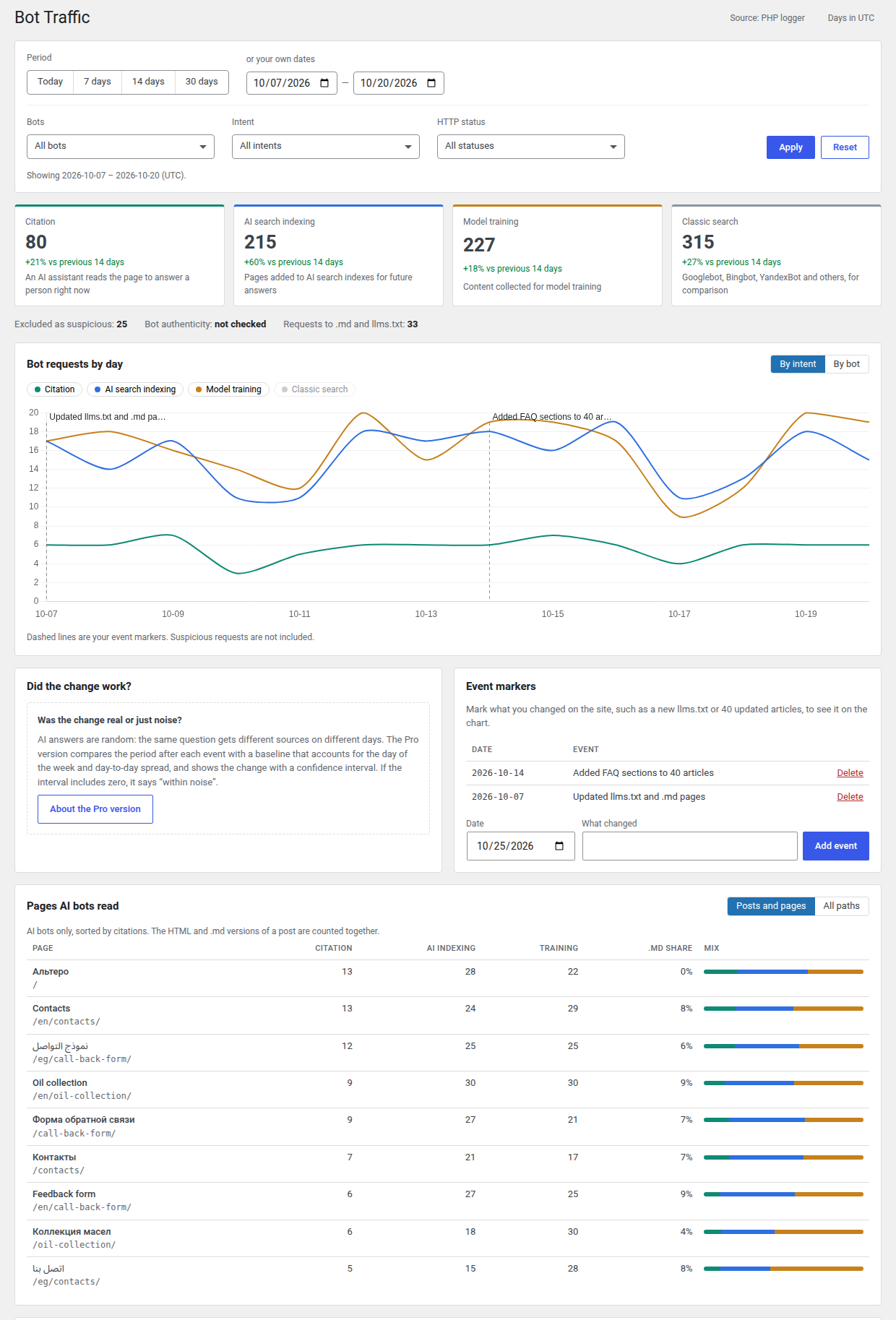
- Requests by intent with the change against the previous period.
- Filters for the whole dashboard: today, 7, 14, 30, 60 or 90 days (as far as your retention setting allows) or your own dates, plus bots, intents and HTTP status codes. The CSV export follows the same filters.
- A daily chart by intent or by bot, with your own event markers («updated llms.txt», «rewrote 40 articles»), so you can see what happened after a change.
- The pages AI bots read, with citations, indexing and training per page. The HTML and
.mdversions of the same post are counted together. You can also switch to raw paths to see requests forrobots.txt,llms.txtand feeds. - Requests by post type and category, and by HTTP status code.
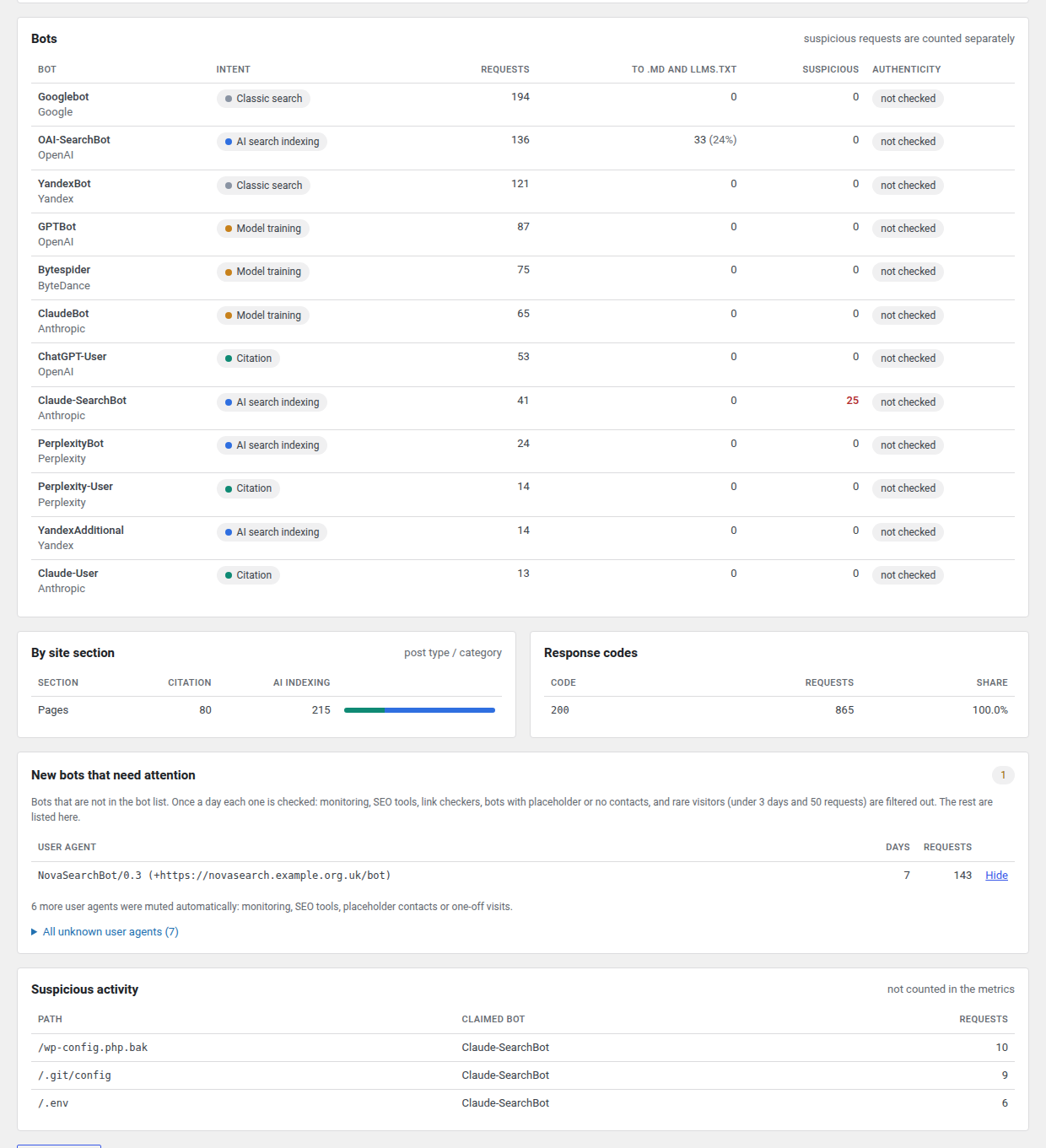
- The most active bots with their intent, requests for
.mdfiles andllms.txt, and suspicious requests per bot. - New bots that need a look. Unknown user agents are reviewed automatically once a day: uptime monitors, SEO tools, link previews, placeholder contacts and one-off visits are filtered out, so a new AI crawler is not lost among them. You can hide a bot you are not interested in, and an admin notice tells you when a new bot keeps coming back.
- Suspicious activity: requests for
/.env,/.git/config, backup files and debug endpoints sent under AI bot names. They are kept out of the numbers above.
Privacy
The plugin records only requests whose user agent looks like a bot. Visitors are never recorded, and IP addresses are stored only for bot requests. Query strings are dropped, so tracking parameters and tokens in URLs are not saved. Detailed data is kept for 90 days by default; you can choose from 30 days to a year in the settings. Everything is removed when you delete the plugin.
Sites behind Cloudflare or a proxy
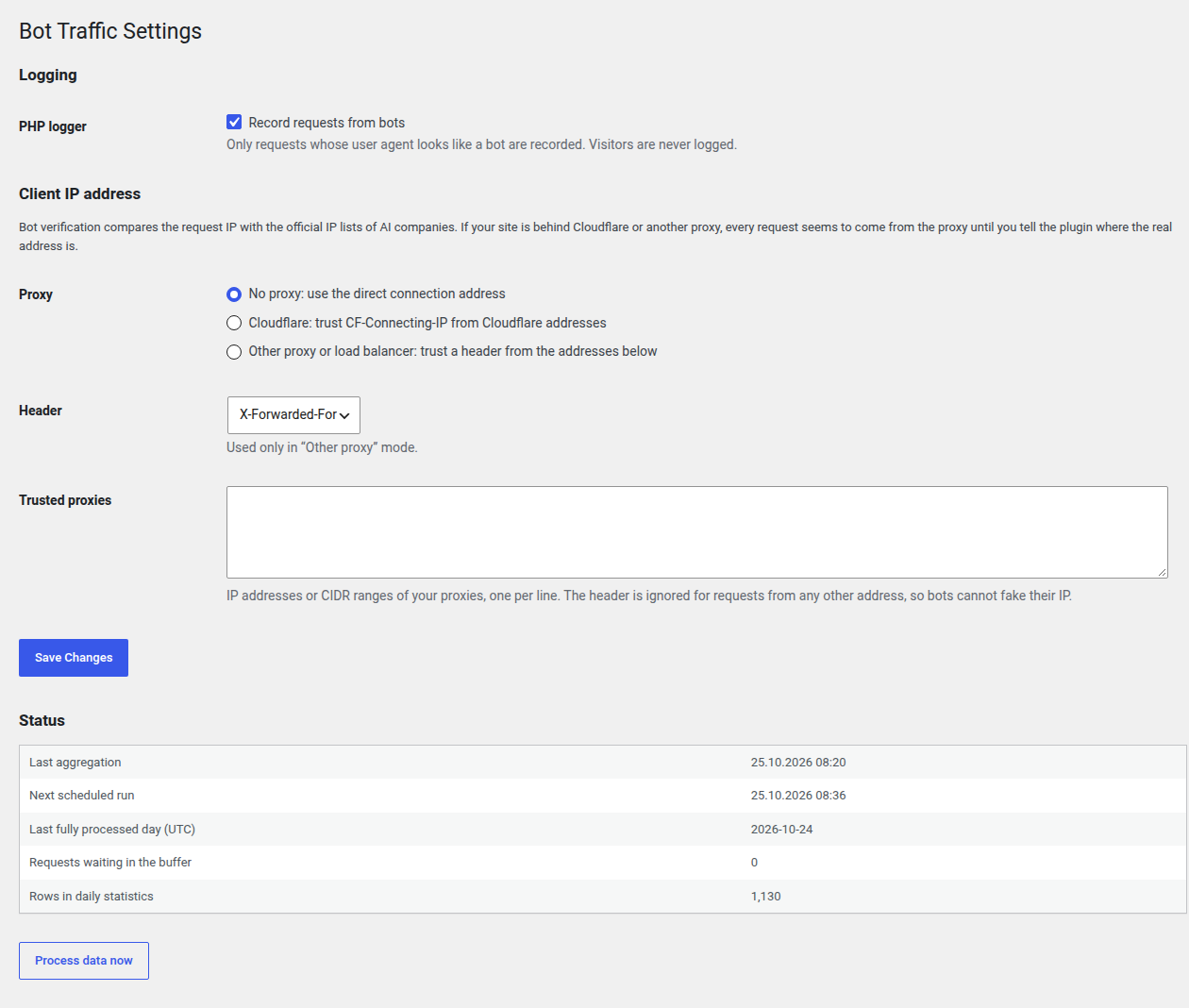
If the site is behind Cloudflare or another proxy, set this up in Bot Traffic Settings Client IP address. Forwarded headers are trusted only from Cloudflare addresses, from a Cloudflare Tunnel running on the same server, or from the proxy addresses you list, so a bot cannot fake its IP.
Pro version
RowanWeb Bot Traffic Pro is a separate, paid version. Everything described above works fully in this free plugin. Pro adds:
- Cloudflare as a data source — counts bot visits served from the Cloudflare cache, which never reach PHP.
- Bot verification — checks each request against the official IP lists published by OpenAI, Anthropic, Perplexity, Google, Apple, Microsoft and others, or by reverse DNS, and keeps spoofed bots out of the numbers.
- Noise-aware event effect — compares the period after an event with a baseline that accounts for the day of the week and day-to-day spread, and shows the change with a confidence interval or says «within noise».
External services
Freemius (optional opt-in, licensing and updates of the Pro version)
The plugin includes the Freemius SDK, which handles the separate Pro version’s licensing and updates. In this free version, Freemius only shows an optional opt-in screen after activation.
- When: only if you choose to opt in (or activate a Pro license).
- What is sent: your site URL, WordPress and PHP versions, plugin version, site language, and the admin’s name and email address, plus plugin activation, deactivation and uninstall events. If you skip the opt-in, nothing is sent.
- Freemius Terms of Service, Privacy Policy and details on what is collected.
Cloudflare Analytics API (Pro version only, optional)
If you connect Cloudflare in the Pro version, the plugin requests bot traffic for your zone from the Cloudflare GraphQL Analytics API (api.cloudflare.com).
- When: once an hour by WP-Cron, only after you enter a Zone ID and an API token in the settings. The free version never contacts Cloudflare.
- What is sent: your zone ID, your API token (as authorization) and the time window. Cloudflare returns the user agent, IP address, host, path, status and response size of bot requests to your own site.
- Cloudflare Terms of Use and Privacy Policy.
Official bot IP lists (Pro version only)
The free version makes no requests to these services. The Pro version verifies bots and, for that, downloads once a week the IP lists that bot operators publish: openai.com, claude.com (Anthropic), developers.google.com, bing.com, search.developer.apple.com, perplexity.com, duckduckgo.com, mistral.ai and index.commoncrawl.org.
- When: once a week by WP-Cron.
- What is sent: a plain download request, nothing from your site.
- Bots that are checked by reverse DNS (Yandex, Baidu, Petal and as a fallback Google and Bing) are looked up through your server’s own DNS resolver.
Third-party libraries
- Chart.js 4.6.1, MIT License — the daily chart on the dashboard. Bundled locally in
lib/chart.js/, nothing is loaded from a CDN. Source: https://github.com/chartjs/Chart.js
Support
Questions, bug reports or feature requests: the plugin’s support forum on WordPress.org, or https://rowan-web.ru/en/
Скриншоты
Установка
- Upload the
rowanweb-bot-trafficfolder to/wp-content/plugins/, or install the ZIP via Plugins Add New Upload. - Activate the plugin.
- If the site is behind Cloudflare or another proxy, open Bot Traffic Settings and choose the matching option under Client IP address.
- Open Bot Traffic Dashboard. Bot requests are processed every hour, so the first numbers appear within an hour of the first bot visit.
Часто задаваемые вопросы
-
Why are the numbers lower than in my Cloudflare dashboard?
-
The free plugin sees requests that reach WordPress. Pages served from a page cache plugin or from a CDN cache never reach PHP, so those bot visits are not counted. The dashboard warns you when a page cache is active. The Pro version can add Cloudflare as a second data source to cover cached traffic.
-
Does the plugin slow down my site?
-
For each request the plugin only checks the user agent. A bot request adds one small database insert at the end of the request. All counting runs in the background once an hour.
-
Does the plugin block bots or change robots.txt?
-
No. It only records and reports. To control which bots may crawl the site, use robots.txt or your firewall.
-
Why does a bot show «not checked» in the Authenticity column?
-
Anyone can send a request with the user agent of a well-known bot. The free version shows what the bots claim to be. The Pro version checks their IP addresses against the official lists and flags spoofed requests.
-
What does «Days in UTC» mean?
-
Days on the dashboard start at midnight UTC, the same as Cloudflare and most bot operators, so the numbers can be compared with other tools.
-
Does the plugin send my data anywhere?
-
No. Bot data stays in your database. The only external service is the optional Freemius opt-in described below.
Отзывы
Нет отзывов об этом плагине.
Участники и разработчики
«RowanWeb Bot Traffic – AI Crawler & GEO Analytics» — проект с открытым исходным кодом. В развитие плагина внесли свой вклад следующие участники:
Участники
Перевести «RowanWeb Bot Traffic – AI Crawler & GEO Analytics» на ваш язык.
Заинтересованы в разработке?
Посмотрите код, проверьте SVN репозиторий, или подпишитесь на журнал разработки по RSS.
Журнал изменений
0.1.5
- How long detailed data is kept is now a setting: 30, 60, 90, 180 or 365 days (90 by default). The dashboard offers the periods that fit.
- All database queries are built with prepared statements.
0.1.4
- Chart.js updated to 4.6.1.
- The free version shows no authenticity column; .md columns are hidden when a period has no requests to .md or llms.txt.
- CSV export: intents are written as on the dashboard (citation, ai_indexing, training, classic_search); response size is empty for the PHP logger, which cannot measure it.
- Bravebot added to the bot list.
- Pro: Claude-User requests from outside Anthropic’s IP list are no longer marked as spoofed: Claude Code and Claude Desktop fetch pages from the user’s own computer.
0.1.3
- Pro: Cloudflare as a data source. It also sees pages served from the Cloudflare cache and from page cache plugins. Bots verified by Cloudflare count as verified.
- A data source that fails (network, token) no longer overwrites the day with zeros; the error is shown in the settings.
- The dashboard shows one data source at a time, with a switch when there are several.
0.1.2
- Pro: fixed bot verification for requests recorded by the PHP logger (the IP was not read, so they stayed «not checked»).
- Pro: event effect with a day-of-week adjusted baseline and a 95% confidence interval, or «within noise».
0.1.1
- Cloudflare mode now also works with Cloudflare Tunnel, where requests reach the site from the local cloudflared process.
- Pro: bot verification by the operators’ official IP lists and reverse DNS. Spoofed bots are kept out of the numbers.
0.1.0
- First release: PHP logger for bot requests, about 60 bots sorted by intent, hourly processing, automatic review of unknown bots, suspicious activity filter, dashboard with filters and event markers, CSV export, trusted proxy settings.