

Описание
Website: digiter.org | Full version / Shop
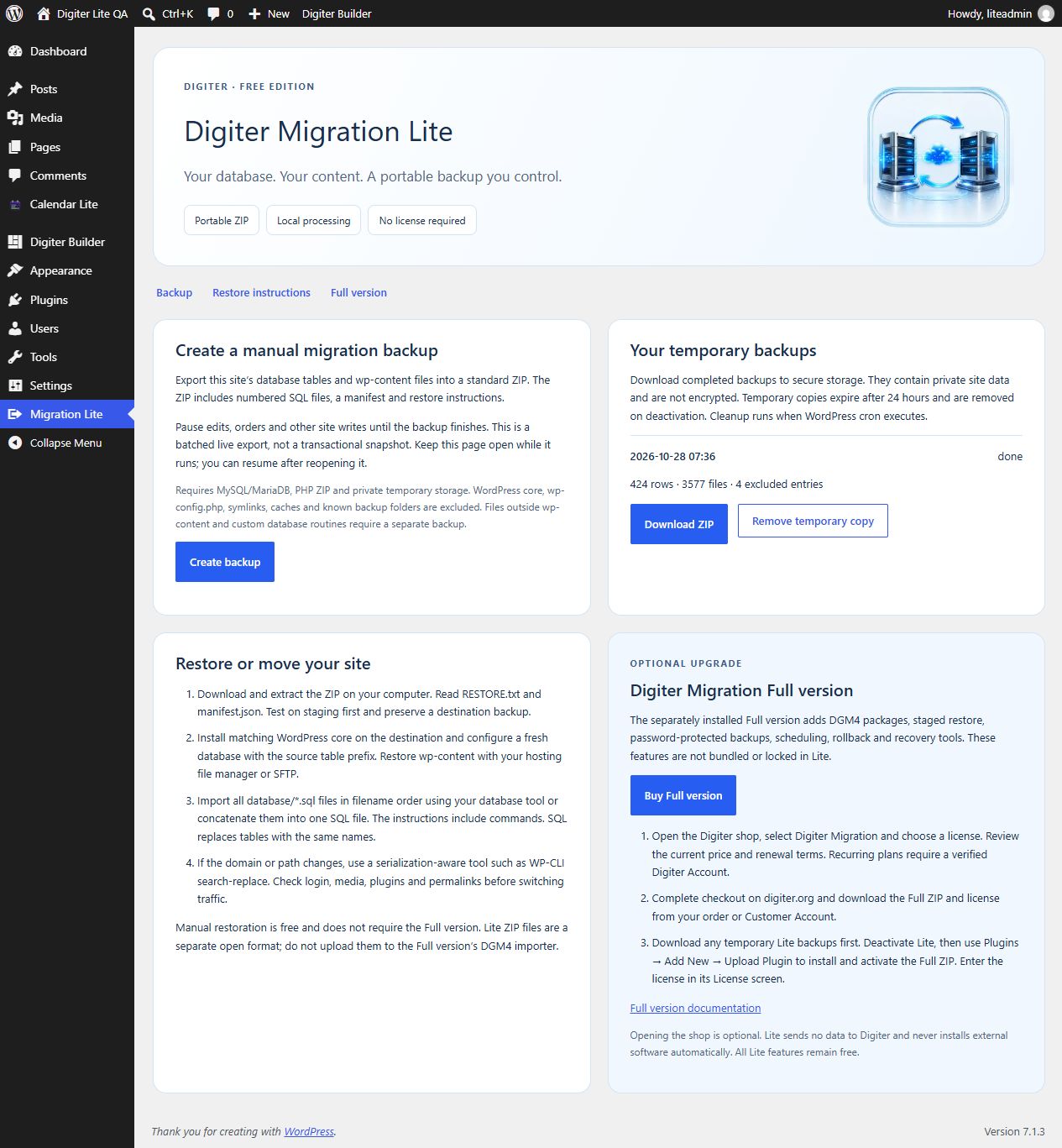
Digiter Migration Lite creates a standard ZIP containing your site’s database tables, wp-content files, a manifest and manual restoration instructions. Restore through your hosting tools without buying another plugin.
Included free
- Administrator-controlled backup, resume, download and removal.
- MySQL/MariaDB schema and data in ordered SQL chunks.
- Local wp-content files in a portable ZIP.
- Private system temporary storage outside the web root.
- Authenticated, nonce-protected downloads restricted to the initiating administrator.
- Manual restoration and domain-change guidance in WordPress and in every backup.
No account, license, trial period, telemetry or remote service is required. All bundled features work without payment. There is no artificial backup size limit; PHP memory, execution time, ZIP and disk limits still apply. Keep the page open during backup; resume from the dashboard after interruption.
Before backing up
Pause edits, uploads, orders and other writes until completion. This is a batched live export, not an atomic snapshot. Test restoration on staging before relying on a backup. Single-site MySQL/MariaDB only; PHP ZIP and private writable system temporary storage are required. SQLite, database views and spatial columns are unsupported. Large individual files or rows can exceed host limits.
Scope and exclusions
Includes database tables with the current site’s prefix and local wp-content files. Excludes WordPress core, wp-config.php, files outside wp-content, symlinks, special files, .git, .svn, .env, debug.log, cache, upgrade, upgrade-temp-backup, backup/backups, updraft, ai1wm-backups and names beginning with digiter-migration-. These exclusions apply at every directory level. Custom database triggers, routines and events are not included. Copy custom configuration, external uploads and symlink targets separately. Unreadable files stop the export rather than producing a silently incomplete backup.
Restoring for free
Extract the ZIP locally, install clean compatible WordPress core on the destination, configure a fresh database with the source table prefix, copy wp-content and import every database/*.sql file in filename order. RESTORE.txt includes Linux/macOS and PowerShell commands to combine chunks into one database.sql file. SQL replaces matching tables: preserve the destination first. Use a serialization-aware tool such as WP-CLI search-replace when the domain or filesystem path changes. Verify login, media, plugins and permalinks before switching traffic.
Optional Full version
WordPress administrators can use the Buy Full version link on the Plugins screen or the plugin’s own Full version section to open Digiter Shop. Select Digiter Migration, review the current price and renewal terms, and complete checkout on digiter.org. Recurring plans require a verified Digiter Account. Download the Full ZIP and license from the order or Customer Account. Download your temporary Lite backups, deactivate Lite, then install the Full ZIP through Plugins > Add New > Upload Plugin and activate the license in its License screen.
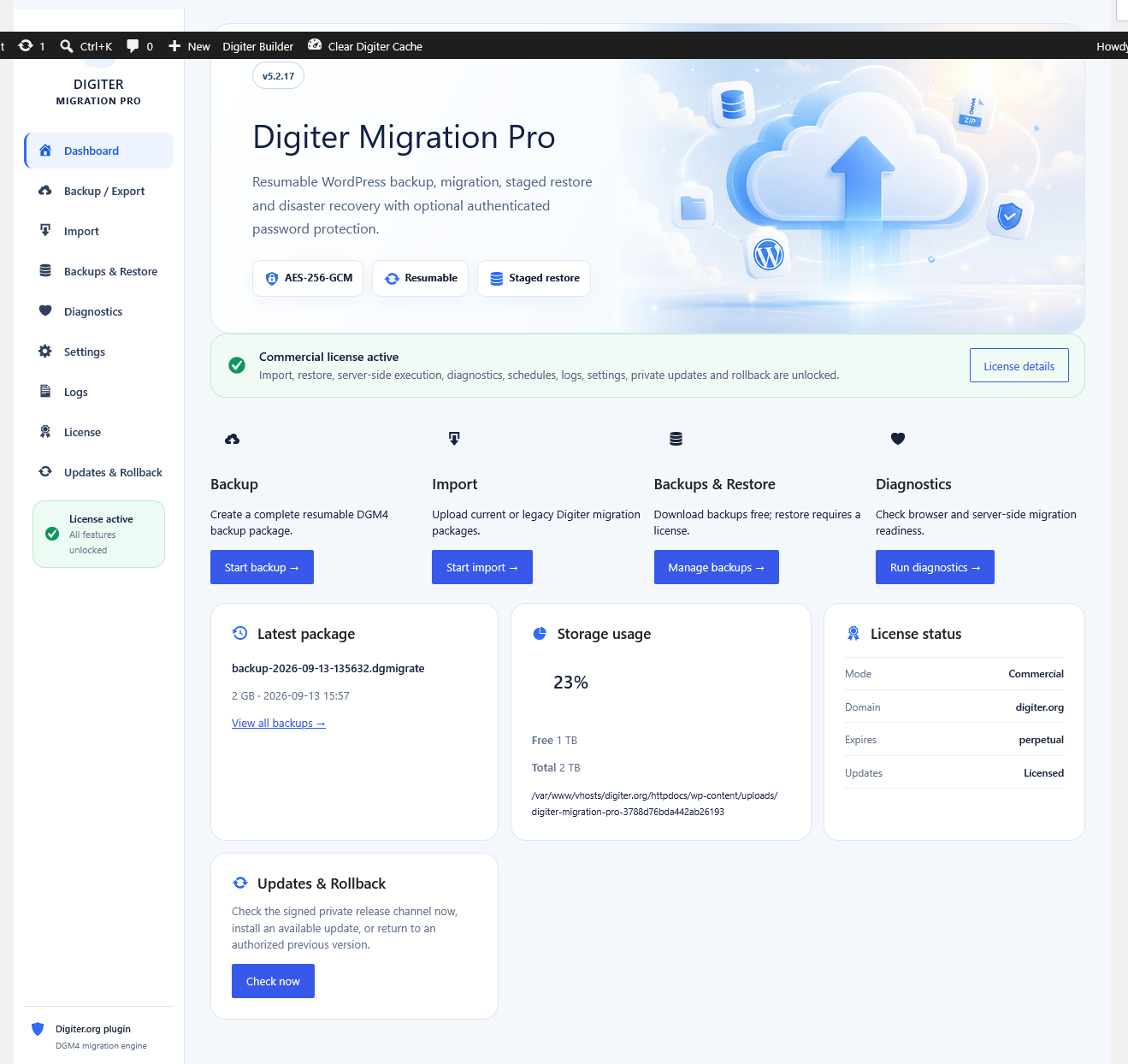
The separately distributed Full edition (listed in the shop as Digiter Migration Pro) includes DGM4/DGE1 packages, staged restore, encryption, schedules, rollback and recovery. This code is not bundled or locked inside Lite. Lite ZIP backups are independent of the Full format and cannot be imported by its DGM4 importer. Manual Lite restoration needs no purchase. Opening the shop is optional; the plugin makes no requests to Digiter, loads no remote assets and never downloads or installs premium code.
Privacy and retention
Backups include users, password hashes, private content and plugin settings/secrets in database tables and files. ZIPs are not encrypted. Download to secure private storage and encrypt stored copies as needed. Job metadata is stored in dgmlt_jobs; archives stay in a random per-site private system temporary directory. Downloads expire after 24 hours. Hourly WordPress cron removes expired copies when cron executes. Deactivation removes temporary copies; download them first. No data leaves the server except when you explicitly download your backup or follow an external shop link in your browser.
Source and licensing
Readable PHP, JavaScript and CSS are included. No build step is required. Original Digiter graphics and code are GPL-2.0-or-later. Screenshot 2 was supplied by the owner and explicitly shows the separate Full edition.
Скриншоты
Установка
- Install the ZIP through Plugins > Add New > Upload Plugin.
- Activate Digiter Migration Lite and open Migration Lite in the dashboard.
- Pause site writes, create a backup and keep the page open until completion.
- Download the ZIP and test the RESTORE.txt procedure on staging.
Часто задаваемые вопросы
-
Does Lite require a license or Full purchase?
-
No. Backup, download and manual restoration are fully available for free.
-
Does this automatically restore over my live site?
-
No. Lite exports a portable archive. Restore deliberately with your hosting tools following RESTORE.txt. There is no automatic importer in Lite.
-
Can I use it on multisite or SQLite?
-
No. This release supports single-site MySQL/MariaDB installations.
-
Can I use Lite ZIP files in the Full importer?
-
No. The formats are different. Restore Lite ZIPs manually; the Full edition creates its own DGM4/DGE1 packages.
-
Why did the backup stop?
-
Check your login, PHP ZIP, disk space and PHP limits. Reload and resume an interrupted request. If a job reports failure, resolve the cause, remove it and create a new backup. Files and database rows must fit within the host’s processing limits.
Отзывы
Нет отзывов об этом плагине.
Участники и разработчики
«Digiter Migration Lite» — проект с открытым исходным кодом. В развитие плагина внесли свой вклад следующие участники:
Участники
Перевести «Digiter Migration Lite» на ваш язык.
Заинтересованы в разработке?
Посмотрите код, проверьте SVN репозиторий, или подпишитесь на журнал разработки по RSS.
Журнал изменений
1.0.1
- Make the website and Full version shop links visible at the beginning of the description and provide the product homepage link.
1.0.0
- Initial release with portable SQL/wp-content backups, private downloads, manual restore instructions and optional Full version purchase guidance.