

Описание
Display Zillow reviews for agents, teams, and lenders.
How it works
- Connect your Zillow profile: Get a free API token (usually about five minutes) from Bridge, Zillow’s data service. The setup guide shows each step and tests the connection.
- Pick a layout: list, grid, or slider (Premium).
- Add reviews with a block, Elementor widget, widget, or shortcode.
Reviews come from Zillow’s official APIs: the Reviews API for agents and teams, and the Mortgages API for lenders. The plugin does not scrape Zillow pages and does not save review data to your WordPress database.
View the Demo.
Features (Free)
- Display the latest reviews for real estate agents.
- Show reviews from multiple profiles.
- List and grid layouts.
- Block with a live preview, plus widget and shortcode options.
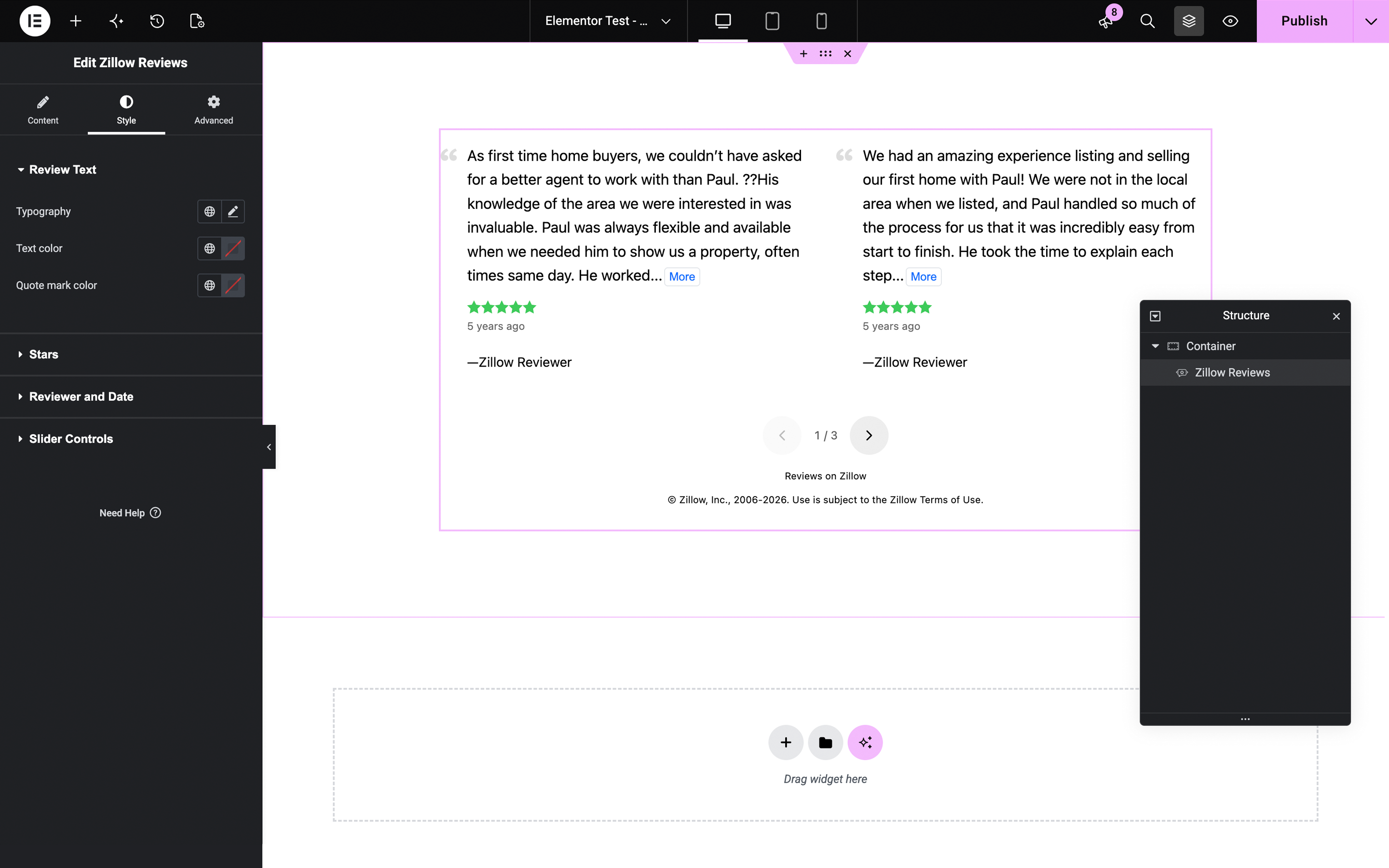
- Elementor widget with a live preview, show/hide options, responsive columns, and style controls.
- Shows the «Reviews on Zillow» attribution and profile links Zillow requires.
- Lightweight: scripts load only on pages that show reviews, and no jQuery is required.
Premium Features
- Team reviews: team leads can show their team members’ reviews alongside their own, with each review linked to the team member’s profile.
- Slider layout with optional autoplay.
- Lender, loan officer, and company profile reviews (requires a Zillow Mortgages Partner ID).
- Priority support.
- Get the Premium Version.
Elementor widget
A native Zillow Reviews widget for Elementor 3.5 or later (Elementor Pro not required):
- Live preview of your reviews in the editor.
- Layout and show/hide options for each widget, with separate columns for tablets and phones.
- Style controls for the review text, stars, and dates, using your global colors and fonts.
- Premium options (slider, team reviews, and lender reviews) in the same widget.
Shortcode
[ez-zillow-reviews]
[ez-zillow-lender-reviews]
Optional Shortcode Parameters
[ez-zillow-reviews layout="grid" columns="2" count="4" screenname="jsmith" excerpt="50"]
- layout…
"list"or"grid"("slider"in Premium). - columns…A number between 1 and 6. In the slider, the number of reviews visible at once.
- count…A number between 1 and 10.
- screenname…The screenname that appears in your Zillow profile link.
- excerpt…A number between 20 and 750. The maximum length of each review (word limit).
- team…(Premium)
"true"or"false". Include your team members’ reviews.
External services
Zillow provides the reviews and the logo:
- Reviews API (through Bridge Interactive) fetches agent reviews. Sends your Bridge Server Token and Zillow screenname when a page shows reviews or you click «Test connection».
- Mortgages API (Premium) fetches lender reviews. Sends your Partner ID, NMLS#, and company name (if set) when a page shows lender reviews or you click «Test connection».
- Zillow logo. Visitors’ browsers load the logo from zillowstatic.com on pages that show it, which shares their IP address with Zillow. Turn it off in Settings › General.
Terms: Zillow API Terms of Use (Reviews API), Zillow Terms of Use (Mortgages API and logo). Privacy: Zillow Group Privacy Notice (all three).
Freemius handles licensing, updates, and optional usage data.
- If you opt in: sends your name, email, site address, and WordPress environment info (such as WordPress, PHP, and plugin versions). Opting in is optional.
- Premium: sends your license key and site address to activate the license and check for updates.
- Freemius Terms, Freemius Privacy Policy
Скриншоты

![Shortcode output for [ez-zillow-reviews layout="grid" columns="2" count="2" screenname="pstalker"]](https://ps.w.org/easy-zillow-reviews/assets/screenshot-2.png?rev=2293160)
[ez-zillow-reviews layout="grid" columns="2" count="2" screenname="pstalker"]

Блоки
Этот плагин предоставляет 1 блок.
- Zillow Reviews Display your latest Reviews on Zillow.
Установка
- In your WordPress dashboard, go to Plugins › Add New Plugin, search for «Easy Zillow Reviews», then install and activate it.
- Go to Zillow Reviews › Settings › Zillow Professional Profile and follow the setup guide to get a free Bridge Server Token (about five minutes).
- Enter your Server Token and Zillow screenname, click Test connection, then Save Settings.
- Optional: adjust the default layout and display settings on the General tab.
- Add the Zillow Reviews block, the Zillow Reviews Elementor widget, an Easy Zillow Reviews widget, or the [ez-zillow-reviews] shortcode to your page or post.
Часто задаваемые вопросы
-
Where do I get a Bridge token?
-
Zillow shares its reviews data through Bridge Interactive. It’s free and usually takes about five minutes:
- Fill out the registration form at bridgedataoutput.com/zgdata. For Website, enter the site where your reviews will appear. For Product Name, enter your business name, and for Product Type, enter «Website». Check Zillow Agent Reviews.
- Click the link in Bridge’s verification email (check your spam folder), then log in.
- Open API Access and click Show Token next to Server Token.
The form says requests can take 10+ days, but Zillow Agent Reviews is usually approved right away.
-
Which Bridge token do I use?
-
The Server Token. Bridge’s API Access page also lists a Client ID, Client Secret, and Browser Token; the plugin doesn’t use those, and «Test connection» tells you if you’ve pasted the wrong one.
-
I have more than one website.
-
Zillow’s terms allow reviews only on the websites named in your Bridge application. For each additional site, log in to Bridge, choose Create New Application from the account menu, and request Zillow Agent Reviews under Data Access. Each site then has its own Server Token.
-
In Bridge, open API Access › Application Settings and click Regenerate Tokens. Then paste the new Server Token into the plugin settings and save.
-
Where do I find my Zillow screenname?
-
It’s the part after «zillow.com/profile/» in the address of your Zillow profile page. You can also paste the whole profile address into the screenname field.
-
I used a Zillow Web Services ID (ZWSID). Does it still work?
-
No. Zillow retired the ZWSID. Please add a Bridge Server Token instead.
-
Why don’t my reviews update right away?
-
Reviews are requested from Zillow each time the page loads (Zillow’s terms don’t allow storing reviews). If your site uses a page cache, new reviews appear when the cache refreshes.
-
Does it work with Elementor?
-
Yes. The plugin adds a native Zillow Reviews widget to Elementor, with a live preview, layout and show/hide options, responsive columns, and style controls. It works with the free version of Elementor (3.5 or later); Elementor Pro is not required. Premium options, such as the slider, appear in the same widget.
-
How do I add Zillow reviews to an Elementor page?
-
- Install Easy Zillow Reviews and connect your Zillow profile under Zillow Reviews › Settings.
- Edit your page with Elementor and search for «Zillow» in the widgets panel.
- Drag the Zillow Reviews widget onto the page, then choose the layout and number of reviews.
To show a different agent’s reviews, enter their Zillow screenname in the widget.
-
Why are my reviews squeezed into a narrow column in Elementor?
-
Block themes such as Twenty Twenty-Three limit page content to a narrow width, and that includes Elementor layouts. In Elementor, open Page Settings and set Page Layout to Elementor Full Width, or set it for all pages under Elementor › Site Settings › Layout.
-
Does it work with other page builders?
-
The [ez-zillow-reviews] shortcode works in any page builder that supports shortcodes, such as Divi or Beaver Builder. The block works in the WordPress block editor.
-
Can I show only my best reviews?
-
No. Zillow’s terms require that reviews are not selected by rating; the plugin always shows your most recent reviews.
Отзывы
Нет отзывов об этом плагине.
Участники и разработчики
«Easy Zillow Reviews» — проект с открытым исходным кодом. В развитие плагина внесли свой вклад следующие участники:
Участники

Перевести «Easy Zillow Reviews» на ваш язык.
Заинтересованы в разработке?
Посмотрите код, проверьте SVN репозиторий, или подпишитесь на журнал разработки по RSS.
Журнал изменений
1.8.1
- Date Released: 2026-10-26
- Improvement: Clearer setup guide that matches Bridge’s current sign-up: one form, email verification, and the Server Token, usually in about five minutes.
- Improvement: «Test connection» explains when you’ve pasted a Bridge Client ID or Client Secret instead of the Server Token, and when Bridge is limiting requests.
- Improvement: The screenname field accepts a full Zillow profile address.
1.8.0
- Date Released: 2026-10-26
- New Feature: Zillow Reviews widget for Elementor, with a live preview, style controls, and a dynamic tag option for the screenname. Supports the slider, team reviews, and lender reviews in Premium.
- New Feature: Show or hide the date, stars, reviewer summary, profile card, «View all» link, Zillow logo, and disclaimer for each Elementor widget.
- New Feature: Separate column counts for tablets and phones in the Elementor widget.
- Improvement: The Zillow logo is now a sharp SVG instead of a small GIF that looked blurry on high-resolution screens.
- Improvement: The «More» button and slider controls work in the Elementor editor’s live preview.
1.7.1
- Date Released: 2026-10-25
- Improvement: Removed the «Reviews on Zillow» heading above reviews. The profile card and «View all» link already say «Reviews on Zillow»; if both are hidden, the label appears as small print above the Zillow disclaimer.
1.7.0
- Date Released: 2026-10-23
- Security: Updated Freemius SDK to version 2.13.5.
- Security: Escaped review content and sanitized shortcode attributes.
- Security: The Bridge API token is now sent in a request header instead of the URL.
- New Feature: Guided setup with a «Test connection» button for Bridge and lender credentials.
- New Feature: The block shows a live preview of your reviews, and can set a screenname.
- New Feature (Premium): Team reviews for team leads, with each review linked to the team member’s Zillow profile.
- New Feature (Premium): Slider layout with optional autoplay.
- Improvement: Added the «Reviews on Zillow» label required by Zillow’s terms, and updated the Zillow disclaimer.
- Improvement: Agents with more than 10 reviews now see their newest reviews (previously, a random set of 10 was sorted by date).
- Improvement: Scripts and styles load only on pages that show reviews; jQuery is no longer required.
- Improvement: The «More» button is accessible to keyboard and screen reader users, and long reviews are fully readable without JavaScript.
- Improvement: Reviews show the city and state without the street address.
- Improvement: Updated the block to the current block API.
- Reliability: API requests now time out after 8 seconds instead of potentially hanging the page.
- Reliability: Identical API requests on the same page are only made once.
- Bug fix: The «More» button on long reviews works again.
- Bug fix: The Zillow logo image no longer appears broken.
- Bug fix: Screennames containing hyphens are now supported.
- Bug fix: Invalid shortcode values (e.g.,
columns="two") no longer cause a fatal error. - Bug fix: Widget titles now appear inside the widget.
- Bug fix: The settings page now works on sites installed in a subdirectory.
- Bug fix: Some reviews showed «who 2023» instead of the service provided.
- API error messages are now only shown to site administrators.
- Settings are now sanitized when saved.
- Removed support for Zillow’s retired Zillow Web Services ID (ZWSID). Sites that only have a ZWSID see a notice explaining how to add a Bridge API access token.
- Requires WordPress 6.3 and PHP 7.4 or later.
1.6.4
- Date Released: 2026-10-18
- Security: Updated Freemius SDK to version 2.13.4.
- Fixed broken image.
- Minimum required PHP version is now 5.6 (required by the Freemius SDK).
1.6.3
- Date Released: 2025-02-10
- Updated Freemius SDK to the latest version.
1.6.2
- Date Updated: 2023-07-13
- Updated Freemius SDK to the latest version.
1.6.1
- Date Updated: 2023-03-21
- Updated Freemius SDK to version 2.5.5.
1.6.0
- Date Updated: 2023-03-21
- New Feature: Added option to set an excerpt length (word limit).
- Bug Fix: Fixed bug that caused location text to appear blank or in lowercase.
- Bug Fix: Fixed CSS bug that caused elements to overlap in WordPress blocks.
- Updated @wordpress/scripts Gutenberg dependency package to v26.0.0.
1.5.3
- Date Updated: 2023-03-06
- Bug Fix: Fixed bug that caused reviews to appear out of sequence (should be newest first).
1.5.2
- Date Updated: 2023-03-05
- Implemented new method to count reviews.
- Updated @wordpress/scripts Gutenberg dependency package to v25.5.0.
1.5.1
- Date Updated: 2022-11-21
- Bug Fix: Fixed bug that raised warnings about an undefined array key after upgrading to v 1.5.0.
1.5.0
- Date Updated: 2022-11-19
- Zillow transitioned to Bridge Interative API access. Create a Bridge API access token to get reviews.
- New Feature: Added support for Bridge Interative API access tokens.
- Updated @wordpress/scripts Gutenberg dependency package to v24.6.0.
- Cleaned up Settings page by rewriting labels and hiding deprecated fields.
1.4.4
- Date Updated: 2022-11-02
- Bug Fix: Fixed bug preventing default numeric values from loading in some Settings Sidebar fields.
- Bug Fix: Fixed CSS layout bug causing elements to wrap to a new line in the Block editor content area.
- Updated @wordpress/scripts Gutenberg dependency package to v24.4.0 and recompiled blocks code.
- Changed the name of the premium plugin version to «Premium Version».
1.4.3
- Date Updated: 2022-10-28
- Rolling back to Freemius SDK version 2.4.3.
1.4.2
- Date Updated: 2022-10-26
- Updated Freemius SDK to version 2.5.0.
- Bug Fix: Fixed bug that caused «invalidInput» error message for Mortgage Lender names containing ampersands.
1.4.1
- Date Updated: 2022-03-18
- Updated Freemius SDK to version 2.4.3.
1.4.0
- Date Updated: 2022-02-03
- New Feature: Added a «screenname» attribute to the shortcode.
1.3.1
- Date Updated: 2021-11-09
- Removed unused .po language files from Freemius SDK.
- Added minor style changes to plugin CSS file.
- Changed the Profile Card text «sales in the last 12 months» to «recent home sales».
- Changed the expected type of the Easy_Zillow_Reviews_Data object $reviews property from «array» to «object».
1.3.0
- Date Updated: 2021-09-09
- Updated Freemius SDK to version 2.4.2.
1.2.3
- Date Updated: 2020-05-29
- Bug Fix: Fixed bug that caused Reviews Summary badge to appear in-line with reviews instead of below them in certain grid layouts.
- Hardcoded blockquote line-height in public CSS file.
- Modified labels for a few Dashboard settings.
1.2.2
- Date Updated: 2020-05-28
- Minor style changes to plugin CSS file.
1.2.1
- Date Updated: 2020-05-28
- New Feature: Display a Zillow profile card with average star rating.
- Bug Fix: Added fallback to cURL for PHP configurations that have allow_url_fopen disabled.
- Bug Fix: Removed erroneous reference to a second Gutenberg block.
- Bug Fix: Removed two instances of Undefined Index errors in widgets and lender functions.
- Bug Fix: Improved sentence construction for loan descriptions in Premium version.
- Updated Freemius SDK to version 2.3.2.
1.2.0
- Date Updated: 2020-04-28
- New Feature: Gutenberg Block
- Moved the Settings page menu item to the top-level of the Dashboard Menu
1.1.7
- Date Updated: 2020-04-21
- Bug Fix: Fixed error that prevented review count and profile link from displaying in Mortgages Partner Edition.
- Bug Fix: Fixed error that caused «Settings» plugin action link to appear under other plugin names in the Plugin menu.
- Added attribution for function copied from FooGallery by Brad Vincent and Contributors.
1.1.6
- Date Updated: 2020-04-19
- Bug Fix: Fixed error that prevented Mortgages Partner Edition from activating while Free Edition was active.
- Bug Fix: Fixed error that prevented reviews for Lending Companies from displaying.
1.1.5
- Date Updated: 2020-04-18
- Bug Fix: Resolved PHP notices when certain elements are set to hidden and WP_DEBUG is true.
- Bug Fix: Restored feature to hide Reviewer Summary.
1.1.4
- Date Updated: 2020-04-18
- NOTE Due to changes in v1.1.x, please check your widgets to confirm that Easy Zillow Reviews is still active.
- Bug Fix: Changed plugin widget name back to ‘ezrwp_widget’ (free version)
- Bug Fix: Restored options to style and hide reviews output.
- Bug Fix: Resolved miscellaneous notices when WP_DEBUG is true.
1.1.3
- Date Updated: 2020-04-13
- Added more fields to Upgrader class, which assists with backwards compatibility from v1.0 to v1.1.
1.1.2
- Date Updated: 2020-04-13
- Bug Fix: Migrated backwards compatibility patch to main plugin file to better support updates, in addition to activations.
1.1.1
- Date Updated: 2020-04-13
- Bug Fix: Added backwards compatibility for new database option names.
1.1.0
- Date Updated: 2020-04-13
- New Feature: Option to upgrade for access to Lender Reviews.
- New Feature: Tabbed Settings interface improves organization of plugin options.
- Bug Fix: Added fix to prevent errors generated by dashes and spaces in screennames.
Premium Version
- New Feature: Lender Reviews
- New Feature: Individual Loan Officer Reviews
- New Feature: Company Profile Reviews
1.0.3
- Date Updated: 2019-01-03
- Bug Fix: Replaced dashicons with image sprite.
1.0.2
- Date Updated: 2018-12-31
- Bug Fix: Fixed typo in admin Settings page.
1.0.1
- Date Updated: 2018-12-31
- New Feature: New Settings Options: Hide Zillow Logo and «View All» link.
- New Feature: Added «Settings» plugin action link.
- Bug Fixes: Resolved miscellaneous notices when WP_DEBUG is true.
- Added support for PHP 5.4, 5.5, 5.6 and 7.2.
1.0.0
- Date Released: 2018-12-30
- Initial Release