

Описание
Filigrane is an image watermark plugin for WordPress that adds your text or logo watermark to photos. Your original files are never touched. Watermarked copies are created the first time an image is requested, stored in a cache, and swapped into your pages at output time.
With this design:
- No «restore» needed. Originals stay exactly as uploaded, so there is nothing to undo.
- No quality loss on your originals. Only the copy is re-encoded, at a quality you choose.
- Deactivate = instantly clean. Turn the plugin off and visitors get the untouched images straight away.
- Works whatever way the image got in. Because it acts on the URL, it does not matter whether images arrive through the Media Library, an importer, a gallery block or a regenerate-thumbnails run.
- Modern formats. JPEG, PNG, WebP, AVIF and (static) GIF.
- Any language. Bundled fonts cover Latin, Cyrillic and Greek.
Features
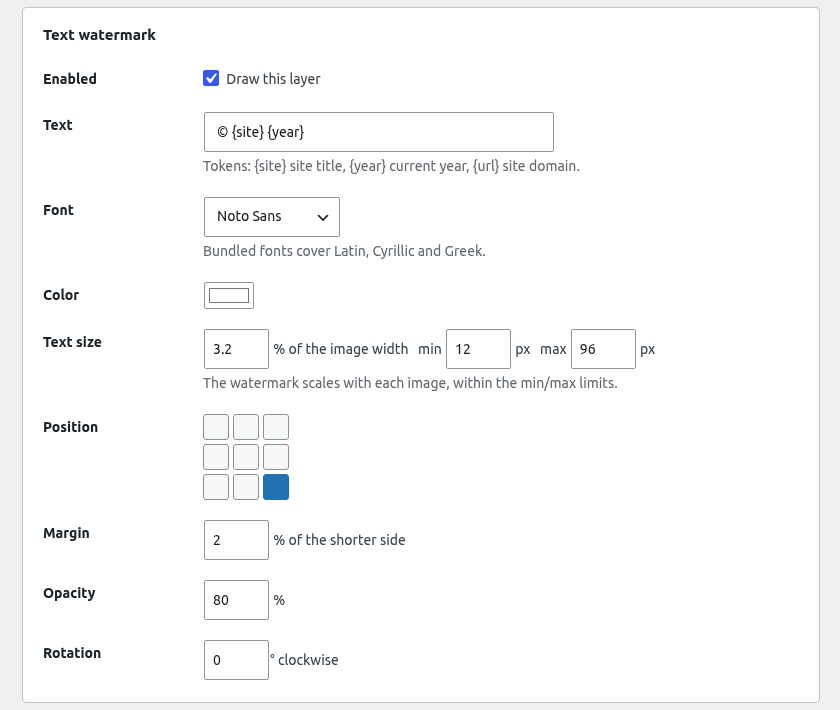
- Text watermark and/or logo watermark (up to two layers).
- Live preview rendered by the same engine that creates the real copies.
- Nine-position placement, margin, opacity, rotation.
- Size relative to each image, with minimum and maximum limits.
- Choose which image sizes get a watermark and skip small images.
- «Do not watermark this image» switch on every attachment.
- Text tokens:
{site},{year},{url}. - Works with GD or Imagick (chosen automatically); EXIF orientation is respected.
- Site Health checks for the image library, cache folder and delivery.
- Automatic fallback for hosts that do not pass missing image URLs to WordPress.
Need several watermark profiles, unlimited layers, or rules that pick a watermark by post type, category or file type? They are in Filigrane Pro, a separate, optional add-on. Everything described above works fully in the free plugin, with no restrictions or nag screens.
External services
This plugin does not connect to any external service. No data leaves your site. Watermarked copies are stored in wp-content/uploads/wmguru-cache.
Third-party resources
Bundled fonts: Noto Sans and Noto Serif, © The Noto Project Authors, licensed under the SIL Open Font License 1.1 (see fonts/OFL.txt).
Скриншоты



Установка
- Upload the
filigranefolder to/wp-content/plugins/, or install it from the WordPress plugin directory. - Activate the plugin through the Plugins screen.
- Go to Media Filigrane.
- Set up your text and/or logo, check the live preview, then tick Show watermarked images on the front end and save.
Часто задаваемые вопросы
-
How do I add a watermark to images in WordPress?
-
Install Filigrane, go to Media Filigrane, add your text and/or logo, check the live preview, then tick Show watermarked images on the front end and save. Existing and new images get the watermark on your pages; the files in your Media Library stay as uploaded.
-
Does it change my original files?
-
No. Originals are never modified or re-encoded. Watermarked copies live in
wp-content/uploads/wmguru-cacheand can be deleted at any time; they are regenerated on demand. -
What happens if I deactivate or uninstall the plugin?
-
Deactivating stops the URL swapping at once, so visitors see the originals. Uninstalling also deletes the cache folder. Your settings are kept unless you ticked «Also delete these settings».
-
Can someone still get the original image?
-
Yes, if they know the original file URL. Filigrane replaces the URLs your site outputs; it does not block direct requests to files in
wp-content/uploads. -
Are animated GIFs and WebP watermarked?
-
Not yet. They are served unchanged.
-
It says direct file URLs do not work on my host.
-
Some hosts answer 404 for missing image files without asking WordPress. Filigrane detects this and switches to signed query-string URLs automatically. Everything still works.
-
Will my page-builder images be watermarked?
-
Images output through WordPress image functions and post content are. Page builders that print raw upload URLs from their own data may not be; support for those is planned.
-
Which image library do I need?
-
GD (with FreeType) or Imagick. Imagick keeps colour profiles and metadata of the source; GD drops them. AVIF needs Imagick with AVIF support, or PHP 8.1+ with GD AVIF support.
Отзывы
Нет отзывов об этом плагине.
Участники и разработчики
«Filigrane – Text & Logo Image Watermark, Originals Untouched» — проект с открытым исходным кодом. В развитие плагина внесли свой вклад следующие участники:
Участники
Перевести «Filigrane – Text & Logo Image Watermark, Originals Untouched» на ваш язык.
Заинтересованы в разработке?
Посмотрите код, проверьте SVN репозиторий, или подпишитесь на журнал разработки по RSS.
Журнал изменений
1.0.0
- First public release.