

Описание
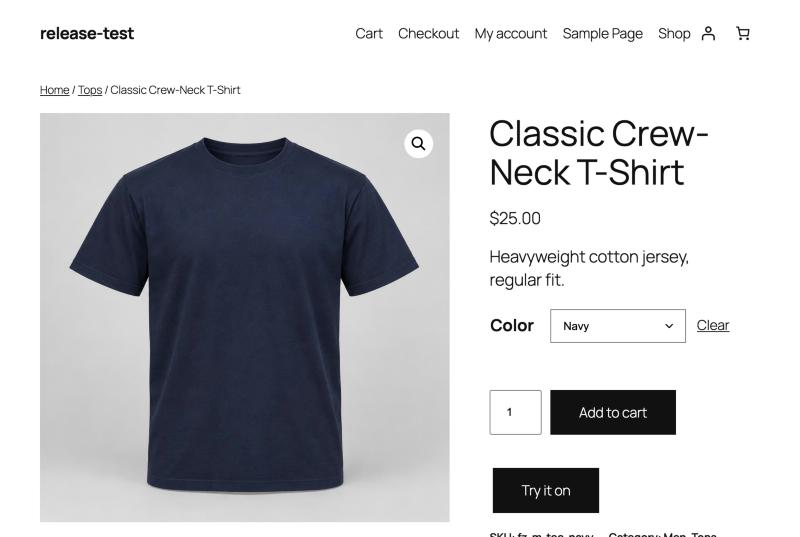
Fitzaro adds a virtual try-on to WooCommerce product pages. A shopper uploads a photo and sees the product on themselves before buying.
The store owner brings their own OpenAI API key; every try-on is billed to that OpenAI account, not to a Fitzaro subscription. A monthly budget, limits per shopper and per store, and automatic deletion of photos keep costs and personal data under control.
Features
- «Try it on» button on product pages, in classic and block themes.
- Tops, dresses and eyewear, each with its own instructions to the AI model.
- Variable products: the selected colour or style is used.
- Before/after slider to compare the shopper’s photo with the result.
- Drag and drop or choose a photo; it is resized in the browser before upload.
- Turn try-on on or off for the whole store, per product type, per category or per product.
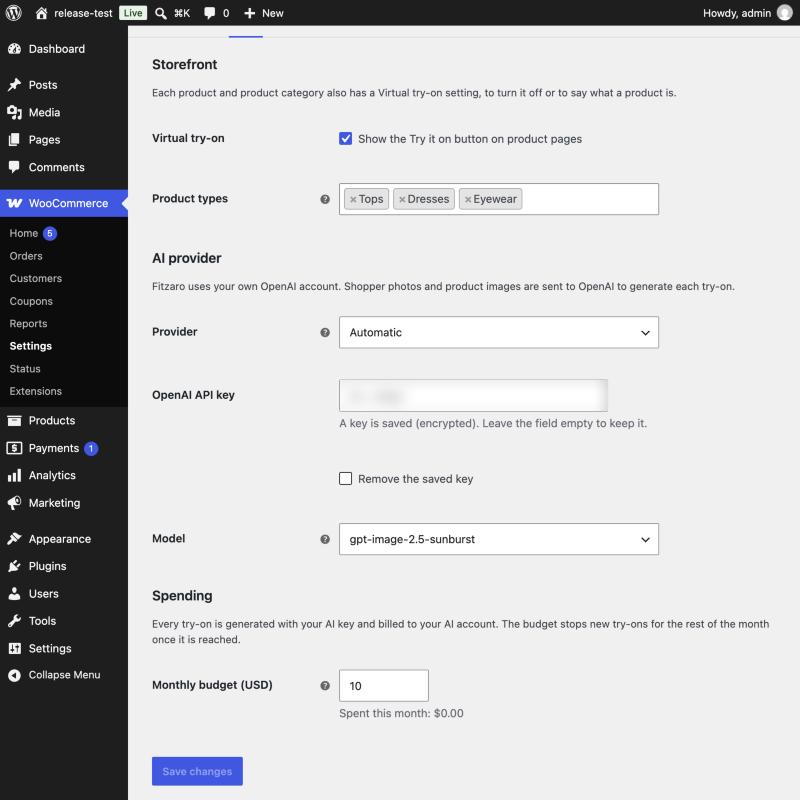
- Monthly budget (10 USD by default) with a notice when it is reached.
- Limits per shopper, per IP address and per store, against abuse.
- The OpenAI key is stored encrypted, or set in wp-config.php.
- Personal data export and erasure tools, and suggested privacy policy text.
- Template and CSS custom properties so themes can restyle the dialog.
External services
Fitzaro sends data to the OpenAI API (https://api.openai.com) to generate try-on images, using the API key the store owner enters in WooCommerce Settings Fitzaro.
- When: each time a shopper starts a try-on, and once when the owner saves the key (a free check of the key and model).
- What: the shopper’s photo (re-encoded, without metadata), the product image and a fixed instruction text. No names, e-mail addresses, IP addresses or order data are sent.
- OpenAI terms of use: https://openai.com/policies/terms-of-use
- OpenAI privacy policy: https://openai.com/policies/privacy-policy
Privacy
Shopper photos are stored in a private folder (outside the web root when the server allows it) and are only ever served through PHP to the browser that uploaded them.
- Uploaded photos are deleted after 24 hours.
- Try-on results are deleted after 7 days.
- Request records hold no images, only a hashed browser ID, a hashed IP address, the product and the cost. They are deleted after 90 days.
- Shoppers can delete their photo and results at any time.
-
A functional cookie (
fitzaro_visitor, HttpOnly, session only) is set when a shopper uploads a photo. -
Logged-in shoppers’ try-ons appear in Tools Export Personal Data and are removed by Tools Erase Personal Data.
- The store’s privacy policy guide includes suggested text for Fitzaro.
When try-on runs, the photo and the product image are sent to OpenAI (see External services).
Скриншоты



Установка
- Install and activate WooCommerce.
- Install Fitzaro from Plugins Add New, or upload the ZIP, and activate it.
- Go to WooCommerce Settings Fitzaro and enter your OpenAI API key. The key is checked when you save.
- Set a monthly budget and choose which product types offer try-on.
- Open a top, dress or eyewear product: the «Try it on» button appears below Add to cart.
To keep the key out of the database, add this line to wp-config.php instead:
define( 'FITZARO_OPENAI_KEY', 'sk-...' );
Часто задаваемые вопросы
-
How much does a try-on cost?
-
It depends on the model and the image size. With the default model, a try-on usually costs a few US cents. Fitzaro records the cost OpenAI reports and stops new try-ons when the monthly budget is reached.
-
Products whose category looks like a top, a dress or eyewear. You can set the type, or turn try-on off, on each product (General tab) and on each product category.
-
Does it work with page caching?
-
Yes. The product page holds no personal data; everything personal goes through the REST API, which is never cached.
-
Where are shopper photos stored?
-
In a private folder: outside the web root when the server allows it, otherwise a randomly named folder inside uploads that is protected from direct access. Photos are only ever served through PHP, to the browser that uploaded them, so they stay private on Nginx too. You can choose the folder with
FITZARO_STORAGE_DIRin wp-config.php. Photos are deleted after 24 hours and results after 7 days. -
Can I change the look of the dialog?
-
Yes. Set the CSS custom properties (for example
--fitzaro-accent), or copytemplates/try-on.phptoyourtheme/fitzaro/try-on.php.
Отзывы
Нет отзывов об этом плагине.
Участники и разработчики
«Fitzaro – AI Virtual Try-On for WooCommerce» — проект с открытым исходным кодом. В развитие плагина внесли свой вклад следующие участники:
Участники
Перевести «Fitzaro – AI Virtual Try-On for WooCommerce» на ваш язык.
Заинтересованы в разработке?
Посмотрите код, проверьте SVN репозиторий, или подпишитесь на журнал разработки по RSS.
Журнал изменений
1.0.0
- First release: try-on for tops, dresses and eyewear with OpenAI image models.
- Product variations, before/after slider, drag and drop upload.
- Monthly budget and usage limits.
- Store, type, category and product controls.
- Personal data exporter and eraser, privacy policy text.