

Описание
PJ Mortgage Tools adds a clean, responsive mortgage calculator to any page or post. Visitors adjust the purchase price, down payment, interest rate, term, taxes, insurance, HOA dues and mortgage insurance, and the monthly payment updates instantly — no page reloads, no outside services, no data leaves the visitor’s browser.
What visitors get
- Live monthly payment with a full breakdown: principal & interest, taxes, HOA, insurance and PMI
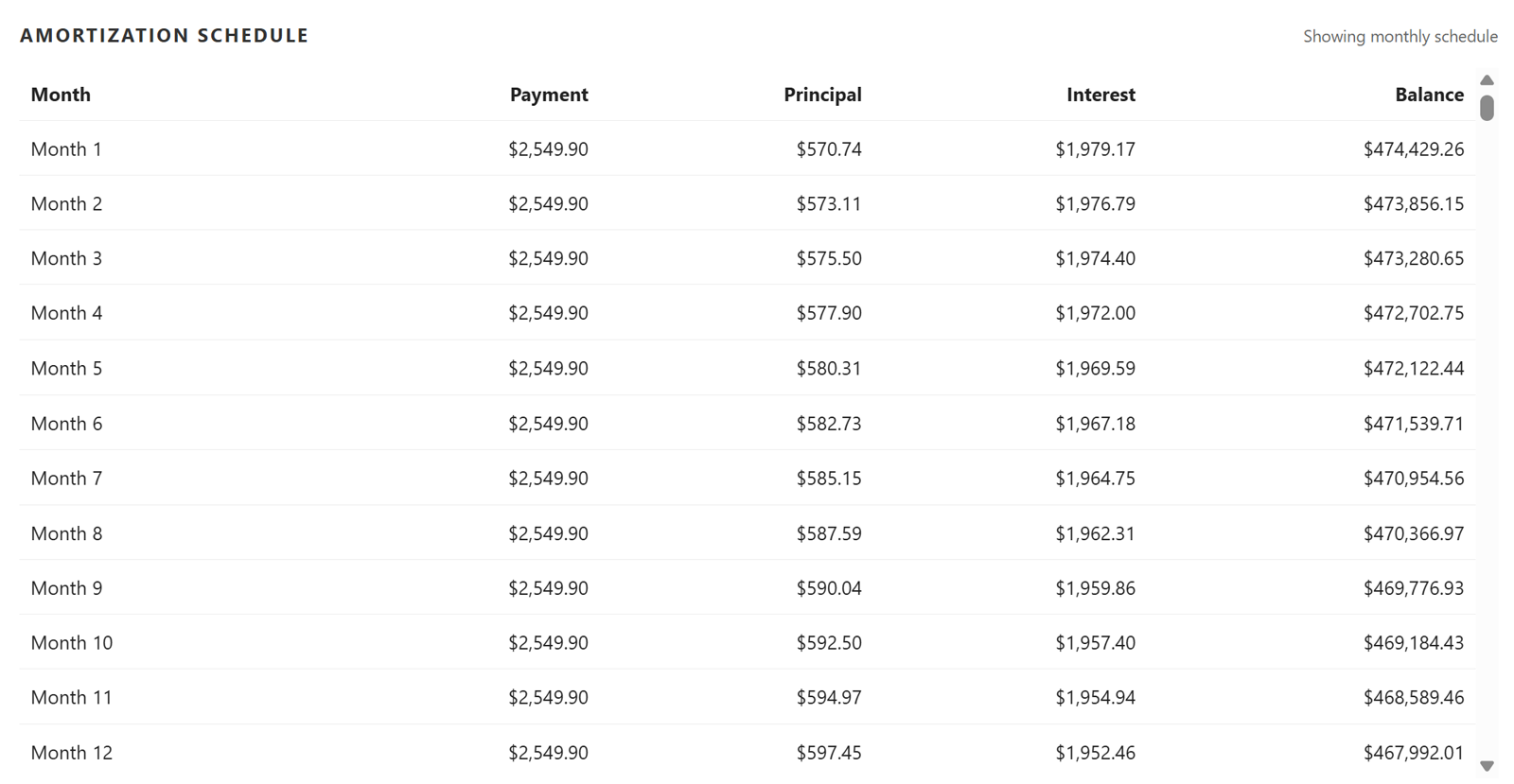
- An amortization schedule, viewable by year or by month
- Extra-payment analysis: enter an extra monthly amount and see the new payoff date, months saved and interest saved
- A layout that works on desktop, tablet and phone, and prints cleanly
What site owners get
[pjmcalc]shortcode with optional attributes for starting values- A «PJ Mortgage Tools» block with the same options in the sidebar
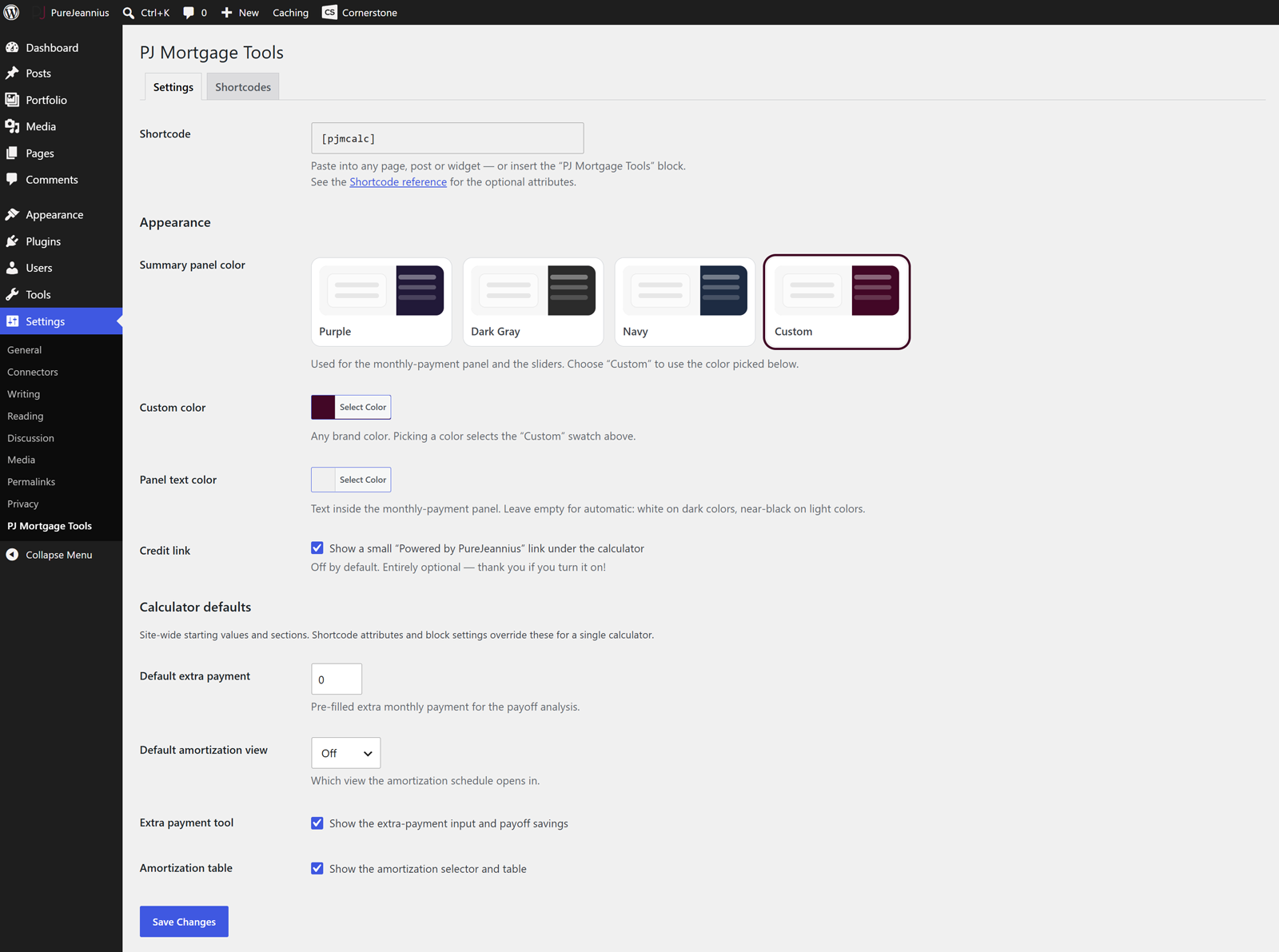
- Three color presets plus any custom brand color for the payment panel and sliders, with an optional panel text color (automatic contrast when left empty)
- Site-wide defaults for the extra payment and amortization view
- Show or hide the extra-payment tool and the amortization table — site-wide, per shortcode or per block
- No tracking, no external requests, nothing loaded on pages that don’t use the calculator
Ideal for real estate agents and brokers, mortgage professionals, property-investment sites and home-buyer resources.
Shortcode attributes (all optional — each is explained on the Shortcodes tab under Settings PJ Mortgage Tools)
[pjmcalc title="Payment Estimator" type_label="30-year fixed" price="450000" rate="6.25" years="30" down_pct="10" tax_pct="1.2" mi_rate="0.5" insurance="1800" hoa="0" extra="200" amort_view="annual" show_pmi="yes" show_extra="yes" show_amort="yes" color="#0f766e" text_color="#ffffff" currency="USD"]
Every feature in this plugin is free, with no license key, trial or usage limit.
Add-ons
PJ Mortgage Tools Pro is a separate plugin sold on purejeannius.com. It adds new tools that are not part of this plugin: branded PDF reports, a home affordability calculator, a rent vs. buy calculator and side-by-side loan scenario comparison.
Скриншоты

Блоки
Этот плагин предоставляет 1 блок.
- PJ Mortgage Tools A live mortgage calculator with amortization schedule and extra-payment analysis.
Установка
- Upload the
pj-mcalcfolder to/wp-content/plugins/, or install it from Plugins Add New. - Activate PJ Mortgage Tools.
- Add the calculator to any page with the
[pjmcalc]shortcode, or insert the PJ Mortgage Tools block. - Optional: choose a color, defaults and which sections to show under Settings PJ Mortgage Tools. The Shortcodes tab there lists every attribute with an example.
Часто задаваемые вопросы
-
How do I change the starting values?
-
Pass them as shortcode attributes, e.g.
[pjmcalc price="400000" rate="6.5" years="30" down_pct="20"], or set them in the block sidebar under «Starting values». -
Can I show more than one calculator on a page?
-
Yes. Each shortcode or block is independent.
-
How is PMI calculated?
-
Monthly PMI = (loan amount × mortgage insurance rate) ÷ 12, applied only while the down payment is below 20%. Set
show_pmi="no"to hide the PMI control and row entirely. -
How is the amortization schedule calculated with an extra payment?
-
The extra amount is added to every monthly principal & interest payment. The schedule, payoff date and interest-saved figures all reflect that.
-
Does the calculator send data anywhere?
-
No. All calculations run in the visitor’s browser. The plugin makes no external requests.
-
Is this financial advice?
-
No. The calculator is an estimate for illustration; it does not include lender fees, points, escrow adjustments or local tax rules. Visitors should confirm figures with a lender.
-
Can I use my own brand color?
-
Yes. Under Settings PJ Mortgage Tools choose the «Custom» swatch and pick any color. If the color is light, the panel text switches to near-black automatically, or you can set a text color yourself. For a single calculator use
color="#hex"andtext_color="#hex". -
Can I hide the extra-payment tool or the amortization table?
-
Yes — site-wide with the checkboxes on the Settings tab, or per calculator with
show_extra="no"/show_amort="no"(or the matching options in the block sidebar). -
Can I change the currency?
-
Use
currency="CAD"(any ISO 4217 code). The browser formats amounts for that currency.
Отзывы
Нет отзывов об этом плагине.
Участники и разработчики
«PJ Mortgage Tools» — проект с открытым исходным кодом. В развитие плагина внесли свой вклад следующие участники:
Участники
Перевести «PJ Mortgage Tools» на ваш язык.
Заинтересованы в разработке?
Посмотрите код, проверьте SVN репозиторий, или подпишитесь на журнал разработки по RSS.
Журнал изменений
1.2.0
- Custom panel color with a color picker, and an optional panel text color (automatic contrast when empty).
- Site-wide default extra payment and amortization view.
- Show or hide the extra-payment tool and amortization table site-wide, with
show_extra/show_amortshortcode attributes, or from the block sidebar. - New
colorandtext_colorshortcode attributes.
1.1.3
- Settings screen now has Settings and Shortcodes tabs; the Shortcodes tab lists every attribute with an example.
1.1.2
- Plugin URI and support links now point to the renamed product page.
1.1.1
- Shortcode is now
[pjmcalc]; function, option and hook names use thepjmcalc_prefix.
1.1.0
- Initial release on WordPress.org.