

Описание
Signals Dispatch for WooCommerce integrates your WooCommerce store with the WhatsApp Business Cloud API, enabling automated order notification messages to customers.
Free Features
- Automated Order Notifications – Send WhatsApp messages when order status changes (processing, completed, on-hold, cancelled)
- Template-Based Messaging – Use pre-approved WhatsApp message templates with dynamic order variables
- Message Queue – Reliable message delivery using WooCommerce Action Scheduler with automatic retries for transient failures
- Delivery Tracking – Real-time message status updates via webhooks (sent, delivered, read, failed)
- Comprehensive Logs – Full message history with payload and response details
- Guided Setup Wizard – 8-step onboarding with credential verification, webhook instructions, and a built-in API connection test
- Checkout Opt-in – When Require Consent is enabled, a WhatsApp opt-in checkbox is shown at checkout (classic and block checkout)
- Manual Send – Send a template message from any WooCommerce order page
- Consent Enforcement – Only send messages to customers who opted in, with locally stored consent records
Pro Features (Coming Soon)
- COD Confirmation – Automated Cash on Delivery order confirmations
- Scheduled Log Cleanup – Automatically purge old logs on a configurable schedule
- Priority Support – Dedicated support channel
Requirements
- WordPress 6.0 or higher
- WooCommerce 7.0 or higher (provides Action Scheduler)
- PHP 7.4 or higher
- WhatsApp Business Account with Cloud API access
Third-Party Services
This plugin connects to the Meta WhatsApp Business Cloud API to send messages. By using this plugin, you agree to Meta’s terms of service:
Скриншоты

Setup wizard with API credential configuration 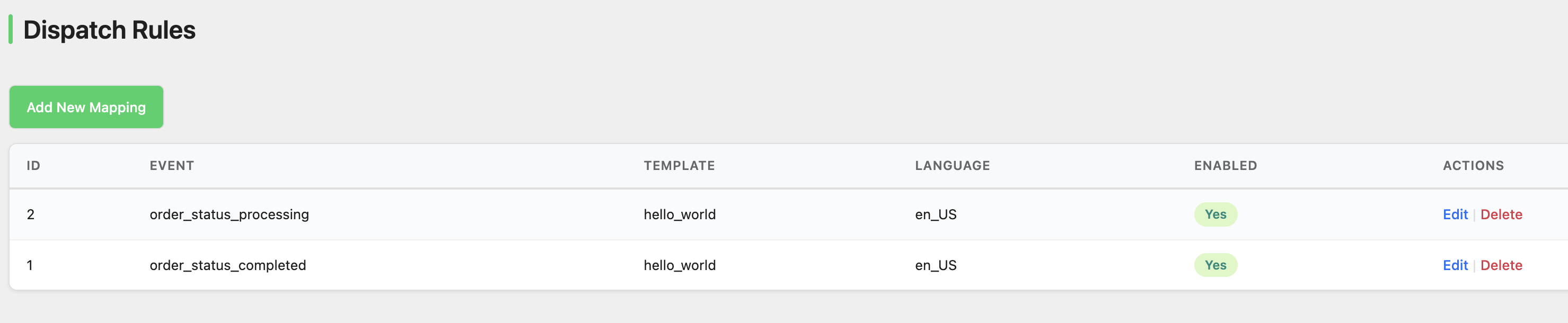
Dispatch rules for mapping events to templates 
Message logs with delivery status 
System health check
Установка
- Upload the
signals-dispatch-for-woocommercefolder to the/wp-content/plugins/directory - Activate the plugin through the ‘Plugins’ menu in WordPress
- Navigate to Signals Setup to configure your WhatsApp Business API credentials
Configuration
For detailed instructions on obtaining your WhatsApp Business API credentials, see the WhatsApp API Setup Guide.
Step 1: API Credentials
Navigate to Signals Setup and enter your WhatsApp Business API credentials:
- Phone Number ID – Your WhatsApp Business phone number ID
- WABA ID – WhatsApp Business Account ID
- Access Token – Permanent or temporary access token from Meta
- Webhook Verify Token – Custom token for webhook verification
Step 2: Webhook Setup
Configure your WhatsApp Business App to send webhooks to:
https://yoursite.com/wp-json/tmasignals/v1/webhook
Use the Verify Token you configured in Step 1.
Step 3: Test Message
Send a test message to verify your configuration is working correctly.
Часто задаваемые вопросы
-
What WhatsApp templates can I use?
-
You can use any approved WhatsApp message templates from your WhatsApp Business Account. The plugin supports utility templates with dynamic variable substitution.
-
How do I map order data to template variables?
-
In Dispatch Rules, specify a JSON array of variable names that correspond to your template’s placeholders:
["billing_first_name", "order_number", "order_total"]Available variables include: order_id, order_number, order_total, order_currency, billing_first_name, billing_last_name, billing_phone, billing_email, shipping_first_name, shipping_last_name, status, site_name.
-
Why aren’t messages being sent?
-
Check the following:
1. Verify your API credentials are correct in Signals Setup
2. Ensure the customer has a valid phone number in their billing details
3. Check that dispatch rules are enabled for the order status
4. Verify that Action Scheduler is running (provided by WooCommerce) -
How do I receive delivery status updates?
-
Configure your WhatsApp Business App to send webhooks to your site’s endpoint. The plugin will automatically update message status as sent, delivered, read, or failed.
-
Does the plugin support customer consent management?
-
Yes. When Require Consent is enabled in Settings, a WhatsApp opt-in checkbox is shown at checkout and messages are only sent to customers who opted in. Consent records are stored locally for GDPR compliance.
-
Can I manually send a WhatsApp message from an order?
-
Yes. A «Send WhatsApp Message» meta box appears on the WooCommerce order page. Choose a dispatch rule and click «Send Now» to send a template message immediately.
Отзывы
Нет отзывов об этом плагине.
Участники и разработчики
«Signals Dispatch for WooCommerce» — проект с открытым исходным кодом. В развитие плагина внесли свой вклад следующие участники:
Участники
Перевести «Signals Dispatch for WooCommerce» на ваш язык.
Заинтересованы в разработке?
Посмотрите код, проверьте SVN репозиторий, или подпишитесь на журнал разработки по RSS.
Журнал изменений
1.1.0
- Added guided 8-step setup wizard with onboarding checklist and progress tracking
- Added built-in Meta API connection tester to verify credentials before saving
- Added health check improvements: 12 system checks including last API test and last webhook received timestamps
- Added display phone number field for easy UI identification of the configured number
- Added setup completion timestamp tracking
- Fixed: all plugin options now correctly removed on uninstall
1.0.0
- Added WhatsApp opt-in consent checkbox on checkout (classic and block checkout)
- Added manual send meta box on WooCommerce order page
- Added Coming Soon page showcasing planned Pro features with email enquiry
- Added upgrade promotion card on Help page
- Added Refresh Status button on Logs page for on-demand delivery status check
- Added trigger source column to logs (automatic vs manual)
- Added GDPR personal data export and erasure with guest customer support
- Renamed REST API namespace to tmasignals/v1 for uniqueness
- Differentiated status badge colours (sent/delivered/read/failed)
- Webhook delivery status tracking confirmed as free feature
- Hardened AJAX nonce validation and admin JavaScript against XSS
- Automatic retries for transient failures (network errors, rate limits, server errors)
- HPOS (High-Performance Order Storage) fully compatible