
Описание
SiteGuard WP Plugin helps protect WordPress sites by strengthening login and admin-area security. It helps reduce brute-force login attacks, password list attacks, comment spam, and unauthorized access to /wp-admin/.
Main Features
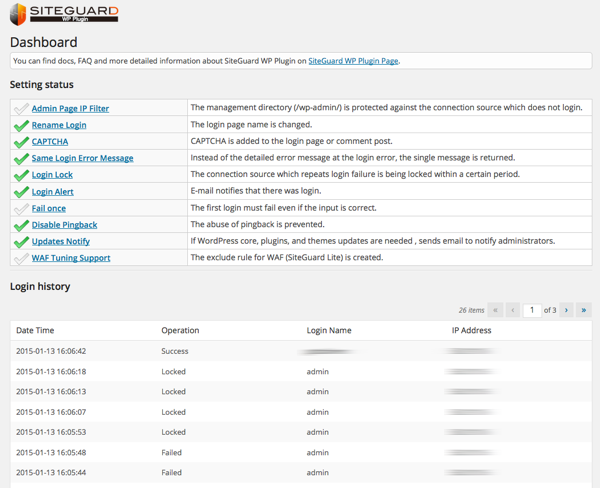
- Admin Page IP Filter: Restricts wp-admin access to IP addresses that have successfully logged in.
- Rename Login: Changes the URL of the login page from
wp-login.phpto a custom path. - CAPTCHA: Adds CAPTCHA to login, comment, password reset, and user registration forms.
- Login Lock: Temporarily locks out IP addresses after repeated failed login attempts.
- Login Alert: Sends email notifications when users log in.
- Fail Once: Intentionally rejects the first valid login attempt and requires the user to try again shortly after.
- Protect XML-RPC: Disables pingbacks or all XML-RPC access to help prevent abuse.
- Block Author Query: Helps prevent username leakage through
/?author=<number>requests. - Update Notifications: Sends email notifications when updates are available for WordPress core, plugins, or themes.
- WAF Tuning Support: Creates exclusion rules to help prevent false positives when SiteGuard Server Edition WAF is installed.
Requirements and Compatibility
- WordPress multisite is not supported.
- Apache 1.3, Apache 2.x, and Nginx are supported.
- Rename Login cannot be combined with a login page URL change feature in another plugin. Enable it in only one plugin; using both can leave two login URLs available, or stop the login page from loading.
- CAPTCHA requires the PHP extensions
mbstringandgd. - WAF Tuning Support requires SiteGuard Server Edition on Apache.
Documentation
Документация, часто задаваемые вопросы и дополнительная информация доступны на английском языке и на японском языке.
Translations
This plugin is translated by the community. We appreciate your help with translations on the WordPress translation platform.
Скриншоты
Установка
From the WordPress Dashboard
- In the WordPress dashboard, go to Plugins > Add New.
- Search for «SiteGuard WP Plugin».
- Install and activate the plugin.
Manual Installation
- Search for and download «SiteGuard WP Plugin».
- In the WordPress dashboard, go to Plugins > Add New > Upload Plugin.
- Upload the downloaded ZIP file.
- Install and activate the plugin.
Отзывы


Участники и разработчики
«SiteGuard WP Plugin» — проект с открытым исходным кодом. В развитие плагина внесли свой вклад следующие участники:
Участники

«SiteGuard WP Plugin» переведён на 13 языков. Благодарим переводчиков за их работу.
Перевести «SiteGuard WP Plugin» на ваш язык.
Заинтересованы в разработке?
Посмотрите код, проверьте SVN репозиторий, или подпишитесь на журнал разработки по RSS.
Журнал изменений
1.8.9
- Update Notifications: fixed notification emails still being sent while the feature was set to OFF.
- CAPTCHA: fixed a fatal error on the login page on servers that cannot render the CAPTCHA image. CAPTCHA is now skipped so that login remains available, and the reason is shown on the settings screen.
- CAPTCHA: fixed login becoming impossible when the CAPTCHA working directory could not be written to by the web server. This is now detected and reported instead of failing silently.
- Confirmed compatibility with WordPress 7.1.
Special thanks to miruko for the update notification report.
1.8.8
- Rename Login: shows a warning when another active plugin is also changing the login page URL.
- Rename Login: fixed an issue where a fresh install could leave the login page inaccessible (the login URL returned 404).
Special thanks to niflex for the plugin conflict report, and to kitadahi for the login URL report.
1.8.7
- Fixed a cross-site scripting (XSS) vulnerability in the logout URL that could occur when the login page URL is changed.
Special thanks to daroo (Patchstack) for the report.
1.8.6
- Rename Login: when the login URL falls back to the .php (stub) form, the settings screen now explains why .htaccess could not be used.
- Rename Login: fixed the .htaccess self-test so it works when WordPress has been given its own directory (the WordPress Address differs from the Site Address).
- Block Author Query: the «Disable REST API» exclusion list now uses REST API namespaces instead of plugin names.
Special thanks to abcdrew and miwarock777 for their contributions to this release.
1.8.5
- Fixed a security issue affecting the login URL protection on some server configurations.
Special thanks to goto5656 for the report.
1.8.4
- Fixed a security issue affecting the login URL protection on some server configurations.
Special thanks to goto5656 for the report.
1.8.3
- Fixed an issue where the cleanup of legacy .htaccess rules (which could lock administrators out of /wp-admin/) did not run on sites that had already updated to 1.8.0 or 1.8.1.
1.8.2
- Fixed an issue where upgrading from 1.7.x to 1.8.x could leave legacy .htaccess rules in place, locking administrators out of /wp-admin/.
Special thanks to t.inoue for the report.
1.8.1
- Fixed a security issue affecting the login URL protection.
1.8.0
- Added support for Nginx and Apache environments that do not use an .htaccess file.
- Improved Login Lock to apply to authentication attempts via XML-RPC.
- Fixed several security issues affecting login URL protection.
- Reviewed and updated the English strings. Special thanks to abcdrew.
Special thanks to Daiki Honda and Daishi Kuroki for their contributions to this release.
Special thanks to Helena Media Research Corporation for the report.
1.7.12
- Fixed an authorization vulnerability in the login history. Special thanks to Ficus Inc.
- Mitigated CAPTCHA authentication failures in some environments.
1.7.11
- Fixed an issue where a syntax error occurred in PHP 5.6 or earlier.
1.7.10
- Fixed a Guessable CAPTCHA vulnerability (CVE-2026-27411). Special thanks to Patchstack.
1.7.9
- Fixed a deprecated notice for the get_currentuserinfo() function.
1.7.8
- Fixed a warning that occurred in version 1.7.7.
1.7.7
- Fixed a bug where the renamed login URL was leaked when wp-register.php was accessed.
1.7.6
- Fixed an issue where a warning occurred on the login screen in PHP 8.x environments.
1.7.5
- Fixed an issue where a fatal error occurred on the Update Notifications screen in PHP 8.x environments.
1.7.4
- Changed the directory for storing CAPTCHA image files to wp-content/siteguard/.
- Fixed some bugs.
1.7.3
- Fixed an issue where password reset emails could not be sent from the admin page when CAPTCHA was enabled.
1.7.2
- Reviewed and modified source code related to security.
1.7.1
- Fixed an issue where a syntax error occurred in PHP 5.6 or earlier.
1.7.0
- Removed the ability to get the client IP address from X-Forwarded-For due to IP spoofing risk.