

Описание
WordPress, by default, includes a simple robots.txt file that’s dynamically generated from within the WP application. This is great, but how do you easily change the content?
Enter WP Robots Txt, a plugin that adds an additional field to the «Reading» admin page where you can do just that. No manual coding or file editing required!
Simply visit https://your-site.com/wp-admin/options-reading.php and you can control the contents of your https://your-site.com/robots.txt
Скриншоты
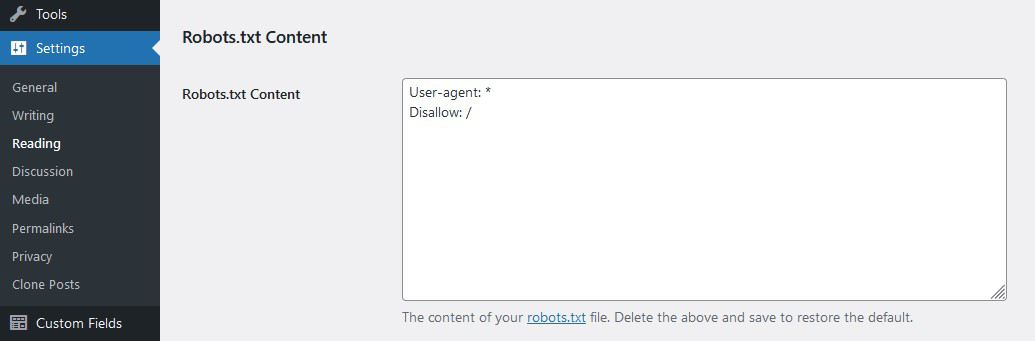
A view of the admin option
Установка
- Скачать плагин
- Unzip it
- Upload the unzipped folder to
wp-content/pluginsdirectory - Activate and enjoy!
Or you can simply install it through the admin area plugin installer.
Часто задаваемые вопросы
-
I totally screwed up my `robots.txt` file. How can I restore the default version?
-
Delete all the content from the Robots.txt Content field and save the privacy options.
-
Could I accidently block all search bots with this?
-
Будьте осторожны! Тем не менее, <код>robots.txt файлы — это предложения. На самом деле они не столько блокируют ботов, сколько предполагают, что боты не сканируют части сайта. Вот почему на странице настроек конфиденциальности указано «Попросить поисковые системы не индексировать этот сайт».
-
Where can I learn more about `robots.txt` files?
-
Here is a general guide by Google and here is the WordPress SEO documentation.
Отзывы


Участники и разработчики
«WP Robots Txt» — проект с открытым исходным кодом. В развитие плагина внесли свой вклад следующие участники:
Участники
«WP Robots Txt» переведён на 7 языков. Благодарим переводчиков за их работу.
Перевести «WP Robots Txt» на ваш язык.
Заинтересованы в разработке?
Посмотрите код, проверьте SVN репозиторий, или подпишитесь на журнал разработки по RSS.
Журнал изменений
1.3.5
- Compatibility with WordPress 6.8
1.3.4
- Compatibility with WordPress 6.7
1.3.3
- Add Line Break to allow appending more rules. Thanks @flberger
1.3.2
- Add translation template
1.3.1
- Compatibility with WordPress 6.4
- WP Coding Standards compliant
1.3
- Ensure Compatibility with WP v6.3
- Increase PHP minimum required version
1.2
- Update the default robots.txt content
- Include sitemap reference
- Resolve code warnings/errors
- WP Coding Standards compliant
- Ensure Compatibility with WP v6
1.1
- Moved the settings field «officially» to the reading page
- General code clean up
1.0
- Initial version