

Описание
Tired of cookie consent plugins that lock essential features behind paywalls, require cloud accounts, or send your visitors’ data to third-party servers?
FAZ Cookie Manager is a WordPress plugin that helps you implement cookie consent and privacy workflows for international regulations — completely free, with no strings attached.
No account to create. The plugin requires no cloud service connection. Basic features like consent logging and geo-targeting are included — no premium plan needed. Core consent features run on your own server, and you own all your data.
Why FAZ Cookie Manager?
Most cookie consent plugins follow the same pattern: a free version with crippled features, and a paid tier starting at $10-50/month that unlocks what you actually need (cookie scanning, consent logs, Google Consent Mode, IAB TCF). FAZ Cookie Manager breaks that model:
- Cookie scanner — Scans your site directly from your browser. No external service, no API limits, no waiting.
- Consent logging with CSV export — Every consent is recorded locally in your database. Export anytime for audits.
- Google Consent Mode v2 — Sends all 7 consent signals to Google tags. No premium required.
- IAB TCF v2.3 — Full Transparency and Consent Framework support, built in.
- Geo-targeting — Show banners only to visitors from regulated regions (EU, California, etc.).
- 180+ languages — Translate every string in the banner, or use one of the built-in translations.
- Script blocking — Tag any script with
data-faz-tagto block it until the right category is accepted. - Microsoft UET/Clarity — Consent integration for Microsoft advertising and analytics tools.
- Revisit consent widget — Floating button lets visitors change their preferences anytime.
- Accessibility-focused — Keyboard navigation (Tab, Enter, Escape), screen-reader support, mobile responsive.
Helps with these frameworks
This plugin assists consent and privacy workflows. It does not itself create, provide, or guarantee legal compliance, and you remain responsible for the final configuration for your site and jurisdiction.
- GDPR (EU General Data Protection Regulation) — Opt-in consent, granular categories, right to withdraw
- CCPA / CPRA (California Consumer Privacy Act) — «Do Not Sell or Share» opt-out link
- ePrivacy Directive (EU Cookie Law) — Consent-based script blocking support
- Italian Garante Privacy — 6-month consent expiry setting and consent logging controls
- EDPB Guidelines — No scroll-as-consent, no pre-checked categories, equal button prominence options
- LGPD (Brazil General Data Protection Law) — Consent-based model
- POPIA (South Africa Protection of Personal Information Act) — Opt-in consent
Try it Live
Try FAZ Cookie Manager in WordPress Playground — no account, no install, runs entirely in your browser.
How it works
- Install and activate — the cookie banner appears immediately with sensible defaults
- Scan your site to detect cookies automatically
- Customize the banner design, text, and colors to match your brand
- Enable Google Consent Mode or IAB TCF if you use advertising tools
- Monitor consent analytics on the dashboard
Core banner functionality runs on your WordPress site. Optional update/download features may contact GitHub, IAB Europe, MaxMind, or the AMP CDN depending on which features you enable and use.
External Services
GitHub / Raw GitHubusercontent (Open Cookie Database)
Used to refresh the built-in cookie definitions snapshot for the optional auto-categorize feature.
Triggered when: you click the definitions update action in the Cookies screen.
Data sent: your server IP address and standard HTTP request headers.
Service URLs:
* https://raw.githubusercontent.com/fabiodalez-dev/Open-Cookie-Database/master/open-cookie-database.json
Terms of Service / Privacy Policy:
* https://docs.github.com/en/site-policy/github-terms/github-terms-of-service
* https://docs.github.com/en/site-policy/privacy-policies/github-privacy-statement
IAB Europe / vendor-list.consensu.org
Used to download the Global Vendor List and purpose translations for the optional IAB TCF feature.
Triggered when: you manually update the vendor list, and weekly while IAB TCF is enabled.
Data sent: your server IP address and standard HTTP request headers.
Service URLs:
* https://vendor-list.consensu.org/v3/vendor-list.json
* https://vendor-list.consensu.org/v3/purposes-en.json
Privacy Policy:
* https://iabeurope.eu/privacy-policy/
MaxMind
Used to download the GeoLite2 Country database for optional geo-targeting.
Triggered when: you enter a MaxMind license key in Settings and start the database download.
Data sent: your server IP address, the license key you provide, and standard HTTP request headers.
Service URL:
* https://download.maxmind.com/app/geoip_download
Terms of Service / Privacy Policy:
* https://www.maxmind.com/en/terms-of-use
* https://www.maxmind.com/en/privacy-policy
ip-api.com
Used as a fallback geolocation lookup for the optional geo-targeting and multi-banner geo-routing features, only when MaxMind is unavailable.
Triggered when: a frontend page renders the banner while geo-targeting / multi-banner geo-routing is enabled AND neither the Cloudflare CF-IPCountry header (opt-in) nor the MaxMind GeoLite2 database produces a result. The visitor’s IP is sent to ip-api.com for country resolution; the resolved country code is cached in a transient (hash-keyed by IP) for one hour to avoid repeating the lookup.
Data sent: the visitor’s IP address and standard HTTP request headers.
Service URL:
* http://ip-api.com/json/{ip}?fields=countryCode
Terms of Service / Privacy Policy:
* https://ip-api.com/docs/legal
Plugin REST endpoint /faz/v1/banner (public)
Used by the plugin’s own front-end JavaScript (script.js) to fetch the per-language / per-country banner payload after the page has loaded. This is an INTERNAL endpoint hosted by the plugin on the same WordPress install — no third-party network call leaves the visitor’s browser to a remote service. It is documented here only because the response carries bannerSlug and activeLaw, two strings that describe which banner profile and which legal regime (gdpr / ccpa) currently applies to the visitor.
Triggered when: the front-end banner script bootstraps on a page that has multi-banner geo-routing active.
Data sent: only what the visitor’s browser already sends with any page request to the same origin. The plugin does not forward the request to any remote service.
Service URL:
* https://{your-site}/wp-json/faz/v1/banner
AMP Project CDN
Used only on AMP pages when the AMP consent integration is active, to load the official amp-consent component required by AMP.
Triggered when: an AMP page renders the AMP consent banner.
Data sent: the visitor IP address and standard browser request data to the AMP CDN.
Service URL:
* https://cdn.ampproject.org/v0/amp-consent-0.1.js
Documentation / Privacy:
* https://amp.dev/documentation/components/amp-consent
* https://policies.google.com/privacy
Note on third-party domain strings inside the plugin codebase
The plugin source includes several third-party domain names (e.g. js.stripe.com, connect.facebook.net, cdn.jsdelivr.net, unpkg.com, googletagmanager.com, etc.) as string patterns for two purposes:
- Script-blocking detection patterns — used to identify analytics, advertising, and tracking scripts that the site administrator’s other plugins may inject, so we can block them until the visitor has given consent. The plugin itself does not load any of these scripts.
- Whitelist defaults — domains such as
unpkg.com/,cdn.jsdelivr.net/,fonts.googleapis.com/,www.google.com/recaptcha/api, etc. are seeded as default whitelist entries so the script blocker leaves them alone unless the admin explicitly removes them. They are configuration data, not outbound HTTP calls.
The only outbound HTTP requests this plugin makes are the five documented above (Open Cookie Database, IAB GVL, MaxMind, ip-api.com fallback, AMP CDN). All five are gated behind explicit administrator action or an enabled feature. The internal /faz/v1/banner endpoint described above is hosted by this plugin on the same site — no third-party network call leaves the visitor’s browser to a remote service.
Cache Plugin Compatibility
When multi-banner geo-routing (1.14.0+) is active, the rendered HTML can legitimately vary by visitor country. This plugin asks the page-cache layer to bypass caching on those requests by emitting:
Cache-Control: no-store, no-cache, must-revalidate, max-age=0Pragma: no-cacheX-LiteSpeed-Cache-Control: no-cacheVary: CF-IPCountry(when the trust filterfaz_trust_cf_ipcountry_headeris enabled)DONOTCACHEPAGE,DONOTCACHEOBJECT,DONOTCACHEDBPHP constants (industry-standard bypass hints)do_action( 'litespeed_control_set_nocache', ... )when LiteSpeed Cache is installed
Verified compatible (no extra configuration needed)
- LiteSpeed Cache — uses the explicit
litespeed_control_set_nocacheaction +X-LiteSpeed-Cache-Controlheader. - WP Rocket — honors
DONOTCACHEPAGEnatively. - W3 Total Cache — honors
DONOTCACHEPAGE/DONOTCACHEOBJECTnatively. - WP Super Cache — honors
DONOTCACHEPAGEnatively. - Hummingbird (WPMU DEV) — honors
DONOTCACHEPAGEnatively. - Cloudflare APO — honors the
Cache-Control: no-storeheader. With CF in front, also enable the trust filter so theVary: CF-IPCountryheader is emitted and CF caches per-country variants instead of bypassing entirely.
Known limitations
- CDNs without origin Cache-Control honoring (e.g. some legacy CloudFront configurations) — verify the response Cache-Control header reaches the edge. If not, add a CF-IPCountry or country-based cache key rule at the CDN level.
- Minor / regional cache plugins (Comet Cache, Cachify, Swift Performance Lite) — not formally tested. Most still honor
DONOTCACHEPAGE; verify by inspecting the response Cache-Control on a country-targeted page.
Override the bypass logic per request via the faz_country_dependent_banner_output filter (return false to force the cache to ignore the country dimension on a specific URL).
Скриншоты
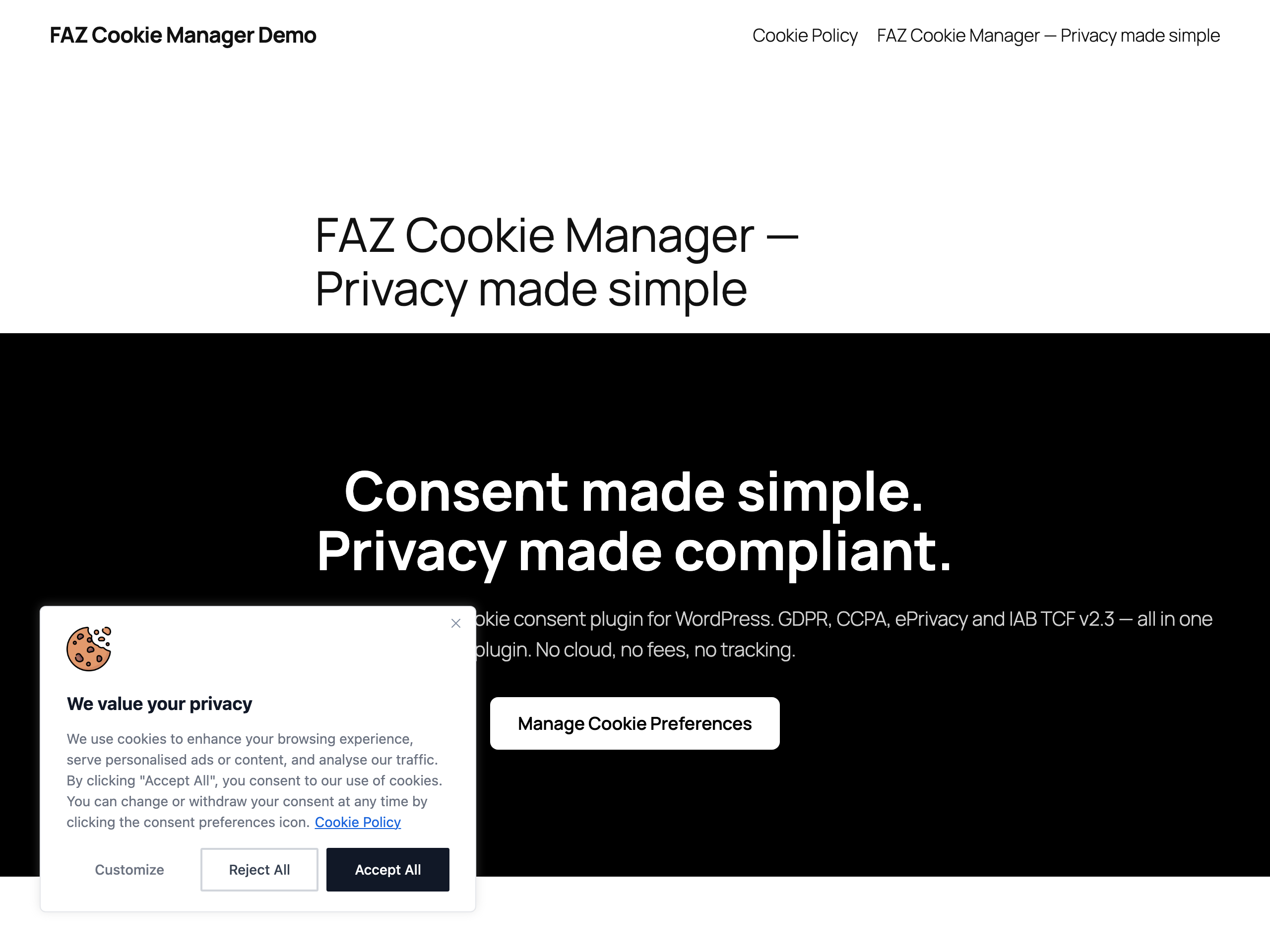
Cookie consent banner on the frontend — GDPR-ready banner in the bottom-left corner with «Customize», «Reject All» and equal-weight «Accept All» buttons. Shown only on the first visit until the visitor makes a choice. 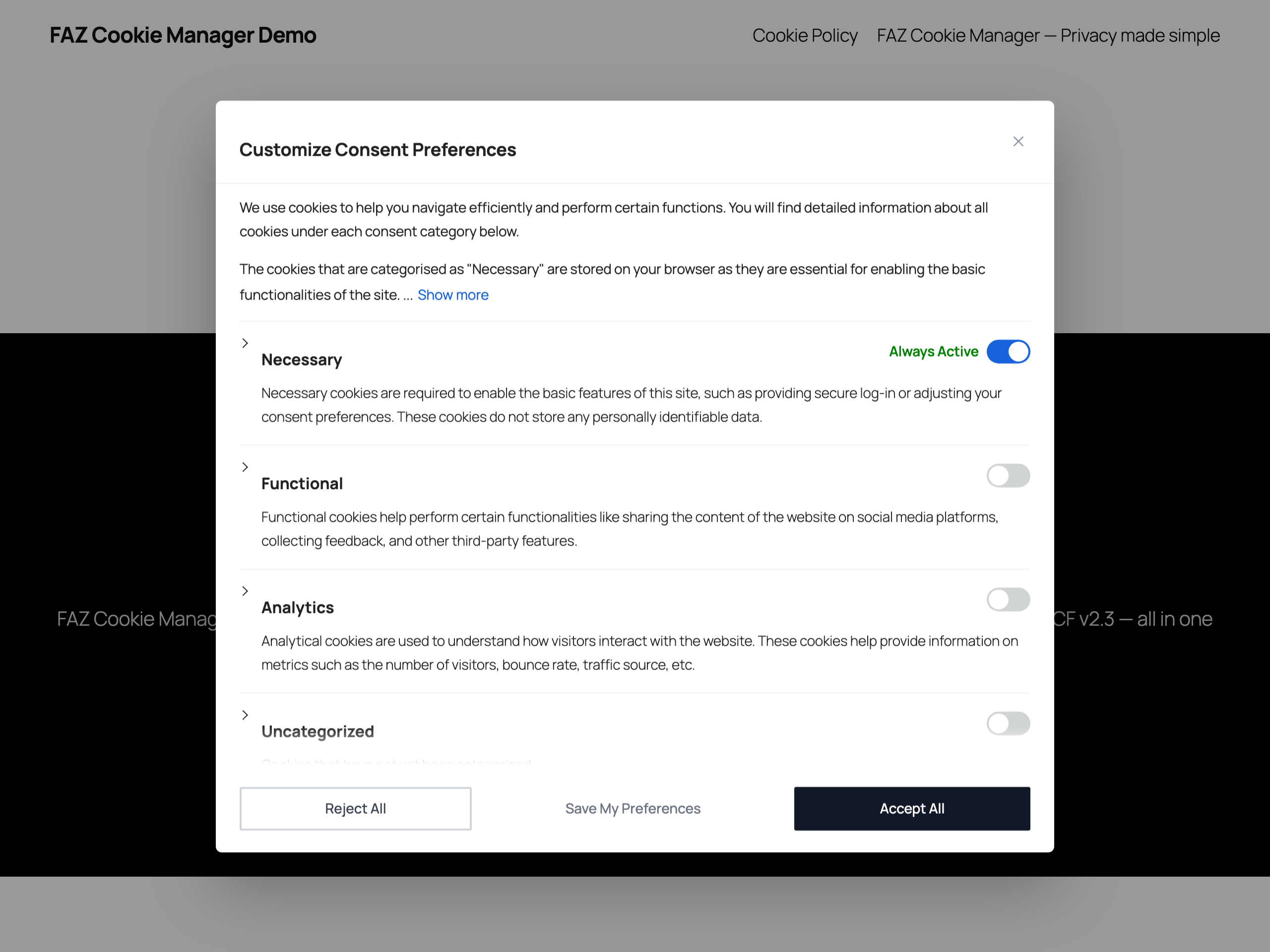
Preference center — Category-level opt-in modal. Necessary cookies are always active; every other category (Functional, Analytics, Uncategorized, Marketing) is opt-in by default, with a clear description for each. 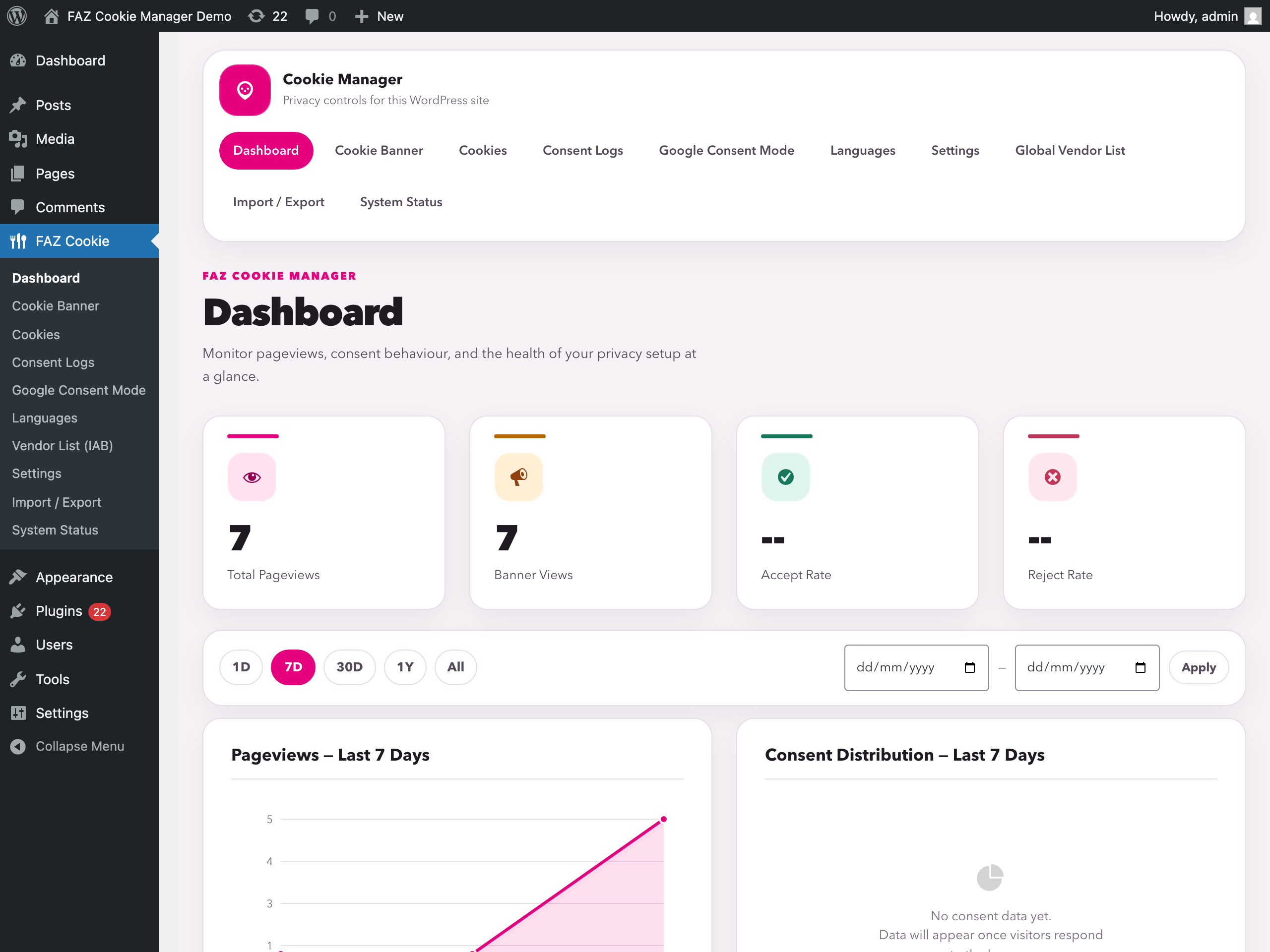
Admin dashboard — Overview of pageviews, banner impressions, accept rate and reject rate, with a 7/30/365-day pageviews chart and consent distribution. 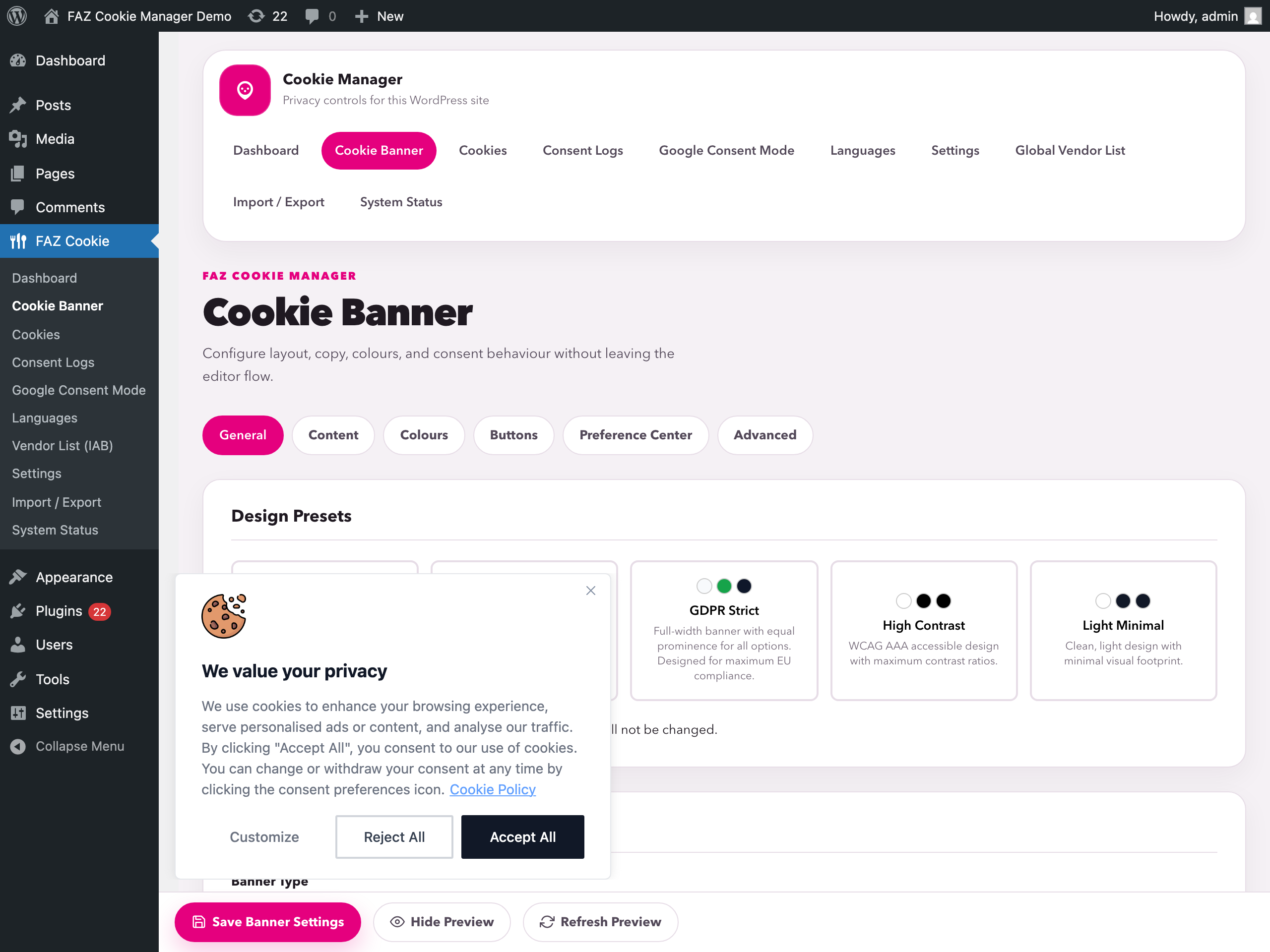
Banner editor — Configure layout, position, colours, copy and behaviour with a live in-iframe preview. Ships with GDPR Strict, High Contrast and Light Minimal design presets. 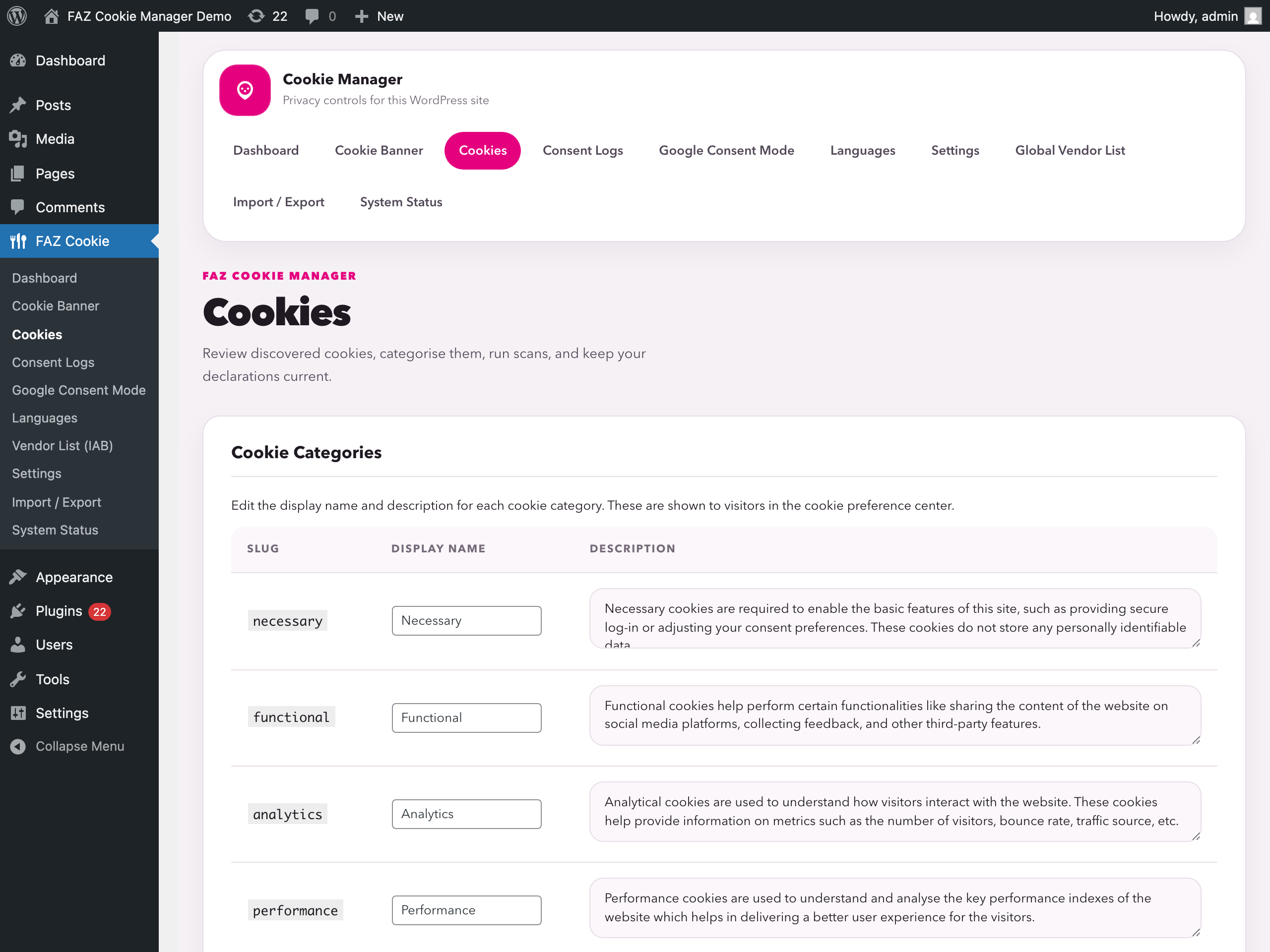
Cookies management — Review and edit cookie categories, run the built-in scanner, and browse the bundled Open Cookie Database with 1,000+ definitions. 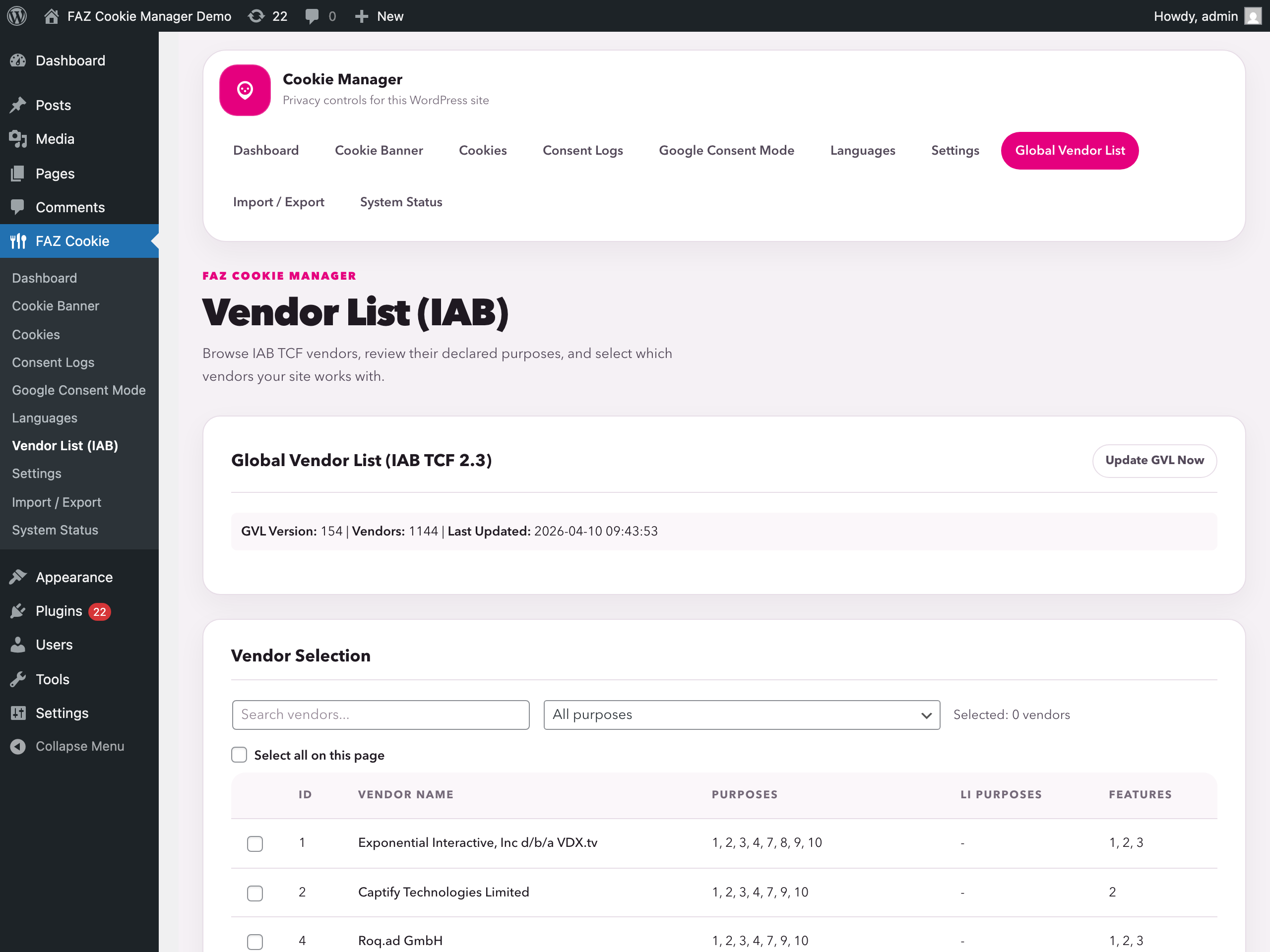
IAB TCF v2.3 Global Vendor List — Browse the bundled GVL, filter by purpose, and select which vendors your site works with. Full Transparency and Consent Framework v2.3 support, no cloud required. 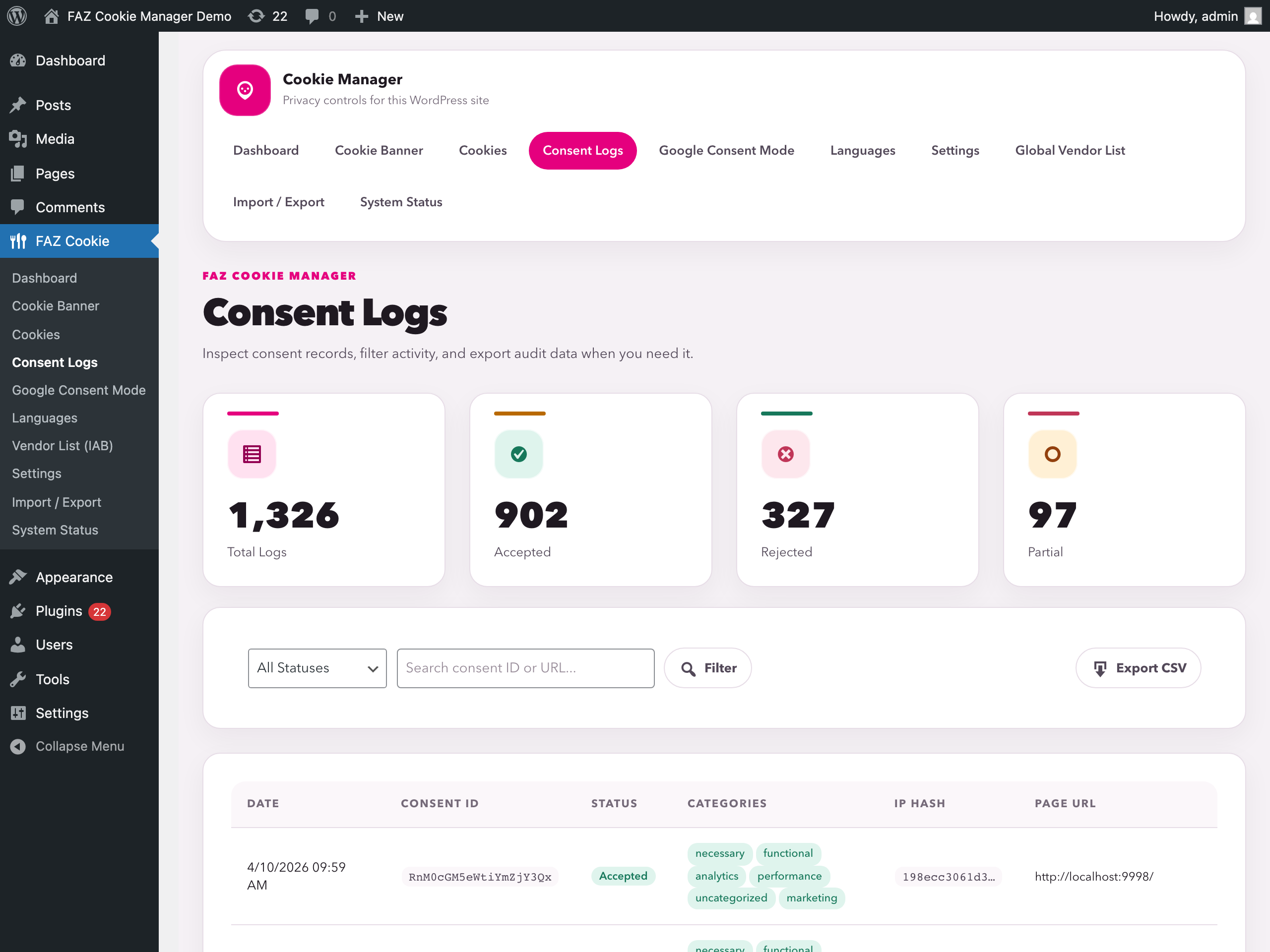
Consent logs — Local, tamper-resistant audit trail of every visitor consent: status, categories, hashed IP, URL and timestamp. Filter, search and export to CSV for DPIA / audits. 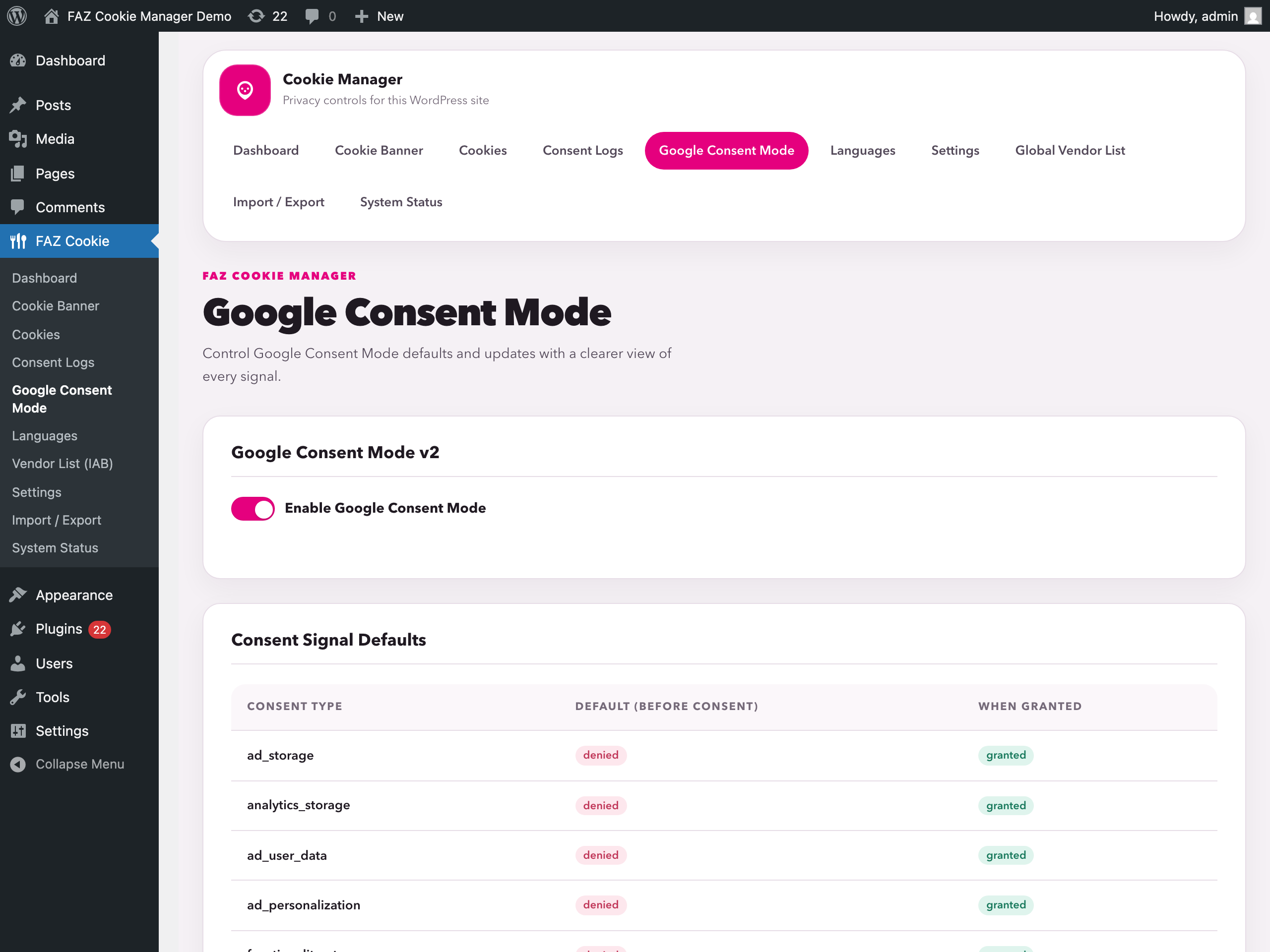
Google Consent Mode v2 — Default vs. granted state for ad_storage,analytics_storage,ad_user_data,ad_personalization,functionality_storage,personalization_storageandsecurity_storage. Works with GTM and gtag.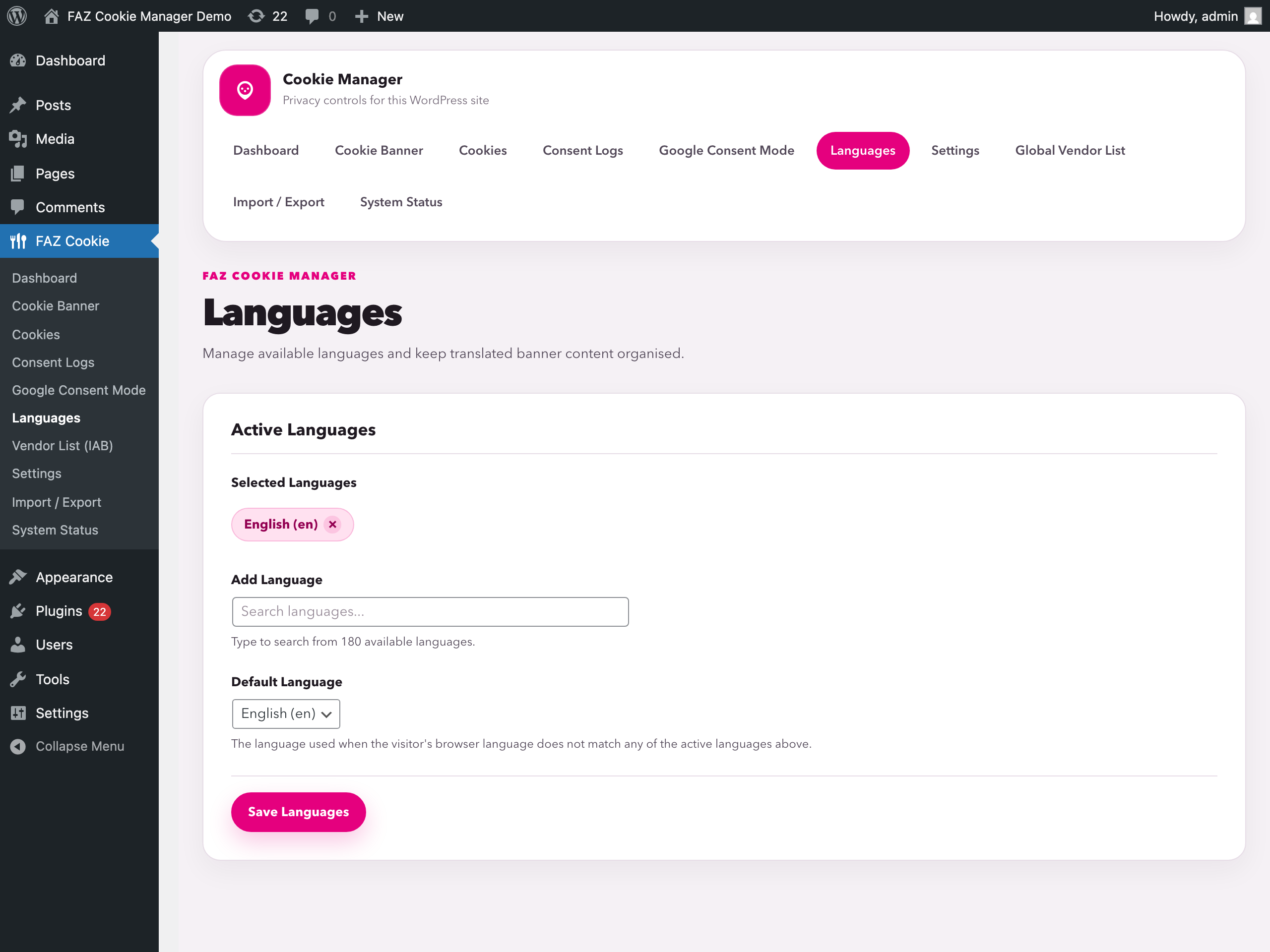
Languages — Manage active languages and the default banner language. Works alongside WPML / Polylang; Italian, Dutch, German, French and Czech translations ship out of the box. 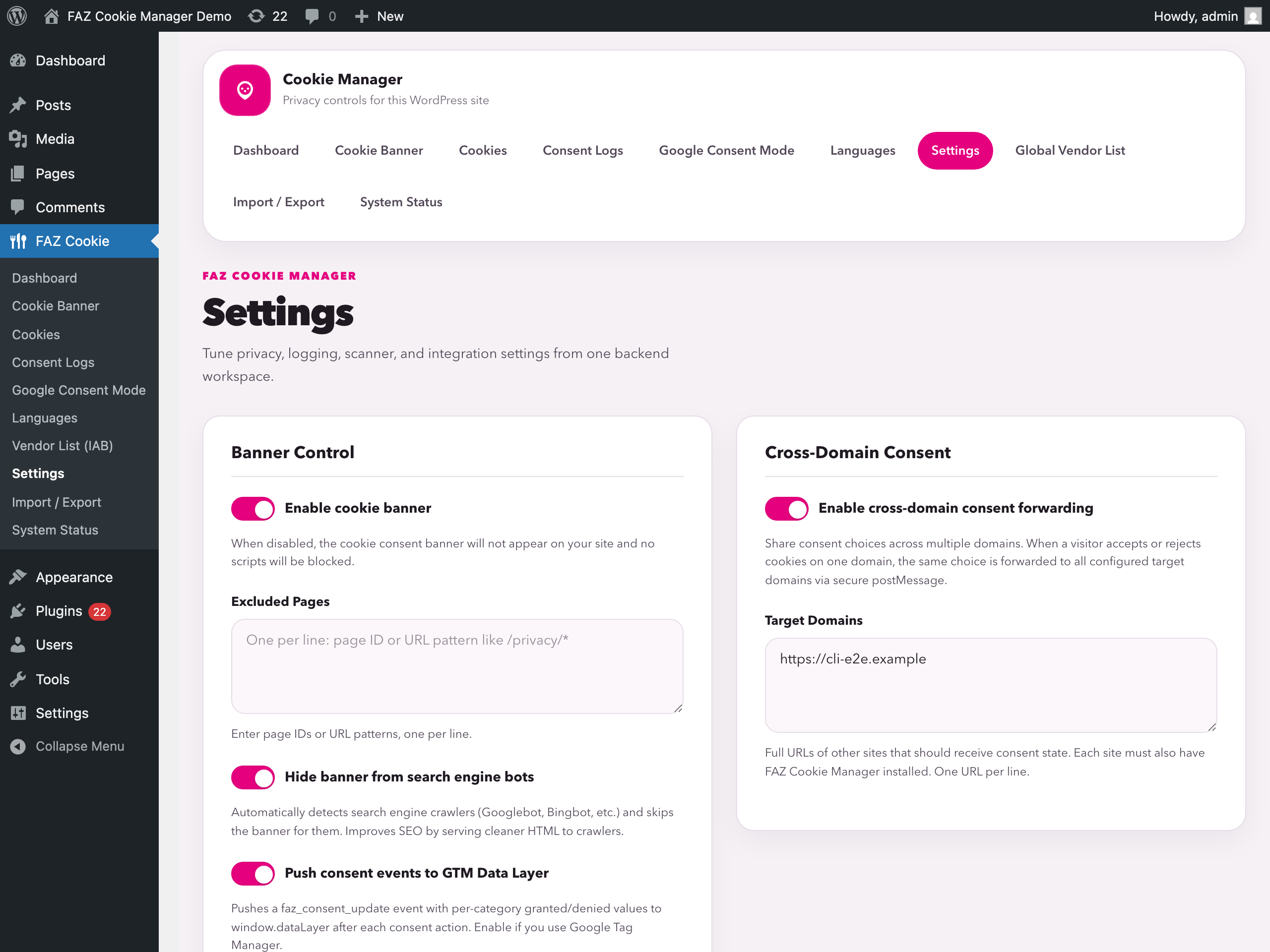
Settings — Global controls: enable/disable the banner, exclude specific pages, cross-domain consent forwarding, hide from bots, GTM dataLayer events, consent log retention and scanner limits.
Блоки
Этот плагин предоставляет 3 блока.
- Settings
- Settings
- Settings
Установка
From the WordPress.org plugin directory (recommended)
- In your WordPress dashboard go to Plugins > Add New Plugin
- Search for FAZ Cookie Manager
- Click Install Now, then Activate
- Go to FAZ Cookie in the admin sidebar to configure your banner
Manual installation
- Download the ZIP from wordpress.org/plugins/faz-cookie-manager
- In your WordPress dashboard go to Plugins > Add New Plugin > Upload Plugin
- Upload the ZIP and click Install Now, then Activate
- Go to FAZ Cookie in the admin sidebar to configure your banner
Часто задаваемые вопросы
-
Does this plugin require a cloud account or subscription?
-
No required cloud account or subscription is needed. Core consent features run locally, while some optional refresh/download features can contact documented third-party services such as GitHub, IAB Europe, MaxMind, or AMP infrastructure.
-
Is it really free? What’s the catch?
-
It’s free and open source (GPL-3.0). There are no premium upgrades, no feature gates, and no upsells. The plugin is based on the GPL-licensed CookieYes v3.4.0 codebase, with cloud dependencies removed and all included features running locally.
-
Is it compatible with Google Consent Mode v2?
-
Yes. The plugin sends all 7 consent signals (
ad_storage,analytics_storage,ad_user_data,ad_personalization,functionality_storage,personalization_storage,security_storage) and supports Google Additional Consent Mode (GACM) for ad technology providers. -
Yes. Any script tagged with
data-faz-tag="category-name"is blocked until the visitor grants consent for that category. This helps you implement consent-based blocking for ePrivacy/GDPR workflows. -
Go to FAZ Cookie > Cookies and click Scan Site. The scanner runs in your browser using iframes, crawling your site’s pages to detect all cookies. Choose from quick scan (10 pages), standard (100), deep (1000), or full scan. No external service involved.
-
Can I log consent for GDPR accountability?
-
Yes. Every consent action (accept, reject, customize) is recorded in a local database table with timestamp, consent ID, categories chosen, anonymized IP, and page URL. Export to CSV anytime from the Consent Logs page.
-
Does it support multiple languages?
-
Yes. The Languages page lets you select from 180+ available languages. The banner text is automatically translated based on the visitor’s browser language, and you can customize every string.
-
Can users change their consent after accepting?
-
Yes. A floating revisit widget appears on every page, letting visitors reopen the preference center and change their choices at any time.
-
Yes. The banner supports full keyboard navigation (Tab, Enter, Escape), proper ARIA labels, and is responsive down to 375px viewports. Buttons have equal visual prominence to avoid dark patterns.
-
Does it work with caching plugins?
-
Yes. The consent banner is rendered via JavaScript from a cached template, so it works with all major caching plugins (WP Super Cache, W3 Total Cache, LiteSpeed Cache, etc.).
-
Does the plugin send any data home or collect telemetry?
-
No. The plugin contains no telemetry, no analytics beacon, and no «phone home». Dashboard numbers are computed locally from your own
wp_faz_pageviewsandwp_faz_consent_logstables. Every outbound request that can happen is documented in the «External services» section and is gated behind an explicit admin action. -
Where is the source of the bundled minified JavaScript?
-
The only minified files we ship are
frontend/js/gcm.min.jsandfrontend/js/tcf-cmp.min.js. The full, unminified sources live next to them asgcm.jsandtcf-cmp.js, and the build commandnpm run build:minrebuilds them withterser. No obfuscation is used. -
Does uninstalling the plugin remove my data?
-
By default, no — your consent logs, banner configuration and categories stay in the database so you can reinstall without losing work. To wipe everything on uninstall, enable Settings General Remove all data on uninstall or define
FAZ_REMOVE_ALL_DATAastrueinwp-config.phpbefore deleting the plugin. -
Does the plugin include a CCPA «Do Not Sell» opt-out form?
-
Yes. Place
[faz_do_not_sell]on any page (e.g. your Privacy Policy) to show a California Consumer Privacy Act opt-out form. When a visitor submits the form, the opt-out is logged in the local consent table with a hashed IP address, a long-lived cookie is set so the visitor sees a confirmation on subsequent visits, and the site admin receives a notification email. Optional attributes:title(heading text) andbutton(submit label). No external service is involved. -
Does the plugin include a GDPR Data Subject Access Request (DSAR) form?
-
Yes. Place
[faz_dsar_form]on any page to show a GDPR-compliant request form covering six rights: Access (Art. 15), Erasure (Art. 17), Data Portability (Art. 20), Rectification (Art. 16), Restriction (Art. 18), and the Right to Object (Art. 21). On submission, the request is stored as a private post in the WordPress database (so it survives email failures), a notification is sent to the admin with a direct link to the record, and a confirmation is sent to the requester. The form includes a honeypot field and nonce verification to block spam bots. Optional attributes:button(submit label).
Отзывы


Участники и разработчики
«FAZ Cookie Manager» — проект с открытым исходным кодом. В развитие плагина внесли свой вклад следующие участники:
Участники
Перевести «FAZ Cookie Manager» на ваш язык.
Заинтересованы в разработке?
Посмотрите код, проверьте SVN репозиторий, или подпишитесь на журнал разработки по RSS.
Журнал изменений
The full changelog (every release back to 1.0.0) lives at:
https://github.com/fabiodalez-dev/FAZ-Cookie-Manager/blob/main/CHANGELOG.md
and on the GitHub Releases page:
https://github.com/fabiodalez-dev/FAZ-Cookie-Manager/releases
1.14.3
- Filter: new
faz_country_detection_consensusfilter, introduced with 2 arguments ($require_consensus,$votes). When the filter resolves totrueAND at least two detection sources disagree on the visitor country,Geolocation::detect_country()returns an empty string (fail-open — banner is shown to everyone). Off by default to preserve the CF-first priority order. Plugins that legitimately need the visitor IP for their own logic should hookfaz_visitor_countryinstead, which exposes it for trusted overrides and test fixtures. - Fix (F101–F112, adamsreview review#2): transactional delete with InnoDB row-lock-promoted fallback default; multisite-aware uninstall sweep that honours per-site opt-in and the
FAZ_REMOVE_ALL_DATAconstant; banner_id pollution fixed by removing the post-save$wpdb->insert_idre-read; LSCacheVary: CF-IPCountryemitted only when thefaz_trust_cf_ipcountry_headerfilter opts in; AMP geo-resolution no longer buckets GB into theeuregional set. - Fix (F301–F308 + CodeRabbit#1#2, adamsreview review#3): cache-poisoning race in
promote_fallback_defaultclosed by movingdelete_cache()to callers (post-COMMIT); both fallback SELECTs now useFOR UPDATEand prefer non-default active peers;faz_cookies+faz_cookie_categoriesenforced to InnoDB on install AND migrated on upgrade so settings-import START TRANSACTION calls are no longer silent no-ops on legacy MyISAM hosts; uninstall network sweep now also fires under bareFAZ_REMOVE_ALL_DATAwhenget_sites()is empty; cache epoch generation switched tosprintf('%.6F', microtime(true))for true microsecond resolution; create_item slug-probe now attempts a focused UPDATE retry before falling back to the cache-invalidate tail. - Fix (R4-S001–S004, adamsreview review#4):
update_item()now wraps its UPDATE + invariant section in aSTART TRANSACTIONso theFOR UPDATElock inpromote_fallback_defaultactually serializes (was a no-op under autocommit, leaving the update path with the same race F302 closed for delete); create_item slug-probe runs the invariant tail unconditionally on slug mismatch so a successful focused-UPDATE retry no longer bypasses the at-most-one-default invariant;clear_default_on_others()no longer self-flushes the cache (caller’s responsibility, mirrors F301); F303 ALTER ENGINE loop now records partial-migration failures infaz_innodb_migration_pendinginstead of silently bumpingdb_versionpast 1.14.3. - Fix: missing-banner notice in admin when
?banner_id=…does not resolve (deleted row, stale bookmark, phantom redirect) — the editor body is hidden and a recovery CTA points at the install’s default banner. - Fix: prefcenter renders every visible category even when its cookie list is empty (regression introduced by the audit-list refactor that early-returned on empty cookies).
- Fix: empty-state preference-center category wrapper now matches the populated-state DOM shape (
<div class="faz-table-wrapper">) so CSS targeting the table wrapper applies uniformly across empty and populated categories.
1.14.0
- Feature: Multi-banner geo-routing (refs #103). New schema columns
target_countriesandpriorityonwp_faz_bannerslet admins serve different banners per visitor country — e.g. a Reject-mandatory GDPR banner to EU/EEA/UK and a CCPA-style banner with the close (X) button to US visitors, picked automatically byController::get_active_banner_for_country()from the Cloudflare CF-IPCountry header (opt-in) or MaxMind/ip-api.com fallback. - Feature: Per-banner override of the EDPB/Garante close-button dark-pattern auto-hide (
settings.allowCloseButtonWithReject). Default false preserves the compliance behaviour; opting in is documented as an EU/EEA/UK violation but unblocks non-EU jurisdictions where Accept + Reject + X is legal. - Feature: Cache busting for country-dependent output via
DONOTCACHEPAGE/DONOTCACHEOBJECT/DONOTCACHEDBconstants +Cache-Control: no-store+Vary: CF-IPCountry(with the trust filter on) so CDNs and full-page caches do not serve the wrong banner to the wrong country. - Feature: AMP
<amp-consent>resolver is now country-aware viaGeolocation::get_visitor_country()with the same geo guards as the classic JS flow. - Feature: Scope-change consent invalidation. Consent cookies now carry
__scope.bannerand__scope.lawso a visitor that crosses a jurisdiction (CCPA GDPR) re-prompts instead of inheriting consent from a different legal regime. - Fix:
banner_defaultmutual-exclusion finally enforced server-side — saving a banner with the default flag clears it on every peer row (matches the admin help text). Without this, more than one banner could simultaneously hold the flag and the fallback picker was non-deterministic. - Fix:
Controller::get_active_banner()preserves its pre-1.14.0 contract for third-party callers. An install with a single status=1, country-targeted, non-default banner now still receives that banner back when the call passes no country. - Fix:
has_country_dependent_banners()andFrontend::is_geo_blocked()iterate the entireruleSet, not just the first entry. A ruleSet like[{code:ALL}, {code:US}]is now consistently classified between the cache-vary headers and the runtime show/block decision. - Fix:
Frontend::send_geo_cache_headers()gates onfaz_is_front_end_request()so REST API / heartbeat / sitemap / robots requests no longer trigger the country-dependent DB chain on every poll. - Fix:
is_country_dependent_output()also marks IAB-TCF output as country-dependent (TCFgdprAppliesis derived from visitor country at render time and must not be served from a shared page cache). - Fix:
update_db_350clearsfaz_banners_table_versionbefore re-runninginstall_tables(), so dbDelta actually adds the newtarget_countries+prioritycolumns on upgrade. - Fix: Geolocation rejects the Cloudflare ‘XX’ (anonymous proxy / unknown) sentinel both on the CF-IPCountry branch and after the
faz_visitor_countryfilter — a third-party filter implementer reintroducing ‘XX’ no longer leaks it into geo-routing. - Fix:
_fazConsentScopeChanged()no longer invalidates valid pre-1.14.0 consent on the first page load after upgrade. Absent scope keys are treated as «upgrade case, no scope info known» and the existing consent stands. - Compatibility: New
Banner::set_target_countries()/set_priority()/get_target_countries()/get_priority()accessors with normalisation (upper-case, dedup,^[A-Z]{2}$validation, non-negative integer clamping). REST schema exposes both fields on/faz/v1/banners/{id}with[A-Z]{2}pattern validation.
1.13.18
- Fix:
wp_localize_scriptandwp_set_script_translationspayloads (inline<script id="*-js-extra">and<script id="*-js-translations">) are no longer false-positively blocked when their body contains a substring that matches a provider pattern. These ID shapes carry only data/i18n strings, never executable tracker code — the prior content-substring matcher would crash third-party plugins whose config keys happened to mention a provider (e.g. trx_addons emits the keyanimate_to_mc4wp_form_submitted, which matched MailChimp’smc4wpand broke the page withReferenceError: TRX_ADDONS_STORAGE is not defined).-js-beforeand-js-afterpayloads stay on the regular blocking path.
1.13.17
- Fix:
dataLayer is not definedwhen third-party trackers emit a baredataLayer.push()before GTM bootstraps. Pre-init viawp_add_inline_script('before'). Closes wp.org thread «bug-report-datalayer-is-not-defined». - Fix: cookie category counts stay stale after scan + auto-categorise — every cookie create/update/delete now invalidates Category controller cache, banner template, IAB unmatched-vendors transient, and 10 page-cache adapters. Closes wp.org thread «bug-report-cookie-categories-not-populated».
- Fix: REST
bulk_updatewas silently droppingopt_in_script/opt_out_script. Now iterates schema editable fields through the samesanitize_script_fieldcapability gate as single-cookie updates. - Fix:
_cookieScriptsno longer truncates at 500 cookies (paged query, JSON-key-anchored LIKE, 10000-row ceiling). - Fix:
sanitize_meta_for_current_userintercepts every write path intowp_faz_cookies.meta. Closes a stored-XSS surface for multisite Site Administrators withoutunfiltered_html. - Fix: own
wp_localize_scriptpayloads ({handle}-js-extra) can no longer be classified as analytics by the output-buffer blocker. Closes #99 and #101 (reported independently by @Myblueroom). - Fix: WP Rocket «Load JavaScript deferred» no longer wraps our
_fazConfigbootstrap payload in aDOMContentLoadedcallback (which would scopevar _fazConfigto the callback and breakscript.jswithCannot set properties of undefined). Newrocket_defer_inline_exclusionsfilter excludes_fazConfig,_fazCfg,_fazGcm,_fazTcfConfigfrom DeferJS wrapping. Closes #95 (thanks @dominikkucharski for the diagnosis and reference patch). - Fix:
<noscript>-wrapped iframes injected by page builders (Bricks/Elementor/Divi) no longer become 0x0 phantom placeholders. - Fix: Escape key no longer dismisses the consent banner without a recorded decision (EDPB dark-pattern). Preference center close-on-Escape preserved.
- Feature:
Necessaryselectable in Custom Blocking Rules dropdown. Closes wp.org thread «feature-request-add-necessary-category-to-script-blocker». - Feature: Banner-status toggle now also appears at the top of the Cookie Banner admin page (mirrors Settings -> Banner Control).
- Compliance: CCPA 1798.135(c) —
[faz_do_not_sell]renders a Withdraw opt-out button +dns_rescindedlog entry. - A11y: DSAR validation announces errors via
role=alert,aria-invalidper field, focus on first invalid..faz-dsar-btn/.faz-dnsmpi-btncarry a contrasting focus indicator (WCAG 1.4.11). DNSMPI error notice switches torole=alerton failure. - Release: scripted 3-way ZIP builder (
scripts/build-release.sh) for wp.org / GitHub / ClassicPress Directory. Refs #20.
1.13.16
- Fix: Plugins like Rank Math include tracker domain names inside inline JavaScript config. Tracker-domain patterns now match only against a script’s
srcURL, not its inline content. - Fix:
faz-skipCSS class was matched as a plain substring (faz-skipperalso exempted). Fixed to exact whitespace-delimited token match. - Fix: Global variables in
uninstall.phprenamed to carry thefaz_prefix.
1.13.15
- Fix: TinyMCE editors restored for Notice / Preference Description in banner admin.
- Fix: REST DELETE category was a silent no-op when the row was not loaded first; REST PUT wiped unspecified fields when starting from a blank object.
- Fix: Dynamic video placeholder (
_fazAddPlaceholder) did not call_fazSetPlaceHolder()for non-YouTube providers. - Fix:
faz_get_cookie_domain()returned malformed IP suffix for IP-addressed sites; now returns''(host-only cookie) per RFC 6265.
1.13.14
- Fix: Fatal error on WordPress Playground —
maybe_create_table()was called synchronously from a controller constructor during plugin loading. Deferred toplugins_loadedand guardedwp_salt()withfunction_exists().
1.13.13
- Fix: Fatal error on fresh install —
wp_salt()called without\prefix inside a namespaced class resolved as a non-existent namespaced function. - Added: WordPress Playground Live Preview on the plugin directory page.